

GPT Image 1.5
Transform your ideas into stunning photorealistic images effortlessly with GPT Image 1.5's advanced AI generation and.
About GPT Image 1.5
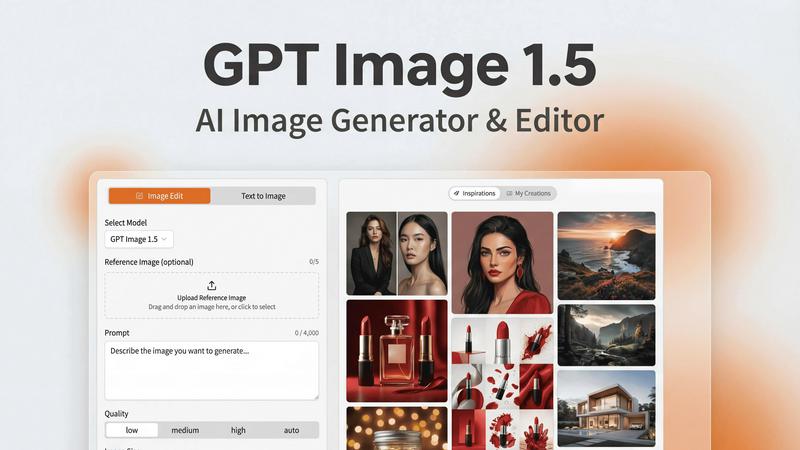
GPT Image 1.5 is the latest innovation in AI image generation, powered by OpenAI's state-of-the-art gpt-image-1.5 model. This revolutionary tool redefines the process of visual creation, making it simple for creatives, marketers, and developers to produce high-quality images without the need for coding skills. With an intuitive web interface, users can easily create stunning visuals ranging from intricate UI mockups to photorealistic product photography and engaging infographics. The advancements in realism, text accuracy, and editability set GPT Image 1.5 apart from conventional AI image tools. It streamlines the workflow from concept to final output, allowing users to effortlessly iterate on designs and craft compelling marketing materials. By enabling seamless transitions from ideas to polished results, GPT Image 1.5 enhances productivity and creativity, making it an invaluable asset in any creative toolkit.
Features of GPT Image 1.5
Fast Image Generation
Experience lightning-fast image generation with GPT Image 1.5, which is up to 4x faster than its predecessors. This speed allows for rapid iterations, making it perfect for those who need quick turnarounds on their visual projects.
Advanced Image Editing
The editing capabilities of GPT Image 1.5 are unparalleled. Users can apply precise modifications, including object removal, style transfer, and scene adjustments, ensuring that every image meets their specific vision without losing essential details.
Reliable Text Rendering
One of the standout features of GPT Image 1.5 is its ability to render text accurately. The model produces crisp lettering and maintains layout consistency, making it ideal for text-heavy designs such as infographics and marketing materials.
Creative Style Transformations
Unlock a world of creative possibilities with GPT Image 1.5's ability to apply various artistic styles and transformations. Users can easily enhance images with text overlays, layout changes, and unique artistic effects, all while keeping critical elements intact.
Use Cases of GPT Image 1.5
Marketing Materials
Marketers can utilize GPT Image 1.5 to create eye-catching visuals for campaigns, including advertisements, social media graphics, and promotional content. The tool's speed and flexibility make it easy to generate multiple variations and concepts quickly.
User Interface Design
Designers can leverage GPT Image 1.5 to produce high-quality UI mockups, allowing for rapid prototyping and iteration. The precise image editing and text rendering capabilities ensure that the designs are both functional and visually appealing.
Infographic Creation
Creating engaging infographics is simple with GPT Image 1.5. Users can generate visuals that effectively communicate complex information, making it easier to present data in a compelling and understandable manner.
Product Photography
E-commerce businesses can benefit from GPT Image 1.5 by generating realistic product images that enhance their online presence. The photorealistic output helps attract customers and elevates the overall branding of products.
Frequently Asked Questions
How does GPT Image 1.5 differ from other AI image tools?
GPT Image 1.5 stands out due to its faster generation speed, superior text rendering, and precise editing capabilities. It caters specifically to the needs of marketers and designers, ensuring high-quality outputs that are easy to create and refine.
Is coding knowledge required to use GPT Image 1.5?
No, GPT Image 1.5 is designed to be user-friendly and accessible to everyone, regardless of their coding skills. The intuitive web interface allows users to create and edit images effortlessly.
Can I edit an image after generating it?
Yes, GPT Image 1.5 offers advanced editing features that allow you to modify generated images. You can perform actions such as object removal, style transfer, and scene adjustments to achieve your desired look.
What types of files can I export my images as?
Users can export their images in multiple formats, including PNG, JPEG, and WebP. This flexibility ensures that you can use the images for various applications, whether for web or print purposes.
Explore more in this category:
Similar to GPT Image 1.5

AIPetGen
AIPetGen turns a photo of your dog, cat, or other pet, or a written description, into a new picture or a short animation.

AI Object Remover
Remove unwanted objects, people, text and watermarks from photos with AI


screenRIG
Signage and kiosk infrastructure for AI agents. Your agent publishes images, video, streams, web pages and apps to screens via one plugin.screenRIG is

ImageGPT
ImageGPT is an all-in-one AI creative platform for generating, editing and transforming images and videos using AI.

AI Album Cover Maker
Create release-ready album covers from a prompt or photo. Generate, refine, and export art for singles, EPs, mixtapes, and playlists.

GetYouTubeTranscript
Free YouTube transcripts on the web, a Chrome extension, and an API + MCP server so AI assistants can read YouTube.

Sprite Sheet Maker
A free browser-based toolkit for creating, cutting, converting, and previewing sprite sheet animations.