

Image3D AI
Transform any 2D image into stunning, high-precision 3D models ready for printing and gaming in minutes with Image3D AI.
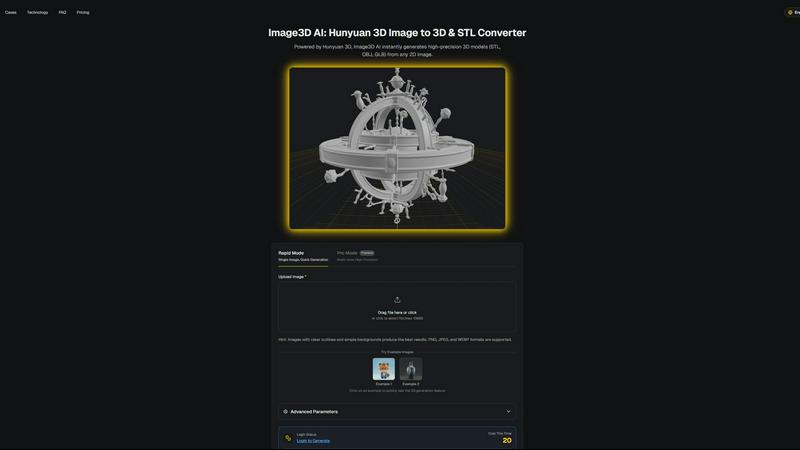
About Image3D AI
Image3D AI is a groundbreaking tool that revolutionizes the 3D creation landscape by utilizing Tencent's Hunyuan 3D engine. This professional-grade platform enables users to convert any static 2D image into a fully realized, production-ready 3D model within seconds. Designed for a diverse range of creators—ranging from 3D printing aficionados and indie game developers to e-commerce specialists and architectural designers—Image3D AI democratizes 3D modeling like never before. It effectively replaces weeks of traditional manual labor with AI-driven precision, allowing for seamless transformation of photos, sketches, or logos into high-fidelity digital assets. With the ability to deliver models in industry-standard formats such as STL, OBJ, and GLB, Image3D AI streamlines workflows across various professional domains. It is not merely a converter; it serves as a generative bridge from flat imagery to voluminous reality, unlocking unprecedented creative potential and efficiency.
Features of Image3D AI
Rapid Mode
The Rapid Mode offers users the ability to generate 3D models from a single image in just moments. This feature is ideal for creators looking for quick results without compromising on quality. It is particularly beneficial for those needing to produce rapid prototypes or engage in fast-paced design processes.
Pro Mode
For users seeking enhanced precision, the Pro Mode allows for multi-view input, enabling the generation of high-quality 3D models. This mode is perfectly tailored for complex projects, as it provides a detailed and accurate representation of objects by utilizing multiple perspectives, ensuring that every angle is captured.
Image Formats Supported
Image3D AI supports a variety of image formats, including PNG, JPEG, and WEBP, ensuring flexibility in input sources. This feature means users can easily upload their preferred images without worrying about compatibility issues, making the tool accessible for all types of creators.
Advanced Parameters
Users can customize their 3D generation experience through advanced parameters. This feature allows for adjustments in quality and processing speed, giving users control over the final output. Whether focusing on low-poly models for games or high-fidelity prints, users can tailor the generation settings to meet their specific needs.
Use Cases of Image3D AI
Game Development
Image3D AI is invaluable for game developers who require rapid asset generation. The tool allows for the quick transformation of concept art into game-ready 3D models, complete with PBR material support, which can be directly imported into popular game engines like Unity or Unreal Engine.
E-commerce Solutions
For e-commerce professionals, Image3D AI enables the conversion of product images into interactive 3D models. This capability enhances online shopping experiences by allowing customers to preview products in 3D, improving engagement and potentially increasing sales.
3D Printing Applications
The image to STL conversion feature is perfect for 3D printing enthusiasts. Users can instantly generate high-precision, print-ready files that are compatible with various 3D printers, making it easier to bring their ideas to life in the physical realm.
Architectural Visualization
Architects and designers can benefit significantly from Image3D AI’s capabilities by quickly generating architectural models. This feature saves valuable modeling time and enhances project presentations, allowing architects to focus more on creative aspects rather than technical modeling details.
Frequently Asked Questions
What types of images work best for 3D conversion?
High-contrast images with clear outlines and simple backgrounds yield the best results. Avoid using blurry or low-light images, as these can hinder the accuracy of the 3D model generated.
How long does it take to generate a 3D model?
Using the Rapid Mode, a single image can be transformed into a 3D model in approximately 60 seconds. The Pro Mode may take slightly longer, depending on the complexity of the input and the number of views provided.
What are the different file formats available for download?
Image3D AI offers several file formats for download, including .STL for 3D printing, .OBJ for 3D editing, and .GLB for web and AR applications. Each format serves specific purposes, allowing users to choose based on their project needs.
Can I test the tool without signing up?
Yes, Image3D AI offers free example images that users can test without needing to log in. This allows potential users to experience the 3D generation feature firsthand before committing to a subscription.
Similar to Image3D AI

MakePixelArt
Free browser-based picture to pixel art converter with adjustable pixel size, retro palettes, grid preview, and PNG downloads.

Presentation Intelligence
AI-native presentation and visual content platform that turns prompts, documents, images, videos, and data into polished, shareable decks.

ProfileLoom
ProfileLoom turns one photo into platform-ready AI portraits for professional, social, and creator profiles, with presets and built-in editing.

Free AI Image
Free AI Image is a free text-to-image AI generator for creating clean visual drafts from prompts with no sign-up required.


IsThisAIImage
Ask is this AI image? Free online checker: upload a photo for AI-generated and deepfake scores plus a clear verdict band.