

Picture Enhancer
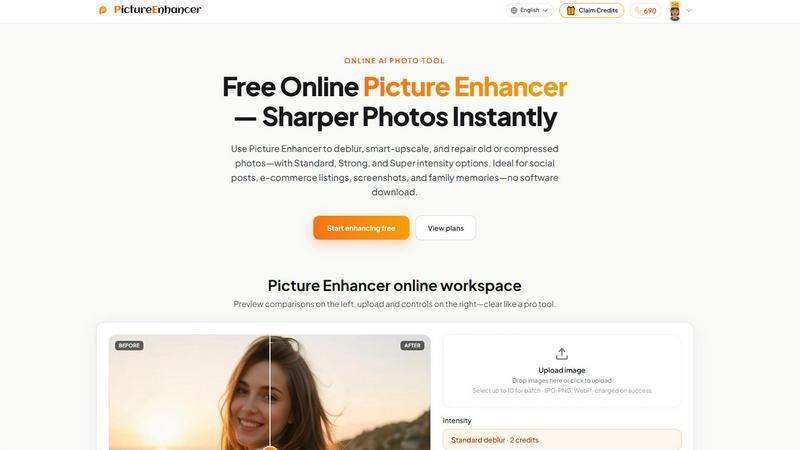
Picture Enhancer revolutionizes image clarity by deblurring, upscaling, and restoring photos instantly in your browser with zero software install.
About Picture Enhancer
Picture Enhancer is a revolutionary, AI-powered online photo enhancement tool that redefines what is possible with image processing. It is a cutting-edge, browser-based platform designed for creators, sellers, and everyday users who demand instant, professional-grade results without the complexity of traditional software. By leveraging advanced neural networks, Picture Enhancer can deblur, smart-upscale, and restore old or damaged photos with unprecedented precision. The tool operates on a futuristic, credit-based system where value is guaranteed: credits are only charged on successful enhancements, ensuring zero waste. For guests, the platform offers three free lifetime tries per IP with no signup required, providing a risk-free gateway to its transformative power. Once signed in, users unlock a universe of capabilities, including access to Standard, Strong, and Super intensity tiers for each mode. The Super tiers and batch processing (up to 10 images) are reserved for paid subscribers and permanent pack buyers, offering a scalable solution for high-volume workflows. Picture Enhancer processes images privately and securely, delivering watermark-free downloads in seconds. It is the ultimate fusion of AI intelligence and user-centric design, making it the go-to tool for social media posts, e-commerce listings, screenshots, and cherished family memories. This is not just an enhancer; it is a quantum leap in visual clarity.
Features of Picture Enhancer
AI Deblur
This feature is a neural engine that reconstructs lost detail from camera shake, soft focus, and mild motion blur. It rebuilds edges and textures with surgical precision, making faces, text, and fine details crisp again. Users can choose from Standard, Strong, or Super deblur intensity to match the severity of the blur. The AI analyzes the image's unique distortion pattern and applies a targeted restoration, ensuring that even heavily blurred photos are revitalized into sharp, usable assets. This is the future of blur correction.
Smart Upscale
This is not simple resizing; it is an intelligent 2x or 4x enlargement that generates new, realistic detail from a small source file. The AI understands the context of the image, adding texture and sharpness to prevent the pixelated, artificial look of traditional upscaling. This feature is revolutionary for turning low-resolution social covers, product hero shots, or print previews into high-definition masterpieces. It breathes life into every pixel, making small images look native to large displays.
Old Photo and Damage Restore
This feature acts as a digital time machine, capable of reducing scratches, fading, and compression artifacts from scanned prints. The AI differentiates between image content and damage, intelligently filling in missing information while preserving the original character of the photo. Strong and Super restore modes are built to handle heavy damage, such as deep creases or significant color degradation, making it ideal for preserving family history. It transforms fragile memories into durable digital assets.
Three-Intensity Tier System
This revolutionary system provides granular control over the enhancement process. Each mode (Deblur, Upscale, Restore) offers Standard, Strong, and Super intensity levels. Standard (2 credits) handles light corrections, Strong (4 credits) tackles moderate issues, and Super (6 credits) unleashes the full power of the AI for the most challenging images. This tiered approach ensures users only pay for the processing power they need, optimizing both cost and output quality. It is a scalable, precision-driven approach to image enhancement.
Use Cases of Picture Enhancer
Portraits and Everyday Photos
For content creators and social media users, Picture Enhancer is a revolutionary tool for cleaning up portraits. It reduces mild blur from candid shots, sharpens facial features, and clarifies clothing textures, ensuring every image looks professional. Whether for a personal portfolio or a high-traffic Instagram feed, this tool transforms average snapshots into stunning, high-definition visuals that demand attention. It elevates everyday photography to a new level of clarity.
E-commerce and Product Shots
Sellers can use Picture Enhancer to revolutionize their product listings. By upscaling product detail and taming compression noise, the tool makes items look more attractive and trustworthy to buyers. The AI sharpens text on packaging and enhances the texture of materials, making hero shots pop. This leads to higher conversion rates and a more premium brand perception, all without the need for expensive photography equipment or software.
Screenshots and UI Captures
For tech writers, support teams, and developers, Picture Enhancer is a cutting-edge solution for improving screenshots. It sharpens text edges and UI elements that are often degraded by compression, making tutorials, support threads, and documentation archives crystal clear. This ensures that instructional materials are easy to read and professional, enhancing user comprehension and reducing support queries. It is the ultimate tool for visual communication.
Old Photo Memories
Preserving family history is a powerful use case for Picture Enhancer. The tool can repair fade, scratches, and other damage from scanned family prints, breathing new digital life into them. Strong and Super restore modes are particularly effective for heavily damaged photos, allowing users to share and print memories that were once considered lost. This makes it an invaluable resource for genealogists, archivists, and anyone looking to digitize their past.
Frequently Asked Questions
What is Picture Enhancer?
Picture Enhancer is a free online AI photo enhancement tool that uses advanced neural networks to deblur, upscale, and restore images. It is designed for creators, sellers, and everyday users who need sharper, higher-quality photos instantly. The platform operates entirely in the browser, requires no software download, and processes images privately and securely.
Can I try Picture Enhancer without signing in?
Yes, guests can use Picture Enhancer without signing in. You receive three free lifetime tries per IP address. This allows you to test the tool's capabilities risk-free. Once you sign in, you receive starter credits and can access more features, including the ability to purchase credit packs or subscriptions.
How does billing work after sign-in?
After signing in, you use credits to enhance images. Credits are only charged on successful enhancements, meaning if the process fails, you are not billed. The cost per image depends on the intensity tier: Standard (2 credits), Strong (4 credits), and Super (6 credits). You can purchase monthly subscriptions that grant credits each cycle, or permanent credit packs that never expire.
Which modes does Picture Enhancer support?
Picture Enhancer supports three core modes: AI Deblur, Smart Upscale, and Old Photo and Damage Restore. Each mode offers three intensity levels (Standard, Strong, and Super) to handle varying degrees of image degradation. The Super tiers and batch processing (up to 10 images) are available to paid subscribers and pack buyers.
Pricing of Picture Enhancer
Picture Enhancer offers a flexible, credit-based pricing model designed for all user levels. Guests get three free lifetime tries per IP. New accounts receive starter credits upon sign-in. Credits are charged only on successful enhancements: Standard (2 credits), Strong (4 credits), and Super (6 credits). Paid users unlock Super tiers and batch enhance (up to 10 images). Monthly subscriptions grant credits each billing cycle, while permanent credit packs never expire, offering a one-time purchase option for continuous use.
Explore more in this category:
Similar to Picture Enhancer

ImageGenerator
Create and edit AI images online with multiple models, text-to-image, image-to-image, background removal, and upscaling.

ColorBestie
AI color previews and marker color suggestions for coloring pages.

AIPetGen
AIPetGen turns a photo of your dog, cat, or other pet, or a written description, into a new picture or a short animation.

ImageGPT
ImageGPT is an all-in-one AI creative platform for generating, editing and transforming images and videos using AI.

AI Album Cover Maker
Create release-ready album covers from a prompt or photo. Generate, refine, and export art for singles, EPs, mixtapes, and playlists.

Sprite Sheet Maker
A free browser-based toolkit for creating, cutting, converting, and previewing sprite sheet animations.

Image to Layers AI
Turn images into editable AI-powered layers
