
CleanPaste.org vs Video to Text
Side-by-side comparison to help you choose the right AI tool.

CleanPaste.org
CleanPaste.org instantly removes invisible characters and AI watermarks from your text, ensuring authenticity and.
Last updated: February 28, 2026

Video to Text
Transform any video or audio into precise text effortlessly in minutes with cutting-edge AI technology and multi-language support.
Last updated: April 13, 2026
Visual Comparison
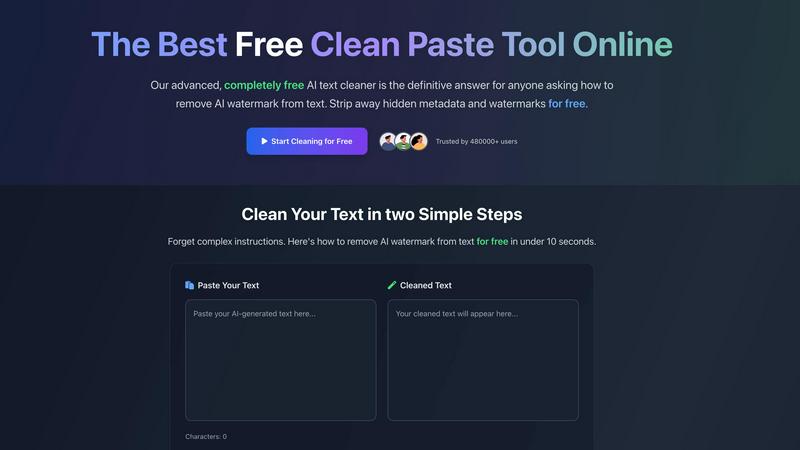
CleanPaste.org
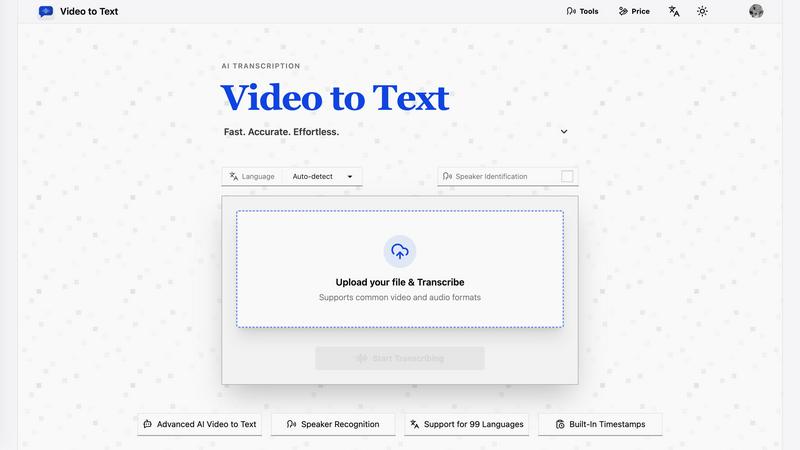
Video to Text
Feature Comparison
CleanPaste.org
Instant Processing
CleanPaste.org offers real-time text processing, allowing users to paste their content and receive cleaned text within seconds. This feature ensures that users can quickly enhance their documents without unnecessary delays.
Watermark Removal Mode
The watermark removal mode is specifically designed to strip AI watermarks from text while preserving its original content. This ensures that the cleaned text retains its natural flow and readability, making it ideal for various applications.
Deep Scan Algorithm
Utilizing advanced algorithms, CleanPaste.org performs a deep scan to detect and eliminate invisible characters, zero-width spaces, and hidden metadata. This feature guarantees comprehensive cleaning of the text, ensuring no traces of AI interference remain.
User-Friendly Interface
The intuitive interface of CleanPaste.org allows users to efficiently navigate the tool without any technical expertise. The straightforward design makes it accessible for everyone, from students to professionals, ensuring a seamless experience.
Video to Text
AI Transcription
Harness the power of advanced AI algorithms that convert audio and video content into text with remarkable accuracy. This feature ensures that even complex dialogues and diverse accents are transcribed correctly, saving users time and effort.
Multi-Language Support
Video to Text supports transcription in 99 languages, equipped with automatic language detection. This feature is essential for users dealing with mixed-language recordings, ensuring that no matter the language, the transcription remains accurate and reliable.
Speaker Diarization
The built-in speaker recognition technology intelligently identifies different speakers in the audio, making it easy to follow conversations, interviews, or multi-part dialogues. This feature enhances clarity and provides context, which is crucial for effective communication.
Flexible Export Options
With the ability to export transcripts in multiple formats such as TXT, SRT, VTT, and CSV, users can choose the format that best suits their needs. Whether for subtitles, plain text, or structured analysis, Video to Text caters to diverse requirements.
Use Cases
CleanPaste.org
For Students
Students can utilize CleanPaste.org to remove hidden characters and metadata from their essays or research papers. This ensures that their submissions are polished and free from any AI traces, enhancing their academic integrity.
For Content Creators
Bloggers and content creators can leverage CleanPaste.org to refine their drafts. The tool removes AI watermarks and invisible characters, enabling creators to maintain an authentic brand voice that resonates with their audience.
For Professionals
Professionals can benefit from CleanPaste.org by cleaning their emails and business documents. This ensures that all communication appears polished and human-like, minimizing the risk of being flagged as AI-generated content.
For Non-Native Speakers
Non-native English speakers can employ CleanPaste.org to enhance the naturalness of AI-assisted drafts. The tool helps them achieve a more fluent and authentic tone, making their writing more relatable and effective.
Video to Text
Content Creation
Creators can effortlessly generate subtitles for YouTube videos, online courses, and social media clips, enhancing accessibility and engagement. Accurate transcriptions ensure that audiences can follow along effortlessly.
Meeting Transcriptions
Transform meetings, webinars, and calls into searchable notes. This use case is invaluable for professionals who need to reference discussions or decisions made during collaborative sessions, improving productivity and accountability.
Journalistic Interviews
Journalists can transcribe interviews quickly and accurately, allowing them to focus on storytelling rather than note-taking. This use case ensures that important quotes and insights are captured verbatim for articles and reports.
Language Learning
Students and language learners can utilize transcripts to practice listening and comprehension skills. This feature enables users to review audio lessons with accompanying text, facilitating a more effective learning experience.
Overview
About CleanPaste.org
CleanPaste.org is an innovative online platform designed to revolutionize the way users manage and enhance their text. This cutting-edge tool specializes in removing AI watermarks, hidden metadata, and invisible characters, empowering users to refine their written content seamlessly. Whether you're a student looking to submit polished essays, a content creator striving for authenticity, or a professional aiming for high-quality communication, CleanPaste.org caters to a diverse audience. Its main value proposition is a commitment to providing a 100% free service with no sign-up requirements, ensuring unrestricted access to all users. With a simple, user-friendly interface, CleanPaste.org allows for instant processing, enabling users to achieve undetectable, human-like text in mere seconds. Trusted by over 480,000 users, this tool not only enhances text quality but also guarantees originality, making it the premier choice for those seeking to eliminate AI traces from their writing effectively.
About Video to Text
Video to Text is an AI-powered transcription service revolutionizing the way creators, teams, and individuals convert video and audio files into precise, exportable text. Designed for those who demand speed and accuracy without the hassle of building their own transcription pipelines, this service stands out with its seamless user experience. Users can effortlessly upload their media files and receive clean, automated transcriptions that are speaker-aware, ensuring clarity in communication. The service also supports a plethora of languages, automatically detecting the spoken language, making it a versatile choice for a global audience. With flexible export options tailored to various workflows, Video to Text not only boosts productivity but also ensures that users can focus on content creation rather than transcription headaches.
Frequently Asked Questions
CleanPaste.org FAQ
How does CleanPaste remove invisible characters?
CleanPaste.org employs sophisticated algorithms to detect and strip invisible characters, zero-width spaces, hidden metadata, and AI watermarks from your text. Users simply paste their content and click clean, with all processing occurring instantly.
Is CleanPaste truly free? What's the catch?
Yes, CleanPaste.org is completely free. There are no hidden fees, usage limits, or premium features that require sign-up. The service is designed to provide the best free tool for removing invisible characters and AI watermarks for everyone.
What types of hidden characters does CleanPaste remove?
The tool is capable of removing a wide range of invisible characters, including zero-width spaces, hidden metadata, AI watermarks, and various formatting artifacts. All features are freely accessible to all users.
How secure is my text when using CleanPaste.org?
CleanPaste.org prioritizes user privacy and data security. The tool does not store or share any user content, ensuring that all text processed remains confidential and secure throughout the cleaning process.
Video to Text FAQ
What is Video to Text?
Video to Text is an AI transcription tool that specializes in converting audio and video files into clean, exportable text. It is designed for anyone needing accurate and efficient transcriptions.
How does the transcription process work?
Users simply upload their audio or video files, and the AI processes the content, providing a transcription that is ready for export. The entire process is straightforward and user-friendly, ensuring minimal effort.
What file formats are supported for upload?
Video to Text supports a wide range of audio and video formats, including MP4, MOV, MKV, WEBM, MP3, WAV, and more. This variety ensures compatibility with most media files.
Is there a limit to how much I can transcribe?
New users receive 30 free transcription minutes to get started. Beyond that, users can purchase additional minutes as needed, with straightforward pay-as-you-go pricing plans available.
Alternatives
CleanPaste.org Alternatives
CleanPaste.org is an innovative online tool tailored to remove invisible characters and AI watermarks from text, making it a vital resource within the AI Assistants category. Users are drawn to its capabilities for various reasons, including the need for enhanced text authenticity, the appeal of a user-friendly interface, and the urgency to produce quality content free from digital traces. As content creators, students, and professionals seek alternatives, they often evaluate factors such as pricing, specific features, and compatibility with their platforms to ensure they find the best fit for their unique writing needs. When exploring alternatives to CleanPaste.org, it's essential to consider the tool's core functionalities, ease of use, and the level of support provided. Users should prioritize options that maintain the commitment to quality and authenticity while also assessing the flexibility and range of services offered. Ultimately, finding a suitable alternative hinges on understanding your specific requirements and how well a new tool aligns with your writing aspirations.
Video to Text Alternatives
Video to Text is a revolutionary AI-powered transcription service designed to transform video and audio files into clean, exportable text rapidly and accurately. As part of the AI Assistants category, it caters to a diverse range of users, including creators, teams, and individuals who seek a seamless way to convert spoken content into written form without the hassle of building their own transcription infrastructure. Users often find themselves exploring alternatives due to various factors such as pricing, feature sets, and platform compatibility. When evaluating potential substitutes, it's crucial to consider the speed and accuracy of transcription, ease of use, the ability to handle various media formats, and the flexibility of export options to ensure the chosen tool aligns with their specific workflow and requirements.