
Img Editor vs Imgezy
Side-by-side comparison to help you choose the right AI tool.

Img Editor
Img Editor empowers you to effortlessly create breathtaking AI-generated images from your imagination in seconds.
Last updated: February 28, 2026

Imgezy
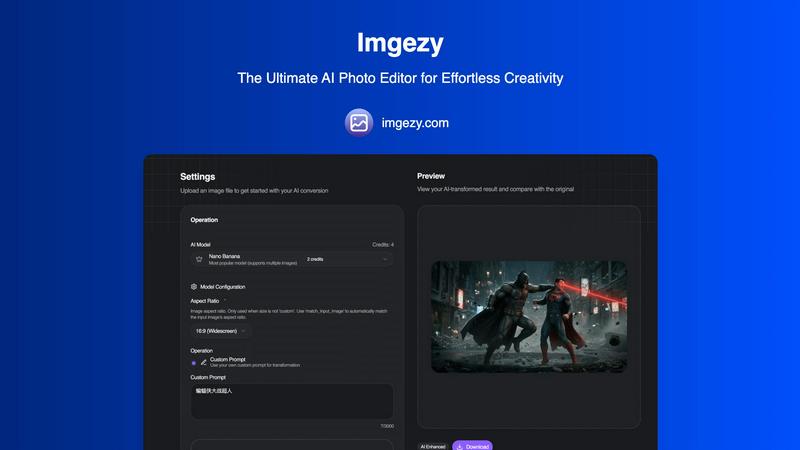
Imgezy is the revolutionary AI photo editor that instantly removes objects and changes backgrounds.
Last updated: February 28, 2026
Visual Comparison
Img Editor

Imgezy
Feature Comparison
Img Editor
Text to Image Generation
This feature allows users to input textual descriptions and receive stunning AI-generated images that match their vision. The advanced AI understands nuances in language, translating them into high-fidelity visuals that capture the essence of user creativity.
Image Editing Capabilities
Users can enhance and modify existing images using Img Editor's state-of-the-art editing tools. With options for adjusting colors, adding effects, and refining details, creators can elevate their visuals to new heights, ensuring every piece meets their artistic standards.
Prompt Generator
The integrated prompt generator assists users in formulating effective descriptions to achieve desired results. By suggesting various prompts based on user input, this tool enhances creativity and expands possibilities, making it easier to explore different artistic directions.
Quality Settings
Img Editor offers multiple quality settings, including 1K, 2K, and 4K options, allowing users to choose the resolution that best fits their needs. Whether for social media posts or high-resolution prints, creators can ensure their images are sharp and vibrant.
Imgezy
Intelligent Object Removal
Imgezy's AI meticulously identifies and removes any unwanted element—be it photobombers, street signs, or imperfections—with surgical precision. The neural network then reconstructs the background with pixel-perfect accuracy, leaving absolutely no trace of the edit. This feature delivers flawless results that were once only possible through hours of manual, expert-level Photoshop work.
Instant Background Replacement
Transform the context of any image in a single click. This feature allows you to seamlessly swap out backgrounds, from applying a solid color for a professional headshot to transporting a subject to a tropical beach or a futuristic cityscape. The AI intelligently handles complex edges like hair and fabric, ensuring a natural, convincing composite every time.
AI-Powered Photo Enhancement
Automatically elevate your images with intelligent enhancement algorithms. Imgezy analyzes and optimizes critical parameters like color vibrancy, lighting balance, contrast, and sharpness to make your photos visually pop. This smart repair function can also restore clarity to blurry or damaged image areas, revitalizing old or imperfect shots.
Batch Processing & High-Quality Output
Scale your creativity effortlessly with batch processing, enabling the editing of multiple images simultaneously for large projects. Every edit culminates in a high-resolution download, guaranteeing no loss of quality. The platform ensures your final assets are production-ready, whether for web, print, or digital campaigns.
Use Cases
Img Editor
Artistic Creation
Artists can use Img Editor to swiftly generate concepts and ideas for their works. By transforming simple text prompts into elaborate visuals, they can experiment with different styles and themes, enhancing their creative process.
Marketing and Advertising
Marketers can harness the power of Img Editor to produce eye-catching visuals for campaigns. Whether crafting social media graphics or promotional materials, the platform enables rapid generation of tailored images that resonate with target audiences.
Content Creation
Bloggers and content creators can enhance their articles with unique visuals generated by Img Editor. By producing relevant images that complement their written content, they can increase engagement and improve the overall aesthetic of their posts.
Educational Resources
Educators can utilize Img Editor to create custom illustrations and infographics for teaching materials. By generating visuals that convey complex concepts, they can enhance learning experiences and make information more accessible to students.
Imgezy
E-Commerce & Product Photography
Online sellers can create pristine, distraction-free product catalogs by instantly removing price tags, mannequins, or messy backgrounds. Quickly generate multiple lifestyle shots by placing products against various contextual backgrounds, dramatically increasing conversion rates without expensive photoshoots.
Social Media Content Creation
Influencers and content creators can maintain a visually cohesive and professional feed. Easily remove unwanted objects from travel photos, replace dull skies with dramatic sunsets, or enhance selfies for maximum engagement. This enables rapid, high-volume content production that stands out in crowded social feeds.
Professional Photography Workflow
Photographers can use Imgezy as a powerful post-production assistant to handle tedious tasks like object cleanup, background adjustments, and batch enhancements. This drastically reduces editing time, allowing artists to focus on composition and client interaction while delivering perfect final galleries faster.
Personal Photo Restoration & Fun
Casual users can effortlessly restore old family photos by removing scratches and tears, enhance vacation pictures, or have fun by creatively editing personal images—like placing a family pet in a whimsical setting. It turns every user into a capable editor for preserving memories and unleashing creativity.
Overview
About Img Editor
Img Editor is a revolutionary AI-driven image generation platform that redefines the landscape of digital art creation. Designed to cater to artists, graphic designers, marketers, and content creators, this tool is completely free, breaking down financial barriers that often restrict access to high-quality art generation. At the heart of Img Editor lies a sophisticated dual-mode AI system, which harnesses the power of advanced neural networks to convert text prompts and existing images into breathtaking visuals. This platform empowers users to unleash their creativity without limitations, allowing for the creation of everything from photorealistic scenes to imaginative abstract art in mere seconds. Img Editor not only serves as a powerful tool but also cultivates a vibrant ecosystem, where users can interact, share, and earn rewards through participation, fostering a community that values collaboration and innovation.
About Imgezy
Imgezy is the paradigm-shifting AI photo editor, engineered to democratize professional-grade visual content creation. It transcends traditional editing software by harnessing cutting-edge artificial intelligence to execute complex edits through simple text-based commands. This revolutionary platform empowers users to manipulate images by merely describing the desired outcome, making advanced techniques like object removal, background replacement, and photo enhancement accessible to all. Designed for a new generation of creators, it serves e-commerce sellers crafting perfect product shots, social media influencers curating flawless feeds, photographers streamlining their workflow, and casual users elevating personal photos. With its core promise of delivering instantaneous, studio-quality results without requiring any technical skill or design experience, Imgezy is not just a tool but an intelligent creative partner. It represents the future of visual expression, where imagination is the only limit, trusted by over 200,000 users to transform their creative vision into reality in seconds.
Frequently Asked Questions
Img Editor FAQ
What types of images can I generate with Img Editor?
Img Editor allows users to create a wide variety of images, ranging from photorealistic landscapes to abstract art. The advanced AI capabilities enable the generation of visuals based on detailed text prompts or modifications of existing images.
Is Img Editor really free to use?
Yes, Img Editor is completely free, offering users unlimited generations without the need for subscription fees. This democratizes access to high-quality image generation, empowering anyone to create professional-grade art.
How does the prompt generator work?
The prompt generator assists users in crafting effective descriptions for image generation. By analyzing user input, it suggests variations and enhancements, enabling users to explore diverse artistic possibilities and improve the quality of their outputs.
Can I submit my creations to a gallery?
Absolutely! Img Editor encourages users to submit their generated images to the community gallery. Approved submissions can earn users additional generations, fostering a collaborative environment where creativity is shared and celebrated.
Imgezy FAQ
How does Imgezy's AI editing work?
Imgezy utilizes advanced generative AI models, like its flagship Nano Banana model. You simply upload an image and provide a text prompt describing the edit you want, such as "remove the trash can" or "change background to a forest." The AI interprets your command and regenerates the image accordingly, performing complex pixel manipulation in seconds.
Do I need any design skills or experience to use Imgezy?
Absolutely not. Imgezy is built specifically for users with zero design experience. The interface is intuitive and the process is guided by simple text prompts. You describe your creative intention in natural language, and the AI handles all the complex technical execution, making professional editing accessible to everyone.
What is the difference between the Basic and Pro plans?
The Basic plan is perfect for personal use, offering a set number of credits for standard generation. The Pro plan, designed for professionals and power users, provides significantly more credits (4x more), includes a commercial license for using images in business contexts, and offers priority support and faster processing.
Can I use Imgezy for commercial projects?
Yes, but a commercial license is required. The Pro subscription plan includes a full commercial license, granting you the rights to use the AI-edited images in client work, marketing materials, e-commerce, and other revenue-generating projects. Always check the specific terms of your chosen plan for licensing details.
Alternatives
Img Editor Alternatives
Img Editor is a revolutionary AI image generation platform that empowers creativity through its cutting-edge machine learning capabilities. It falls within the image and photo category, designed for artists, designers, marketers, and anyone eager to transform their ideas into stunning visuals without financial constraints. Users often seek alternatives due to various factors such as pricing models, specific feature sets, or compatibility with their preferred platforms. When selecting an alternative, it’s essential to consider the quality of output, the ease of use, the flexibility of features, and the overall user experience to ensure it aligns with your creative vision.
Imgezy Alternatives
Imgezy is a revolutionary AI-native platform in the image editing and photo manipulation category. It empowers users to transform visuals through simple text commands, automating complex tasks like object removal and background replacement with unprecedented speed. Users often explore alternatives for various reasons, including budget constraints, specific feature requirements not covered by a single tool, or the need for integration with different creative platforms and workflows. The search for a perfect tool is a natural part of the evolving digital creator's journey. When evaluating an alternative, prioritize core capabilities like AI model intelligence, output quality, and processing speed. Consider the user interface's intuitiveness, the flexibility of pricing models, and how well the tool integrates into your existing creative or operational stack for seamless workflow augmentation.