
Imgezy vs RemoveTexts
Side-by-side comparison to help you choose the right AI tool.

Imgezy
Imgezy is the revolutionary AI photo editor that instantly removes objects and changes backgrounds.
Last updated: February 28, 2026

RemoveTexts
Effortlessly erase text and unwanted elements from images in seconds with RemoveTexts, the AI tool that transforms visuals without any design skills.
Last updated: March 11, 2026
Visual Comparison
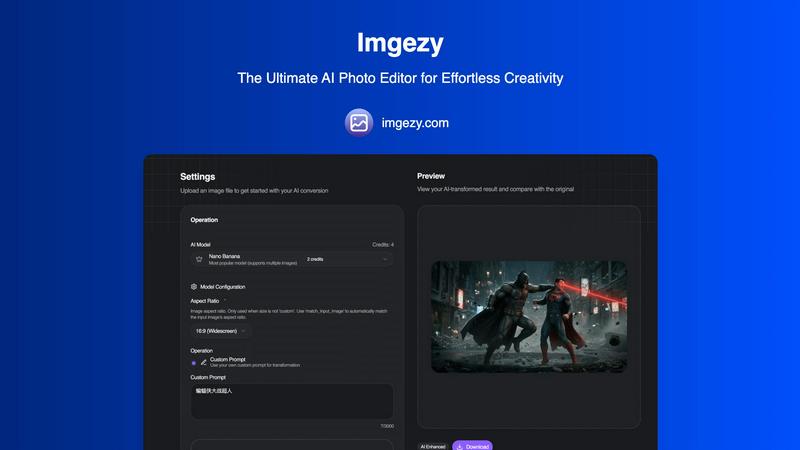
Imgezy
RemoveTexts

Feature Comparison
Imgezy
Intelligent Object Removal
Imgezy's AI meticulously identifies and removes any unwanted element—be it photobombers, street signs, or imperfections—with surgical precision. The neural network then reconstructs the background with pixel-perfect accuracy, leaving absolutely no trace of the edit. This feature delivers flawless results that were once only possible through hours of manual, expert-level Photoshop work.
Instant Background Replacement
Transform the context of any image in a single click. This feature allows you to seamlessly swap out backgrounds, from applying a solid color for a professional headshot to transporting a subject to a tropical beach or a futuristic cityscape. The AI intelligently handles complex edges like hair and fabric, ensuring a natural, convincing composite every time.
AI-Powered Photo Enhancement
Automatically elevate your images with intelligent enhancement algorithms. Imgezy analyzes and optimizes critical parameters like color vibrancy, lighting balance, contrast, and sharpness to make your photos visually pop. This smart repair function can also restore clarity to blurry or damaged image areas, revitalizing old or imperfect shots.
Batch Processing & High-Quality Output
Scale your creativity effortlessly with batch processing, enabling the editing of multiple images simultaneously for large projects. Every edit culminates in a high-resolution download, guaranteeing no loss of quality. The platform ensures your final assets are production-ready, whether for web, print, or digital campaigns.
RemoveTexts
Paint to Remove
With the Paint to Remove feature, users can brush over specific text areas in their images for precise control. This targeted approach allows you to eliminate only the text you want gone, ensuring that the rest of your image remains intact and visually appealing.
Auto Remove All
The Auto Remove All function leverages the power of AI to automatically detect and remove every text element from your image with just one click. This feature is perfect for those who need a quick solution for cleaning up images filled with text, saving valuable time and effort.
Edit & Replace Text
The Edit & Replace Text feature enables users to change existing text within images while perfectly matching the original style and font. This allows for seamless modifications, making it easy to update information or branding in your visuals without compromising quality.
Remove Objects
The Remove Objects feature goes beyond text removal, allowing users to erase unwanted objects, logos, and other visual elements from their images. This functionality ensures that you can create clean and professional visuals tailored to your needs.
Use Cases
Imgezy
E-Commerce & Product Photography
Online sellers can create pristine, distraction-free product catalogs by instantly removing price tags, mannequins, or messy backgrounds. Quickly generate multiple lifestyle shots by placing products against various contextual backgrounds, dramatically increasing conversion rates without expensive photoshoots.
Social Media Content Creation
Influencers and content creators can maintain a visually cohesive and professional feed. Easily remove unwanted objects from travel photos, replace dull skies with dramatic sunsets, or enhance selfies for maximum engagement. This enables rapid, high-volume content production that stands out in crowded social feeds.
Professional Photography Workflow
Photographers can use Imgezy as a powerful post-production assistant to handle tedious tasks like object cleanup, background adjustments, and batch enhancements. This drastically reduces editing time, allowing artists to focus on composition and client interaction while delivering perfect final galleries faster.
Personal Photo Restoration & Fun
Casual users can effortlessly restore old family photos by removing scratches and tears, enhance vacation pictures, or have fun by creatively editing personal images—like placing a family pet in a whimsical setting. It turns every user into a capable editor for preserving memories and unleashing creativity.
RemoveTexts
E-Commerce Product Images
E-commerce sellers can utilize RemoveTexts to clean up product images by removing watermarks and unwanted text. This enhances the visual appeal of their listings, helping to drive sales and attract more customers.
Social Media Content Creation
Marketers and social media managers can quickly eliminate distracting text from images, ensuring their content is visually engaging and professional. This is particularly useful for creating polished promotional materials and advertisements.
Legal Document Redaction
Legal professionals can use RemoveTexts to redact sensitive information from documents and images. This capability is essential for maintaining confidentiality while ensuring that the remaining content remains clear and legible.
Academic and Research Publications
Researchers and academics can benefit from RemoveTexts by removing unnecessary text overlays from charts and graphs in their publications. This refinement elevates the clarity and professionalism of their visual data presentations.
Overview
About Imgezy
Imgezy is the paradigm-shifting AI photo editor, engineered to democratize professional-grade visual content creation. It transcends traditional editing software by harnessing cutting-edge artificial intelligence to execute complex edits through simple text-based commands. This revolutionary platform empowers users to manipulate images by merely describing the desired outcome, making advanced techniques like object removal, background replacement, and photo enhancement accessible to all. Designed for a new generation of creators, it serves e-commerce sellers crafting perfect product shots, social media influencers curating flawless feeds, photographers streamlining their workflow, and casual users elevating personal photos. With its core promise of delivering instantaneous, studio-quality results without requiring any technical skill or design experience, Imgezy is not just a tool but an intelligent creative partner. It represents the future of visual expression, where imagination is the only limit, trusted by over 200,000 users to transform their creative vision into reality in seconds.
About RemoveTexts
RemoveTexts is a revolutionary AI-powered image editing tool designed to effortlessly remove unwanted text and elements from images. With its user-friendly interface, anyone—regardless of design skill—can upload images and achieve clean, professional results in mere seconds. Whether you're looking to eliminate watermarks, meme text, subtitles, or branded overlays, RemoveTexts employs advanced deep learning algorithms to detect and erase text while intelligently reconstructing the surrounding background. This makes it ideal for creators, marketers, and designers looking to enhance their visuals without the hassle of complex software like Photoshop. Trusted by over 100,000 users worldwide, RemoveTexts empowers you to achieve pristine image clarity, elevating your content effortlessly.
Frequently Asked Questions
Imgezy FAQ
How does Imgezy's AI editing work?
Imgezy utilizes advanced generative AI models, like its flagship Nano Banana model. You simply upload an image and provide a text prompt describing the edit you want, such as "remove the trash can" or "change background to a forest." The AI interprets your command and regenerates the image accordingly, performing complex pixel manipulation in seconds.
Do I need any design skills or experience to use Imgezy?
Absolutely not. Imgezy is built specifically for users with zero design experience. The interface is intuitive and the process is guided by simple text prompts. You describe your creative intention in natural language, and the AI handles all the complex technical execution, making professional editing accessible to everyone.
What is the difference between the Basic and Pro plans?
The Basic plan is perfect for personal use, offering a set number of credits for standard generation. The Pro plan, designed for professionals and power users, provides significantly more credits (4x more), includes a commercial license for using images in business contexts, and offers priority support and faster processing.
Can I use Imgezy for commercial projects?
Yes, but a commercial license is required. The Pro subscription plan includes a full commercial license, granting you the rights to use the AI-edited images in client work, marketing materials, e-commerce, and other revenue-generating projects. Always check the specific terms of your chosen plan for licensing details.
RemoveTexts FAQ
How does RemoveTexts work?
RemoveTexts employs advanced AI technology to analyze images and intelligently reconstruct the background after removing unwanted text. This ensures seamless results with no visible traces of the removed elements.
What types of images can I upload?
You can upload images in JPG, PNG, or WebP format, with a maximum file size of 10 MB. This versatility makes it easy to work with a variety of image types for your editing needs.
Is RemoveTexts free to use?
Yes, RemoveTexts offers a free online platform for users to remove text and unwanted elements from their images without the need for any design skills or software installation.
Can I remove watermarks with RemoveTexts?
Yes, RemoveTexts is specifically designed to remove watermarks and other text overlays from images, allowing you to achieve clean, professional results in seconds.
Alternatives
Imgezy Alternatives
Imgezy is a revolutionary AI-native platform in the image editing and photo manipulation category. It empowers users to transform visuals through simple text commands, automating complex tasks like object removal and background replacement with unprecedented speed. Users often explore alternatives for various reasons, including budget constraints, specific feature requirements not covered by a single tool, or the need for integration with different creative platforms and workflows. The search for a perfect tool is a natural part of the evolving digital creator's journey. When evaluating an alternative, prioritize core capabilities like AI model intelligence, output quality, and processing speed. Consider the user interface's intuitiveness, the flexibility of pricing models, and how well the tool integrates into your existing creative or operational stack for seamless workflow augmentation.
RemoveTexts Alternatives
RemoveTexts is an innovative AI-powered tool designed specifically for the image and photo editing category. Its primary function is to effortlessly remove unwanted text from images, enabling users to enhance their visuals without needing advanced design skills or complicated software like Photoshop. As creators, marketers, and designers increasingly seek efficient solutions, many users find themselves exploring alternatives due to factors such as pricing, specific feature sets, or desired platform compatibility. When searching for alternatives to RemoveTexts, users should consider key aspects such as ease of use, the accuracy of text removal, and the range of editing features offered. Evaluating the output quality and supported languages is also essential, especially for those working with diverse image content. Ultimately, the right alternative should streamline the editing process while delivering results that meet the user's specific needs.