
NB2 Hub vs RemoveTexts
Side-by-side comparison to help you choose the right AI tool.

Transform text and photos into stunning 4K images with precise layout control and unrivaled clarity using NB2 Hub.
Last updated: February 28, 2026

RemoveTexts
Effortlessly erase text and unwanted elements from images in seconds with RemoveTexts, the AI tool that transforms visuals without any design skills.
Last updated: March 11, 2026
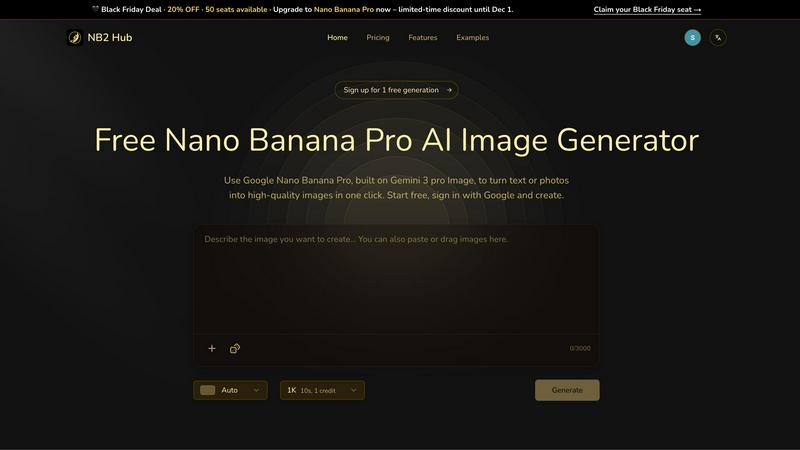
Visual Comparison
NB2 Hub
RemoveTexts

Feature Comparison
NB2 Hub
Faithful text + image remix
Nano Banana Pro allows users to upload a reference image alongside a short prompt, intelligently preserving layout and lighting while enhancing details and textures. This feature is perfect for creating iterations of UI designs, refining product shots, or enhancing comic panels with exceptional fidelity.
Crisp text inside images
This feature enables the generation of clean, legible on-image text, accommodating everything from headlines to paragraphs with multilingual typography. With no blur or halo effects, it is ideal for creating visually striking posters, advertisements, and social media covers that stand out.
Grounded to real-world facts
Harness world knowledge and retrieval grounding to create accurate visual representations of data, locations, and styles in your images. This feature ensures that your generated visuals are not only aesthetically pleasing but also truthful and informative, making it ideal for educational content.
Multi-reference fusion & identity consistency
This innovative feature allows users to fuse multiple reference images while maintaining character, product, and brand consistency across different shots. It is particularly beneficial for storyboards and multi-angle product showcases, ensuring a cohesive visual narrative throughout various perspectives.
RemoveTexts
Paint to Remove
With the Paint to Remove feature, users can brush over specific text areas in their images for precise control. This targeted approach allows you to eliminate only the text you want gone, ensuring that the rest of your image remains intact and visually appealing.
Auto Remove All
The Auto Remove All function leverages the power of AI to automatically detect and remove every text element from your image with just one click. This feature is perfect for those who need a quick solution for cleaning up images filled with text, saving valuable time and effort.
Edit & Replace Text
The Edit & Replace Text feature enables users to change existing text within images while perfectly matching the original style and font. This allows for seamless modifications, making it easy to update information or branding in your visuals without compromising quality.
Remove Objects
The Remove Objects feature goes beyond text removal, allowing users to erase unwanted objects, logos, and other visual elements from their images. This functionality ensures that you can create clean and professional visuals tailored to your needs.
Use Cases
NB2 Hub
UI Design Iteration
With the faithful text and image remix feature, designers can quickly iterate on interface designs by preserving the original layout while upgrading text and image quality. This accelerates the design workflow and enhances the final product's visual appeal.
Social Media Campaigns
Marketers can utilize crisp text generation for creating eye-catching headlines and captions within images. This capability allows for the rapid production of engaging content tailored for social media platforms, ensuring that campaigns are both visually and textually impactful.
Educational Infographics
Educators and content creators can leverage the grounded real-world facts feature to visualize complex data in a comprehensible and visually appealing manner. This is particularly useful for infographics that require accuracy and aesthetic appeal to facilitate learning.
Product Mockups
Brand strategists can take advantage of the multi-reference fusion capability to create consistent and professional product mockups. By applying logos and branding elements to 3D objects, marketers can produce high-quality visuals that accurately represent their products across different platforms.
RemoveTexts
E-Commerce Product Images
E-commerce sellers can utilize RemoveTexts to clean up product images by removing watermarks and unwanted text. This enhances the visual appeal of their listings, helping to drive sales and attract more customers.
Social Media Content Creation
Marketers and social media managers can quickly eliminate distracting text from images, ensuring their content is visually engaging and professional. This is particularly useful for creating polished promotional materials and advertisements.
Legal Document Redaction
Legal professionals can use RemoveTexts to redact sensitive information from documents and images. This capability is essential for maintaining confidentiality while ensuring that the remaining content remains clear and legible.
Academic and Research Publications
Researchers and academics can benefit from RemoveTexts by removing unnecessary text overlays from charts and graphs in their publications. This refinement elevates the clarity and professionalism of their visual data presentations.
Overview
About NB2 Hub
NB2 Hub is the ultimate gateway to harnessing the power of Google's revolutionary Nano Banana AI image generation models, designed for creators who seek a seamless and robust platform for visual synthesis. This web-based tool delivers instant access to advanced models like the Gemini-powered Nano Banana 2 and the cutting-edge Nano Banana Pro, enabling users to execute both text-to-image and sophisticated image-to-image transformations with remarkable consistency in character and style. Aimed at professionals across various fields—digital artists, marketers, product designers, and content strategists—NB2 Hub is more than a simple image generator; it serves as a reliable co-pilot for visual ideation and execution. The core value proposition is straightforward: democratize access to state-of-the-art AI imaging technology, emphasizing accuracy, controllability, and rapid output. With features that include faithful layout preservation, crisp on-image text rendering, and multi-reference fusion, NB2 Hub transforms basic prompts into high-fidelity, 4K-ready assets in mere seconds, effectively bridging the gap between creative vision and tangible results without requiring complex software expertise.
About RemoveTexts
RemoveTexts is a revolutionary AI-powered image editing tool designed to effortlessly remove unwanted text and elements from images. With its user-friendly interface, anyone—regardless of design skill—can upload images and achieve clean, professional results in mere seconds. Whether you're looking to eliminate watermarks, meme text, subtitles, or branded overlays, RemoveTexts employs advanced deep learning algorithms to detect and erase text while intelligently reconstructing the surrounding background. This makes it ideal for creators, marketers, and designers looking to enhance their visuals without the hassle of complex software like Photoshop. Trusted by over 100,000 users worldwide, RemoveTexts empowers you to achieve pristine image clarity, elevating your content effortlessly.
Frequently Asked Questions
NB2 Hub FAQ
What types of images can I create using NB2 Hub?
You can create a wide range of images, including text-to-image creations, image remixes, infographics, and product mockups, all tailored to your specific needs and creative vision.
Do I need any technical skills to use NB2 Hub?
No, NB2 Hub is designed to be user-friendly, requiring no deep technical expertise. Its intuitive interface allows anyone, regardless of skill level, to generate high-quality images seamlessly.
Can I try NB2 Hub for free?
Yes, NB2 Hub offers a free trial that allows you to generate high-quality images at no cost, enabling you to explore its features before committing to a subscription.
What is the quality of images produced by NB2 Hub?
NB2 Hub produces high-fidelity images at resolutions up to 4K, ensuring that your visuals are sharp, detailed, and ready for professional use across various platforms.
RemoveTexts FAQ
How does RemoveTexts work?
RemoveTexts employs advanced AI technology to analyze images and intelligently reconstruct the background after removing unwanted text. This ensures seamless results with no visible traces of the removed elements.
What types of images can I upload?
You can upload images in JPG, PNG, or WebP format, with a maximum file size of 10 MB. This versatility makes it easy to work with a variety of image types for your editing needs.
Is RemoveTexts free to use?
Yes, RemoveTexts offers a free online platform for users to remove text and unwanted elements from their images without the need for any design skills or software installation.
Can I remove watermarks with RemoveTexts?
Yes, RemoveTexts is specifically designed to remove watermarks and other text overlays from images, allowing you to achieve clean, professional results in seconds.
Alternatives
NB2 Hub Alternatives
NB2 Hub is a revolutionary platform that empowers creators by harnessing the capabilities of Google's cutting-edge Nano Banana AI image generation models. This web-based tool falls under the category of advanced image and photo synthesis, enabling users to transform text and images into stunning 4K visuals with remarkable precision and layout control. Many users seek alternatives to NB2 Hub due to various factors such as pricing, specific feature sets, or unique platform requirements. When exploring alternatives, it is essential to consider aspects like the quality of image generation, ease of use, and the level of support and community engagement available. A suitable alternative should not only match the performance of NB2 Hub but also align with the specific needs of your creative workflow.
RemoveTexts Alternatives
RemoveTexts is an innovative AI-powered tool designed specifically for the image and photo editing category. Its primary function is to effortlessly remove unwanted text from images, enabling users to enhance their visuals without needing advanced design skills or complicated software like Photoshop. As creators, marketers, and designers increasingly seek efficient solutions, many users find themselves exploring alternatives due to factors such as pricing, specific feature sets, or desired platform compatibility. When searching for alternatives to RemoveTexts, users should consider key aspects such as ease of use, the accuracy of text removal, and the range of editing features offered. Evaluating the output quality and supported languages is also essential, especially for those working with diverse image content. Ultimately, the right alternative should streamline the editing process while delivering results that meet the user's specific needs.