
Prompt Builder vs SVG to 3D
Side-by-side comparison to help you choose the right AI tool.

Prompt Builder
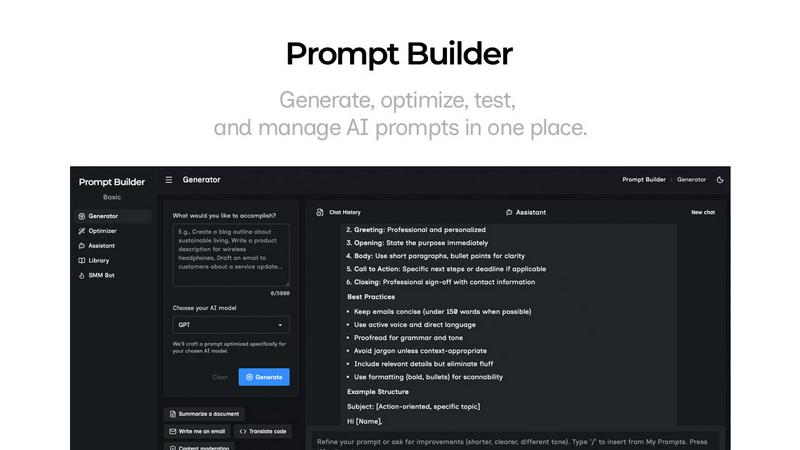
Prompt Builder instantly crafts and refines AI prompts for any model, turning ideas into perfect results in seconds.
Last updated: April 13, 2026

SVG to 3D
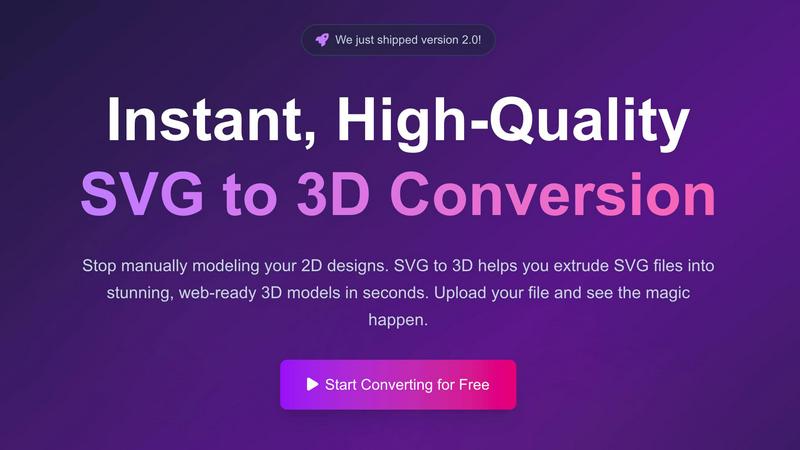
Instantly extrude your SVG files into high fidelity 3D models with AI powered precision.
Last updated: February 28, 2026
Visual Comparison
Prompt Builder
SVG to 3D
Feature Comparison
Prompt Builder
Model-Optimized Prompt Generator
This is the genesis engine of your prompt workflow. Describe your objective in plain English and select your target AI model (e.g., Gemini 1.5 Pro, Claude 3 Opus, GPT-4). The Generator instantly crafts a structurally tuned prompt that aligns with the specific nuances and optimal formatting of that model. It moves beyond one-size-fits-all templates, providing a solid, context-aware draft that serves as the perfect starting point for refinement, drastically reducing initial setup time and improving first-attempt accuracy.
Integrated Chat Assistant & Workspace
Prompt Builder features a fully integrated, multi-model chat environment for seamless testing and refinement. You can run your generated or library prompts directly within the platform using an assistant model of your choice (Grok, DeepSeek, etc.), eliminating disruptive context-switching between tools. This chat-first workspace preserves your entire iteration history, allowing you to pin breakthrough follow-ups and save the most effective conversational threads alongside the original prompt for perfect reproducibility.
Intelligent Prompt Optimizer
The Optimizer acts as your AI-powered prompt surgeon. Paste any existing prompt—whether from your library, a previous project, or an external source—and the Optimizer deconstructs and enhances it. It applies structured improvements for clarity, adds precise constraints, refines output formats, and suggests relevant examples. This feature transforms vague or underperforming prompts into robust, instruction-following powerhouses, with all optimization history auto-saved for review.
Centralized Prompt Library & Community Hub
This feature provides a dynamic, searchable repository for all your prompt assets. Your personal library allows you to categorize, pin, edit, and instantly deploy any saved prompt. Beyond your own work, you gain access to a curated vault of Community Prompts—pre-built, high-performing templates from other users. This turns prompt engineering from a solitary task into a collaborative, knowledge-sharing ecosystem, enabling you to discover and adapt proven solutions for countless use cases.
SVG to 3D
One-Click, Web-Optimized GLB Export
This feature is the cornerstone of modern web development workflows. With a single click, SVG to 3D generates pristine, lightweight GLB/GLTF files that are natively optimized for real-time web experiences. The exported models feature clean topology and are perfectly structured for seamless integration into leading frameworks like Three.js, React Three Fiber, and Babylon.js, eliminating hours of manual optimization and preparation for the digital canvas.
Advanced Browser-Based Modeling Suite
Go beyond primitive extrusion with a sophisticated, in-browser modeling panel. This feature grants you granular control over your model's physical properties, allowing you to dynamically adjust extrusion thickness, apply complex custom bevels, and fine-tune every detail. A real-time 3D preview updates instantly, providing a fluid, interactive modeling experience that rivals desktop applications, all without a single software installation.
Professional PBR Material System
Elevate your models from simple geometry to photorealistic assets. SVG to 3D incorporates a cutting-edge Physically Based Rendering (PBR) material system. Apply realistic metals, rough plastics, emissive surfaces, and custom textures with intuitive controls. This allows for the creation of stunning, visually rich models that respond accurately to lighting, making them ideal for high-fidelity presentations, marketing visuals, and immersive web scenes.
Multi-Format, Production-Ready Exports
The platform is engineered for versatility across the entire digital and physical spectrum. It supports exports in all critical industry formats: web-ready GLB/GLTF, universal OBJ for further editing, and meticulously clean STL files for immediate 3D printing. Each export is processed with optimized algorithms to ensure watertight geometry and minimal file size, guaranteeing professional results for any downstream application.
Use Cases
Prompt Builder
Accelerated Content Creation Pipeline
Content teams and solo creators can leverage Prompt Builder as a force multiplier. Use the SMM Bot to generate platform-tailored social posts (X threads, LinkedIn articles, TikTok scripts) from a single brief, then refine tone and messaging in chat. Save winning content frameworks to the Library to maintain brand voice consistency across all channels, transforming a creative idea into publish-ready copy in a fraction of the traditional time.
Developer-First AI Agent Prototyping
Developers building on AI APIs can use Prompt Builder as a rapid prototyping sandbox. Generate and test multiple prompt variations tuned for different models (Claude for reasoning, GPT for code) to find the most reliable and cost-effective configuration for an agent's task. The Optimizer helps harden prompts against edge cases, and the Library serves as a version-controlled knowledge base for different agent functions, streamlining the development cycle.
Enterprise Knowledge Workflow Standardization
Organizations can deploy Prompt Builder to codify and scale best practices. Teams can build a shared Library of approved, optimized prompts for common tasks like customer email drafting, report analysis, or internal documentation. This ensures every employee uses the most effective, vetted prompts, leading to consistent output quality, reduced token waste on retries, and measurable gains in operational efficiency and AI ROI.
AI Research & Comparative Model Analysis
Researchers and AI enthusiasts utilize the platform for rigorous, side-by-side model testing. The ability to generate a single intent into multiple model-tuned prompts and run them concurrently in Assistant allows for direct comparison of outputs from Gemini, Claude, Llama, and others. This facilitates deep analysis of model strengths, weaknesses, and response characteristics, all while maintaining an organized record of every experiment in the chat history and Library.
SVG to 3D
Interactive 3D Web Asset Creation
Revolutionize front-end development by instantly converting SVG icons, logos, and UI components into interactive 3D elements. This use case is essential for developers building immersive portfolios, product showcases, or gaming interfaces. The tool's optimized GLB output ensures high performance and seamless functionality within modern JavaScript frameworks, adding a cutting-edge spatial dimension to user experiences.
Rapid Prototyping for UI/UX Design
Transform static design mockups from tools like Figma into compelling 3D presentations. Designers can quickly extrude interface elements, logos, and typography to create dynamic prototypes with depth, shadows, and realistic materials. This capability allows for more persuasive client presentations, stakeholder reviews, and user testing with assets that feel tangible and innovative, bridging the gap between 2D design and spatial concept.
Direct-to-Print 3D Model Fabrication
Democratize 3D printing by bypassing complex CAD software. Hobbyists, artists, and engineers can upload vector art, technical diagrams, or custom logos and generate print-ready STL files in moments. The tool's focus on generating clean, manifold geometry is critical for this use case, ensuring the exported models are error-free and ready for slicing, turning digital designs into physical objects with unprecedented ease.
Real-Time Brand Asset Visualization
Empower marketing and branding teams to dynamically visualize logos and brand marks in 3D environments. Create stunning promotional materials, social media content, or AR/VR brand experiences by converting vector logos into fully textured 3D models. This allows for consistent, high-quality asset generation across multiple platforms, from web banners to virtual showrooms, enhancing brand perception with futuristic visual storytelling.
Overview
About Prompt Builder
Prompt Builder is the definitive prompt engineering operating system, engineered to dismantle the friction between human intent and machine output. It transcends being a simple tool; it's a comprehensive, chat-native workspace designed for the iterative creation, testing, and systematic management of AI prompts. At its core, Prompt Builder solves the critical inefficiency of manually rewriting prompts for different large language models (LLMs). You simply describe your task in natural language, select your target model—be it GPT, Claude, Gemini, Llama, or any other leading AI—and the platform generates a model-optimized, professional-grade prompt draft. This foundational prompt is then refined through an integrated chat interface, allowing for rapid iteration. Every successful version can be saved, pinned, and organized into a personal or team library, creating a living repository of high-performance prompts. Built for developers, content creators, marketers, and AI power users, Prompt Builder's revolutionary value proposition is turning hours of prompt-crafting guesswork into a streamlined workflow of seconds, ensuring consistent, high-quality outputs and maximizing the return on every AI interaction.
About SVG to 3D
SVG to 3D is a paradigm-shifting, browser-native engine that instantly transmutes 2D vector graphics into fully-realized, production-ready 3D models. It is engineered to dismantle the archaic barriers of traditional 3D modeling, eliminating the need for complex, resource-heavy software like Blender or Cinema 4D for fundamental tasks. This tool is the definitive solution for developers, designers, and digital fabricators who demand velocity without sacrificing quality. Its core value proposition is a quantum leap in workflow efficiency: from SVG to a deployable 3D asset in seconds. Whether you're a web developer injecting immersive 3D into a React Three Fiber application, a designer prototyping dimensional UI elements from Figma, or a creator preparing a clean STL for 3D printing, SVG to 3D provides a frictionless, intuitive, and powerful pipeline. It represents the future of accessible 3D content creation, putting advanced modeling capabilities directly in your browser with a privacy-first, local-processing architecture.
Frequently Asked Questions
Prompt Builder FAQ
Which AI models does Prompt Builder support?
Prompt Builder is architected for model agnosticism and supports a vast and growing ecosystem of large language models. This includes industry leaders like OpenAI's GPT series, Anthropic's Claude, Google's Gemini, Meta's Llama, Mistral AI's models, xAI's Grok, DeepSeek, Perplexity, and Cohere. The platform continuously updates to integrate new and updated models, ensuring your prompt engineering workflow remains future-proof.
How does the "model-optimized" prompt generation work?
The system utilizes advanced heuristics and learned structural patterns specific to each supported LLM. When you select a target model, the Generator tailors the prompt's architecture, instruction phrasing, constraint placement, and output formatting to align with how that particular model has been trained to process information most effectively. This eliminates the guesswork, providing a prompt engineered for higher fidelity and fewer hallucinations from the first interaction.
What is the difference between the Generator, Optimizer, and Assistant?
These are the three core, interconnected modules of the Prompt Builder workflow. The Generator creates a new prompt from a natural language idea. The Optimizer enhances and refines an existing prompt you provide. The Assistant is the execution and testing environment where you run prompts (from the Generator, Optimizer, or Library) in a live chat with a chosen AI model to see outputs and iterate. Think of it as Create (Generator), Enhance (Optimizer), and Test/Execute (Assistant).
Can I collaborate with my team on prompts in the Library?
Yes, Prompt Builder is designed for collaborative intelligence. Team plans allow you to create shared workspaces and libraries where prompts can be co-created, refined, and organized. Team members can search, run, and pin from the collective repository, ensuring everyone uses the latest, most effective versions. This transforms individual prompt mastery into a scalable, institutional asset, driving uniform quality and efficiency across projects.
SVG to 3D FAQ
How does SVG to 3D ensure the privacy of my files?
SVG to 3D operates on a strict privacy-first principle. Whenever possible, the entire conversion process is executed locally within your web browser using WebAssembly and advanced JavaScript. This means your SVG files and the resulting 3D models are never uploaded to an external server. Your proprietary designs and intellectual property remain securely on your machine, ensuring complete confidentiality and security.
What are the main advantages over using software like Blender?
The primary advantage is radical simplicity and speed for a specific task. While Blender is a powerhouse for general 3D work, it has a steep learning curve. SVG to 3D is hyper-specialized: it automates the technically complex process of cleanly extruding vector paths into 3D meshes. You achieve professional, optimized results in seconds directly from your browser, eliminating software boot-up time, manual modeling steps, and the need for specialized 3D modeling knowledge.
Which 3D file formats can I export to?
The platform supports a curated selection of the most essential and industry-standard 3D file formats. You can export your model as a GLB or GLTF (the modern standard for the web and real-time applications), as an OBJ file for compatibility with other 3D editing suites, and as an STL file, which is the universal format for 3D printing. Each format is optimized for its specific use case, ensuring ready-to-deploy assets.
Is there a limit to the complexity of SVG files I can convert?
The tool is engineered to handle a wide range of SVG complexity, from simple icons to intricate vector illustrations. Performance is tied to your device's capabilities since processing is local. Extremely complex SVGs with thousands of paths may require more processing power. For optimal results, it is recommended to simplify your SVG artwork by merging paths and removing unnecessary nodes before conversion, which leads to cleaner geometry and faster processing.
Alternatives
Prompt Builder Alternatives
Prompt Builder is a next-generation prompt engineering workspace, a category-defining tool within the AI assistant ecosystem. It transforms raw ideas into optimized, model-specific AI prompts through an intuitive, chat-driven interface. This platform consolidates the entire prompt lifecycle—generation, testing, optimization, and management—into a single, cohesive environment. Users explore alternatives for various strategic reasons. Some seek different pricing models or free tiers, while others require specific integrations or platform exclusivity. Feature depth, such as advanced analytics, team collaboration tools, or support for niche AI models, also drives the search for other solutions. When evaluating other platforms, consider core engineering capabilities. Look for robust testing suites, version control for prompts, and broad model compatibility. The ideal alternative should accelerate your workflow, not complicate it, offering a seamless bridge between human intent and machine execution.
SVG to 3D Alternatives
SVG to 3D is a paradigm-shifting AI assistant that redefines the creative pipeline, enabling the instantaneous transformation of 2D vector graphics into fully-realized 3D models. It belongs to the vanguard of AI-native design tools, automating a traditionally complex process into a seamless, browser-based experience. Users often seek alternatives to find a solution that perfectly aligns with their specific operational matrix. This could be driven by budget constraints, a need for more advanced parametric controls, integration with a different software ecosystem, or a requirement for offline processing capabilities beyond the cloud-native model. When evaluating other platforms, prioritize the core vectors of your workflow. Assess the fidelity of the 3D conversion, the quality and variety of export formats for your target medium—be it the metaverse or the 3D printer bed—and the intuitiveness of the interface for rapid iteration. The optimal tool is one that dissolves friction between your 2D vision and its 3D manifestation.