
Dokta vs Tailride
Side-by-side comparison to help you choose the right AI tool.

Dokta is the autonomous AI agent that automates document management and payments for SMBs and freelancers.
Last updated: April 4, 2026

Tailride
Tailride autonomously extracts and organizes invoices from your inbox and portals.
Last updated: February 28, 2026
Visual Comparison
Dokta

Tailride
Feature Comparison
Dokta
Instant AI-Powered Document Analysis
Dokta's core intelligence lies in its lightning-fast analysis engine. Utilizing cutting-edge OCR combined with Claude's AI, it reads, classifies, and extracts key data from any uploaded document—be it a photo, scan, or PDF—in less than 60 seconds. This process automatically identifies the document type, amounts, due dates, and involved parties, transforming unstructured documents into structured, actionable data without a single keystroke required from the user.
Automated Billing & Contract Lifecycle
This feature streamlines the entire revenue cycle. Users can generate professional invoices and quotes in clicks. For freelancers on day-rate contracts, Dokta enables automatic monthly invoice generation. It also facilitates online quote sending with digital acceptance links, allowing for one-click conversion of an accepted quote into a formal invoice, creating a seamless, closed-loop workflow from proposal to payment.
Real-Time Cash Flow Intelligence Dashboard
Gain immediate, crystal-clear financial oversight with the dynamic cash flow dashboard. This feature provides a real-time, at-a-glance view of key metrics: billed revenue, collected revenue, outstanding payments, and VAT. It includes a 12-month graphical visualization, empowering users to understand their financial trajectory and make data-driven decisions without manual spreadsheet compilation.
Proactive Anomaly & Risk Detection
Dokta acts as a vigilant sentinel for your document integrity. Its AI engine is trained to detect potential risks and inconsistencies, such as modified IBAN details, duplicate invoices, incoherent VAT amounts, or missing sequential numbering. This proactive protection layer helps prevent fraud and administrative errors, safeguarding your business's financial operations automatically.
Tailride
Autonomous Inbox Intelligence
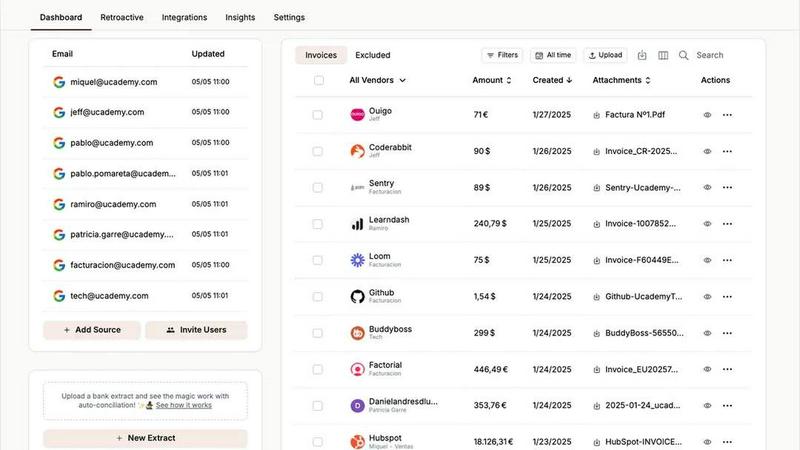
Tailride establishes a native, secure connection to your email ecosystem (Gmail, Outlook, IMAP) to function as a 24/7 sentinel. Its proprietary AI doesn't just scan; it comprehends your inbox, autonomously detecting and extracting invoices and receipts from PDFs, images, email bodies, and embedded URLs. It eliminates the archaic practice of forwarding emails, ensuring no document is ever missed. The system can perform deep-time retroactive scans to organize past quarters or years in minutes, transforming a historical mess into a structured digital ledger instantly.
Cognitive Portal Extraction Engine
Transcend the inbox with Tailride's cutting-edge Chrome extension, a portal-hopping extraction tool. With a single click, it directly pulls invoices from complex SaaS platforms and marketplaces like Adobe, Microsoft, ChatGPT, and Amazon. This feature dismantles the friction of manual download-upload cycles, creating a seamless pipeline from any digital vendor directly into your automated accounting workflow, capturing every transaction across your digital footprint.
Adaptive AI Rules & Workflow Orchestration
Move beyond simple OCR to true cognitive processing. Tailride's AI learns your business context, allowing you to build custom, no-code rules for automatic categorization, tagging, and routing. Instruct the system to forward all software subscriptions to a specific Google Drive folder or tag all marketing expenses from Meta Ads. This self-optimizing workflow engine automates decision-making, ensuring every document is processed according to your company's unique operational logic.
Unified Reconciliation & Data Sync
Tailride completes the financial loop with intelligent, two-way synchronization and reconciliation. It seamlessly integrates with accounting giants QuickBooks and Xero, ensuring your extracted data populates ledgers automatically. The platform's reconciliation engine then performs intelligent transaction matching against bank feeds, identifying missing invoices and highlighting discrepancies to provide a real-time, audit-ready state of your finances without manual cross-checking.
Use Cases
Dokta
The Freelance Developer / IT Consultant
For freelancers operating on Time & Materials contracts, Dokta automates the entire billing workflow. The platform can store contract terms and automatically generate accurate monthly invoices, sending them for one-click validation. This allows the developer to focus entirely on coding while Dokta handles payment tracking, automated reminders for late payers, and provides a clear overview of earned vs. collected revenue.
The Creative Project Freelancer (Designer, Photographer)
This professional manages projects from initial proposal to final payment. Dokta streamlines this by enabling the creation of polished quotes that can be sent to clients via a professional online acceptance link. Upon client approval, the quote is converted to an invoice in one click. The platform then tracks the project's payment status and manages client communication for follow-ups, ensuring a smooth creative business operation.
The Auto-Entrepreneur / Micro-Entrepreneur
Focused on simplicity and compliance, the auto-entrepreneur uses Dokta to generate legally compliant invoices effortlessly. The tool tracks all receipts and payments in one place, provides clear warnings for upcoming URSSAF social charge deadlines, and offers a straightforward view of turnover relative to the micro-enterprise tax ceiling, eliminating declaration stress and administrative complexity.
The Growing Small to Medium Business (SMB)
For small teams, Dokta centralizes document management across departments. It automates accounts payable and receivable by reading supplier invoices and client documents, extracting data, and populating a unified client/vendor database. The real-time cash flow dashboard gives leadership immediate financial insight, while automated payment reminders improve collection rates, all within a secure, GDPR-compliant European infrastructure.
Tailride
For Scaling Startups & SMBs
Fast-growing companies drowning in SaaS subscriptions and vendor invoices deploy Tailride as their financial autonomic system. It connects the entire team's inboxes, automatically capturing every incoming expense from day one. Within a week, chaos turns into order: all invoices are extracted, categorized by AI rules, and synced to their accounting software, saving hundreds of manual hours per month and providing flawless visibility for burn rate analysis and tax readiness.
For Accounting Firms & Bookkeepers
Progressive accounting practices use Tailride to revolutionize client onboarding and monthly bookkeeping. Instead of chasing clients for shoeboxes of receipts or access to 20 different portals, accountants invite clients to connect their inboxes. Tailride becomes the centralized data hub, automatically aggregating and pre-organizing all financial documents from every source, drastically reducing data entry time and allowing firms to scale their client roster without proportional increases in manual work.
For Distributed & Remote Teams
Companies with remote employees or field operatives leverage Tailride's multi-user capabilities to streamline expense management. Team members simply forward receipts via email or send photos through integrated Telegram/WhatsApp bots. Tailride's AI processes these instantly, extracting key data and filing them centrally. This eliminates reimbursement bottlenecks and ensures all company spending, from home office supplies to client dinners, is captured effortlessly and accurately.
For E-commerce & Digital Marketing Agencies
Businesses with high-volume transactions across platforms like Amazon, Meta Ads, and Shopify use Tailride's Chrome extension as their financial extractor. Instead of manually logging into each portal to download hundreds of monthly invoices, finance teams extract them all with one click. Combined with AI rules to categorize ad spend by campaign, Tailride provides automated, granular cost tracking that is essential for calculating ROAS and managing client profitability.
Pricing Comparison
Dokta
Dokta offers simple, transparent subscription plans with no hidden modules. All paid plans include a 14-day free trial with no credit card required.
Discovery Plan: €0/month. Includes 15 documents per month (max 5 pages per document), a free invoice generator, unlimited client database, and is ideal for starting out.
Starter Plan: €9/month. Designed for auto-entrepreneurs, it includes 50 documents/month (20 pages/doc), automated payment reminders, expense tracking, CSV accounting export, and email support.
Freelance Plan: €12/month (Founder's Price). Tailored for freelancers with recurring contracts, it includes 100 documents/month and all Starter features, plus specific tools for Time & Materials contract management and automatic monthly invoicing.
Tailride
Tailride offers a transparent pricing structure designed to scale with your business needs. You can start with a free plan to experience core automation features. Paid plans begin with the Pro tier, which unlocks advanced AI rules, multi-user inbox connections, and priority support, typically priced for individual power users or small teams. For growing businesses and accounting firms with higher volumes and more complex workflows, the Business plan offers increased processing limits, dedicated onboarding, and enhanced reconciliation features. Tailride also provides custom Enterprise solutions for large organizations with specific security, integration, and volume requirements. All plans emphasize value, aiming to deliver a return on investment by saving significant manual accounting hours. You can explore the current detailed pricing tiers and sign up for a free trial directly on the Tailride website.
Overview
About Dokta
Dokta is the autonomous document intelligence engine, a revolutionary AI-powered platform that transforms document chaos into operational clarity for the modern solo professional and SMB. It is not merely a management tool; it is a cognitive layer for your business paperwork. By simply dropping any document—invoice, quote, contract, or receipt—Dokta's advanced AI, powered by Claude from Anthropic, performs intelligent optical character recognition (OCR), classifies the document type, and extracts critical data like amounts, dates, and client details in under 60 seconds. This initiates a fully automated document lifecycle: from creating professional invoices and sending online quotes for digital acceptance, to tracking payments, automating polite payment reminders, managing contract deadlines, and generating actionable tasks. It eradicates manual data entry, lost files, and administrative dread. Dokta dynamically builds and enriches your client and supplier database, provides real-time cash flow dashboards, and ensures seamless CSV exports for accounting. Designed with stringent European data sovereignty, it is 100% GDPR compliant and hosted on AWS in Paris. For freelancers, consultants, auto-entrepreneurs, and growing businesses, Dokta represents the future of administrative work—where documents are not stored, but actively managed by AI.
About Tailride
Tailride is the autonomous financial intelligence layer for the modern business, engineered to render manual invoice and receipt processing obsolete. It is a revolutionary AI-powered accounting automation platform designed for forward-thinking business owners, finance teams, and accounting professionals who refuse to be bogged down by administrative chaos. By deploying advanced neural networks, Tailride seamlessly integrates with your core communication hub—your email inbox—to perform continuous, intelligent scanning. It automatically detects, extracts, and processes financial documents from emails and attachments with uncanny accuracy, regardless of format. The platform extends its reach beyond the inbox with a powerful Chrome extension, enabling one-click invoice extraction from over 20 critical online portals like Amazon, Meta Ads, and Notion. Tailride's true power lies in its cognitive automation: customizable AI rules learn your business's unique patterns for automatic categorization, while seamless bi-directional sync with QuickBooks, Xero, and Google Drive creates a unified financial data ecosystem. Complete with intelligent bank reconciliation that matches transactions and identifies discrepancies, Tailride doesn't just organize your finances; it provides a real-time, autonomous command center for your fiscal operations, saving hundreds of hours and eliminating human error.
Frequently Asked Questions
Dokta FAQ
How does Dokta's AI ensure data extraction accuracy?
Dokta employs a dual-layer system for high accuracy. First, advanced OCR technology accurately reads text from documents. Second, its integrated Claude AI model classifies the document type and contextually understands the data fields (like distinguishing between a total amount and a subtotal). Any low-confidence extractions are flagged for user review during the validation step, ensuring the system learns and maintains precision while keeping the user in control.
Is my document data secure and compliant with European regulations?
Absolutely. Data security and sovereignty are foundational to Dokta. All data is encrypted using AES-256 encryption both in transit and at rest. The platform is fully hosted on Amazon Web Services (AWS) in their Paris region, ensuring all data remains within the European Union. Dokta is explicitly designed to be 100% compliant with the General Data Protection Regulation (GDPR), giving users and their clients full regulatory peace of mind.
What happens if I exceed my monthly document limit?
If you exceed your plan's monthly document limit, Dokta will notify you. You will have the option to upgrade your plan to a higher tier with a larger document allowance for the remainder of your billing cycle. Documents that exceed your limit will be queued and processed once you upgrade or when your monthly allowance resets at the start of your next billing period.
Can Dokta integrate with my existing accounting software or bank?
Currently, Dokta focuses on being a powerful, standalone source of truth for your document management and financial tracking. It provides comprehensive, clean CSV exports of all your financial data (invoices, clients, transactions) that can be easily imported into any major accounting software or used by your accountant. This approach ensures maximum flexibility without the complexity and maintenance of direct API integrations.
Tailride FAQ
How does Tailride ensure the security of my email and financial data?
Tailride employs bank-grade security protocols, including robust encryption (TLS/SSL) for data in transit and at rest. The platform uses secure, read-only OAuth connections for email services, meaning your login credentials are never stored. Your raw emails never leave your infrastructure; only the extracted and anonymized invoice data is processed. We adhere to strict data privacy standards, ensuring your financial information remains confidential and secure within our SOC 2 compliant environment.
Can Tailride handle invoices in different languages and complex formats?
Absolutely. Our AI-powered document recognition engine is built on a multilingual neural network, capable of accurately processing invoices and receipts in numerous languages, including English, French, German, and Spanish. It is engineered to understand complex layouts, varied templates, and line-item details, extracting key fields like date, total amount, vendor, and tax information with high precision, regardless of the document's origin or design.
What happens if the AI misreads or cannot extract data from an invoice?
Tailride's system is designed for high accuracy, but for edge cases, it includes a seamless human-in-the-loop verification interface. Any document with low-confidence extractions is flagged in a user-friendly dashboard for quick manual review and correction. Furthermore, the AI learns from these corrections, continuously improving its model to prevent similar errors in the future, creating a self-improving system that becomes more intelligent with your specific document flow.
How does the integration with accounting software like QuickBooks work?
Tailride offers deep, two-way integrations with leading accounting platforms. Once connected, the software syncs automatically. Extracted invoices are transformed into structured bills or expenses and pushed directly into your QuickBooks or Xero account, complete with vendor details, amounts, and categories. This creates a fully automated pipeline from the moment an invoice arrives in your inbox to it being recorded in your general ledger, eliminating all manual data entry.
Alternatives
Dokta Alternatives
Dokta is an AI-native document intelligence platform, a quantum leap in business process automation. It belongs to the category of AI-powered document management and financial workflow tools, designed to eliminate administrative entropy for modern solopreneurs and SMBs. Users often seek alternatives to align with specific operational paradigms. This could be driven by budget scaling, the need for deeper integrations within a particular tech stack, or requirements for more specialized feature sets beyond core document automation and financial tracking. When evaluating an alternative, prioritize systems with true cognitive automation—not just templates. Assess the AI's ability to learn from your document chaos, its real-time data extraction fidelity, and how seamlessly it orchestrates the entire document lifecycle from creation to payment and task generation. The platform should act as a proactive co-pilot, not a passive repository.
Tailride Alternatives
Tailride is an AI-native accounting automation platform, a revolutionary force in the business and finance software category. It transforms document chaos into structured data by autonomously extracting invoices and receipts from emails and web portals, powered by intelligent recognition. Users often explore alternatives due to evolving needs. This can include budget constraints, the requirement for different integration ecosystems, or the need for specialized features beyond core automation, such as advanced approval workflows or deeper ERP connectivity. When evaluating an alternative, prioritize true AI capability over basic OCR, seamless integration with your existing financial stack, and robust security protocols for handling sensitive financial data. The ideal solution acts as an autonomous financial data layer, not just a simple capture tool.