
AI Formatter
Effortlessly transform raw text into stunning, professional documents with AI Formatter's extensive library of.
About AI Formatter
AI Formatter, developed by Sun Sky LLC, is a groundbreaking tool that transforms the way users handle document creation and formatting. Designed for both individuals and professionals, this innovative AI-driven platform enables users to convert raw text or uploaded files into polished, professional-grade documents within seconds. The tool excels in formatting, ensuring that users can save precious time while producing results that are visually striking and industry-compliant. With compatibility for multiple file formats such as Word, PDF, and TXT, AI Formatter is a versatile solution catering to diverse needs. It boasts an impressive 95%+ ATS pass rate, making it a vital resource for job seekers aiming to leave a lasting impression on recruiters. Users can choose from over 100 meticulously designed templates for resumes, cover letters, meeting agendas, and invoices, ensuring their documents not only meet but exceed professional standards. The platform's real-time online editor allows for complete customization, providing users the freedom to adjust fonts, colors, and layouts according to their preferences. Additionally, AI Formatter facilitates multi-format exports and secure sharing options, enhancing the user experience. Whether you are a job seeker looking to stand out, a business professional standardizing documents, or an academic aiming for efficiency, AI Formatter is your ultimate ally in achieving productivity and professionalism.
Features of AI Formatter
Extensive Template Library
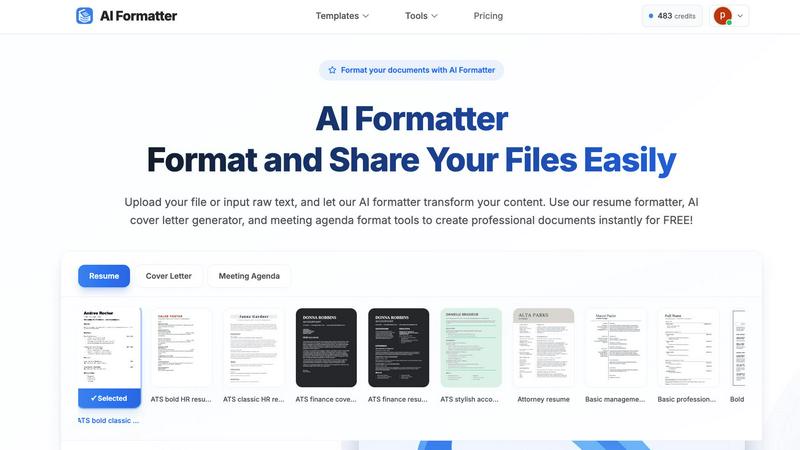
AI Formatter offers an expansive library of over 162 professional templates tailored for various document types, including resumes, cover letters, and meeting agendas. Each template is designed with ATS optimization in mind to ensure compatibility with automated screening systems.
AI-Powered Formatting
Users can upload existing documents or input raw text, and the AI Formatter will automatically process and format the content into the selected template. This feature streamlines the formatting process, allowing users to maintain their content while benefiting from professional structure and design.
Real-Time Customization
The platform includes an intuitive online editor that allows users to review and customize their formatted documents in real-time. Users can modify fonts, colors, and layouts, ensuring that the final product is tailored to their personal or professional branding.
Multi-Format Export and Secure Sharing
AI Formatter supports various export options, enabling users to download their documents in multiple formats, including Word and PDF. Additionally, the secure sharing feature allows for easy and safe distribution of documents, enhancing collaboration and accessibility.
Use Cases of AI Formatter
Job Seekers Enhancing Their Applications
Job seekers can leverage AI Formatter to create polished resumes and cover letters that stand out to recruiters. The ATS-optimized templates ensure their documents pass initial screenings, increasing their chances of getting noticed.
Professionals Standardizing Business Documents
Business professionals can utilize AI Formatter to standardize important documents such as meeting agendas, invoices, and reports. The ability to create consistent formatting across documents enhances professionalism and brand identity.
Academics Streamlining Research Papers
Academics can benefit from AI Formatter by quickly formatting research papers, theses, and presentations. The tool simplifies the formatting process, allowing researchers to focus on content rather than layout.
Entrepreneurs Creating Marketing Materials
Entrepreneurs can use AI Formatter to design visually appealing marketing materials, proposals, and business plans. The professional templates and customization options help them present their ideas effectively to potential investors and clients.
Frequently Asked Questions
What file formats does AI Formatter support?
AI Formatter supports various file formats including PDF, DOC, DOCX, and TXT. Users can upload their documents in these formats to start the formatting process seamlessly.
How does the AI Formatter ensure ATS compatibility?
AI Formatter's templates are specifically designed to be ATS-optimized, meaning they follow industry standards that enhance the likelihood of passing automated screening systems used by recruiters.
Can I edit my document after formatting?
Yes, after the AI Formatter processes your document, you can edit and customize it using the real-time online editor. This allows you to make adjustments to fonts, colors, and layouts as needed.
Is there a limit on the file size I can upload?
Yes, AI Formatter allows users to upload files with a maximum size of 10MB. This ensures that the platform remains efficient and responsive during the formatting process.
Explore more in this category:
Best Productivity & Management AI tools
Similar to AI Formatter

Panzoe
Panzoe is an all-in-one AI platform for personal productivity, business automation, AI assistants, content creation, and custom AI solutions.

Clever AI Humanizer
Clever AI Humanizer is a free tool that makes AI-generated text sound more human.

Kody Tools
Free collection of online developer utilities, code formatters, and digital converters designed to streamline your daily workflow.

tallycounterweb.com
Online tally counter for tracking attendance, workouts, inventory, sports scores, visitors, habits, and everyday counting tasks.

Forms Plugin
The #1 Native Form Builder Plugin for Framer - No Code, No Embeds, No External Platforms.

Product Launch Checklist
A free launch checklist for SaaS, apps, AI tools and more. Every step says why it matters and when you can skip it.

HomeAnswerBook
Practical, independent guides to home repairs, maintenance, costs, troubleshooting, and everyday fixes.

BlazePDF
Highlight faster. Study in flow with custom shortcuts and a workflow built around you. Print smarter, or turn any page into a tiled poster.