

BG Remove Pro
BG Remove Pro harnesses AI to effortlessly eliminate image backgrounds in seconds, delivering stunning results for free.
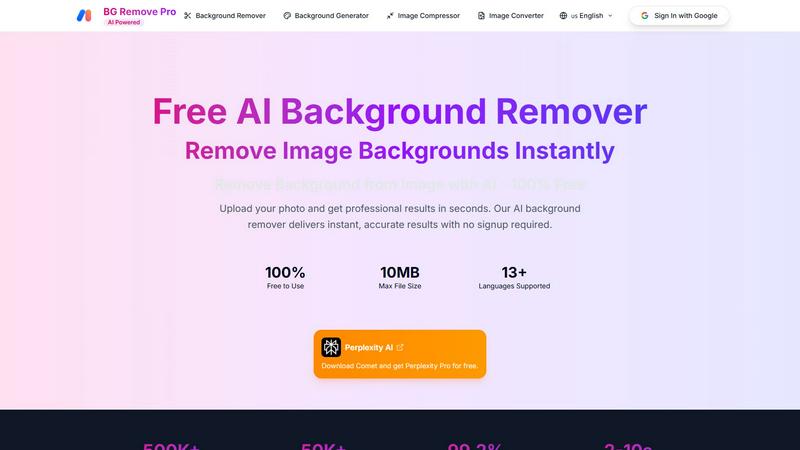
About BG Remove Pro
BG Remove Pro is a groundbreaking, AI-native platform that revolutionizes image processing by providing professional-grade results at lightning speed. Designed with an advanced artificial intelligence engine, it enables users to instantly and accurately remove backgrounds from any image without the need for technical expertise or complex manual selection. This innovative tool caters to a diverse range of users, including e-commerce entrepreneurs, marketing designers, professional photographers, and social media creators. The main value proposition lies in its perfect blend of cutting-edge machine learning algorithms, a completely free-to-use model, and a seamless, browser-based experience that eliminates the necessity for installation or sign-up. BG Remove Pro transcends mere background removal, offering a comprehensive suite that includes a background generator, image compressor, and converter, establishing itself as an essential all-in-one creative cockpit for the digital landscape.
Features of BG Remove Pro
AI-Powered Background Remover
The AI-powered background remover is the core feature of BG Remove Pro, leveraging sophisticated algorithms to detect and eliminate backgrounds with remarkable precision. Users can upload images in various formats, and within seconds, the AI processes the image to deliver clean, professional results without any manual intervention.
Background Generator
In addition to removing backgrounds, BG Remove Pro features a background generator that allows users to create customized backgrounds for their images. This tool empowers users to enhance their visuals by selecting from a variety of textures, colors, and styles, ensuring that every image stands out.
Image Compressor
The image compressor tool efficiently reduces file sizes without compromising on quality. This is crucial for maintaining optimal website performance and ensuring quick loading times. Users can compress images to fit specific requirements, making it ideal for e-commerce platforms and digital marketing campaigns.
Image Converter
BG Remove Pro includes an image converter that supports various formats, including JPEG, PNG, and WebP. This feature allows users to easily convert their images for diverse applications, ensuring compatibility across all digital platforms while retaining high-quality output.
Use Cases of BG Remove Pro
E-commerce Product Photography
For e-commerce entrepreneurs, BG Remove Pro streamlines the process of creating professional product images. By removing distracting backgrounds, users can showcase their products in a clean and appealing manner, enhancing the overall shopping experience and boosting sales.
Professional Photography
Photographers can incorporate BG Remove Pro into their workflows to handle complex backgrounds effortlessly. This tool allows for quick background removal, enabling photographers to focus on their creative vision and produce high-quality images that meet client demands.
Social Media Content Creation
Social media creators benefit tremendously from BG Remove Pro, as it allows them to generate eye-catching visuals quickly. By removing backgrounds and enhancing images, users can create stunning content that captures audience attention and drives engagement across various platforms.
Graphic Design Projects
Designers can leverage BG Remove Pro's capabilities to obtain clean assets for their projects. Whether crafting presentations, marketing materials, or digital art, this tool provides the essential features needed to create visually appealing designs with ease and efficiency.
Frequently Asked Questions
What image formats are supported?
BG Remove Pro supports a variety of image formats, including JPG and PNG. This flexibility ensures that users can upload their images without worrying about compatibility issues.
How accurate is the AI background removal?
The AI background removal feature boasts an impressive accuracy rate of 99.2%. This high level of precision ensures that users receive professional-quality results, even with complex backgrounds.
Is my data safe and private?
Absolutely. BG Remove Pro processes images locally without storing them on external servers, ensuring that user data remains secure and private throughout the background removal process.
Can I use this for commercial purposes?
Yes, images processed through BG Remove Pro can be used for commercial purposes. Users are free to utilize their edited images in e-commerce, marketing, and any other professional applications without restrictions.
Similar to BG Remove Pro

Flux3Max.io
Make 5-20 s videos with sound from text, a photo or a first and last frame with FLUX 3 Max. 720p or 1080p, pay per second, from $9.90.

My Tools Suite Pro
Discover the best free online tools with ToolSuite Pro. Explore AI, productivity, marketing, SEO, writing, business, and software tools in one place.

PixText
Free photo text editor: click any text in your image to change or remove it. AI rebuilds the background behind it, with no watermark. Free to start.

White Screen Checker
Check your screen display for dead pixels using White screen or black screen checkers.

Discord Fonts
Generate stylish Discord fonts and Unicode text instantly. Copy and paste creative text styles into your Discord profile and messages.

ButterShare
Realtime peer-to-peer file transfer in the browser. Send files directly between devices, no account and no upload to a server.

Enhance My Photo
Online AI photo enhancer that sharpens portraits, products, scenery, pets and text images and exports them as JPEG, PNG or WebP without watermarks.

ImageAgent
Create and edit AI images through conversation, using text or reference images and refining results in chat.