

Browser Notes
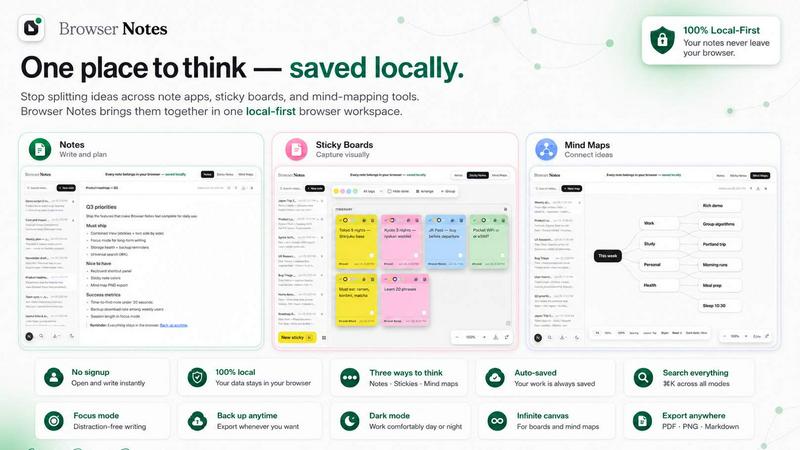
Browser Notes revolutionizes your workflow with local-first notes, boards, and mind maps that live in your browser without signup or cloud.
About Browser Notes
Browser Notes is a revolutionary, local-first cognitive workspace that redefines how you capture, organize, and visualize your thoughts. In an era where your private ideas are often siphoned into the cloud, scattered across fragmented apps, sticky boards, and mind-mapping tools, Browser Notes emerges as a sovereign alternative. It is a Chrome Extension that consolidates notes, sticky notes, and mind maps into a single, unified environment that lives entirely within your browser. There is no account creation, no user tracking, and no forced synchronization to external servers. Everything you create is stored locally, ensuring absolute data privacy and ownership. This product is designed for knowledge workers, students, developers, and creators who demand a frictionless, offline-capable system for ideation and documentation. Its core value proposition is the liberation of your digital thoughts from the tyranny of the cloud. You can write and format with Markdown, brainstorm on a free-form canvas, or branch complex ideas from a central node using mind maps. The entire experience is instantaneous, responsive, and designed for the modern, privacy-conscious user. With built-in search, keyboard shortcuts, and the ability to import and export backups at any time, Browser Notes is not just a tool; it is a declaration of independence for your data. It transforms your browser from a mere gateway to the internet into a powerful, local-first command center for your mind.
Features of Browser Notes
Local-First Sovereignty with Zero Tracking
This is the foundational feature that redefines the note-taking paradigm. Every piece of data you create, from a simple sticky note to a complex mind map, is stored exclusively in your browser's local storage. There are no accounts to create, no cookies to accept, and no background scripts phoning home to a server. This means zero tracking of your behavior, zero risk of a cloud breach exposing your private ideas, and zero reliance on an internet connection for functionality. You are the sole custodian of your intellectual property, granting you unprecedented digital autonomy.
Tri-Modal Cognitive Workspace
Browser Notes breaks the mold of single-purpose tools by offering three distinct, yet interconnected, modes of thought. The Notes mode provides a full-featured Markdown editor for structured writing and documentation. The Sticky Notes mode offers a free-form, infinite canvas for chaotic brainstorming, visual layout, and quick ideation. The Mind Maps mode allows you to build hierarchical, branching structures from a central concept, perfect for strategic planning and complex problem solving. This tri-modal architecture allows you to fluidly switch between linear, spatial, and radial thinking without ever leaving the application.
Offline-First Architecture with Instant Performance
The entire application is engineered to function flawlessly without an internet connection. Since all data is stored locally, there is no latency from network requests, no loading spinners, and no "sync failed" errors. Actions are instantaneous, creating a frictionless user experience that feels native to your machine. This offline-first design ensures that your productivity is never interrupted by a poor Wi-Fi signal or a deliberate disconnection from the grid. It is a tool built for deep, uninterrupted work in any environment.
Intelligent Data Backup and Portability
While the system is local-first, Browser Notes acknowledges the need for data safety and portability. It provides a robust, user-controlled backup and restore mechanism. With a single click, you can export your entire workspace into a portable backup file. This file can be stored on your personal drive, a USB key, or your preferred encrypted cloud service. Conversely, you can import a previous backup at any time to restore your entire workspace. This feature gives you complete control over your data lifecycle, ensuring that your ideas are never trapped within a single browser instance.
Use Cases of Browser Notes
Private Journaling and Daily Logging
For individuals who maintain a private journal, daily log, or personal knowledge base, Browser Notes is the ultimate sanctuary. Unlike cloud-based journaling apps that analyze your entries for advertising or training data, Browser Notes keeps your most intimate thoughts completely offline. You can write with Markdown formatting, create quick sticky notes for daily reminders, and use mind maps to visualize your weekly goals. The absence of an account and the guarantee of no tracking provides the psychological safety needed for truly honest self-reflection and documentation.
Agile Project Planning and Sprint Retrospectives
Development teams and project managers can leverage the tri-modal workspace for agile workflows. Use the Notes mode to draft sprint goals and user stories. Switch to Sticky Notes on a free canvas to conduct a digital "post-it" retrospective, identifying what went well and what needs improvement. Finally, use a Mind Map to branch out the root causes of a bottleneck or to visualize the dependencies between different project epics. All of this happens in a shared, local environment without the overhead of a complex, cloud-based project management suite.
Academic Research and Thesis Development
Students and researchers can use Browser Notes to synthesize information from multiple sources. The Notes mode is perfect for transcribing key quotes and writing preliminary analysis. A Sticky Notes board can act as a mood board or a visual repository for images and links related to the research topic. The Mind Map feature is exceptionally powerful for outlining a thesis structure, connecting disparate research papers, and visualizing the argumentative flow of a dissertation. The offline capability is crucial for deep study sessions in libraries or areas with limited connectivity.
Creative Writing and World-Building
Writers, game designers, and storytellers can harness Browser Notes as a centralized lore bible and drafting tool. Use the Mind Map to build the geography of a fictional world, branching out cities, characters, and political factions. The Sticky Notes canvas can be used to arrange plot points on a timeline or to visually map character relationships. The Notes editor becomes the primary drafting space for chapters, scenes, and dialogue. The entire creative universe is stored locally, protecting the intellectual property of your original work from any external access.
Frequently Asked Questions
How does Browser Notes ensure my data is private and not tracked?
Browser Notes operates on a strict local-first architecture. It does not create user accounts, does not use cookies for tracking, and does not send any data to external servers. All your notes, sticky notes, and mind maps are stored exclusively in your browser's local storage using the Web Storage API. The extension has no network permissions to transmit data. Your privacy is not a feature; it is the fundamental architecture of the application. There is no telemetry, no analytics, and no background processes that contact the internet.
Can I access my notes on multiple devices or browsers?
Because Browser Notes stores data locally, your workspace is tied to the specific browser and device where it was created. There is no cloud sync to enable cross-device access. However, the application provides a powerful backup and restore feature. You can export your entire workspace as a backup file from one device and then import that file on another device where the extension is installed. This manual process gives you full control over your data migration without compromising the core principle of local-first sovereignty.
What happens to my data if I clear my browser cache or uninstall the extension?
If you clear your browser's local storage or uninstall the Browser Notes extension, your data will be permanently deleted from that browser instance. To prevent data loss, Browser Notes strongly recommends using the backup feature regularly. You can export a backup file and store it in a safe location. If you intend to uninstall or clear your cache, you should first export a backup. You can then reinstall the extension and restore your workspace from the backup file.
Does Browser Notes work completely offline, and what features are available?
Yes, Browser Notes is built on an offline-first architecture and works completely without an internet connection. All three core features (Notes, Sticky Notes, and Mind Maps) are fully functional offline. You can create, edit, delete, and organize all your content while disconnected from the internet. The backup and restore features also work offline for local file management. The only feature that requires an internet connection is the initial installation of the Chrome Extension from the Chrome Web Store.
Explore more in this category:
Similar to Browser Notes

Panzoe
Panzoe is an all-in-one AI platform for personal productivity, business automation, AI assistants, content creation, and custom AI solutions.

Kody Tools
Free collection of online developer utilities, code formatters, and digital converters designed to streamline your daily workflow.

tallycounterweb.com
Online tally counter for tracking attendance, workouts, inventory, sports scores, visitors, habits, and everyday counting tasks.

Forms Plugin
The #1 Native Form Builder Plugin for Framer - No Code, No Embeds, No External Platforms.

Product Launch Checklist
A free launch checklist for SaaS, apps, AI tools and more. Every step says why it matters and when you can skip it.

HomeAnswerBook
Practical, independent guides to home repairs, maintenance, costs, troubleshooting, and everyday fixes.

BlazePDF
Highlight faster. Study in flow with custom shortcuts and a workflow built around you. Print smarter, or turn any page into a tiled poster.
