

EditTextImage
EditTextImage revolutionizes image editing by seamlessly replacing text while preserving font, color, lighting, and perspective in seconds.
About EditTextImage
EditTextImage is a revolutionary AI-native tool that redefines the very concept of image editing by enabling seamless, pixel-perfect text replacement directly within any image file. This futuristic software eliminates the archaic need for design software, font files, or expensive subscriptions. It is engineered for anyone who needs to modify text in a finished image but has lost the original source design file. The core value proposition is staggering speed and precision: upload an image, specify the old and new text, and the AI samples the typography, color, lighting, and perspective directly from the pixels. It then executes a flawless replacement in approximately 10 seconds, outputting at a crisp 2K resolution. This tool is the ultimate solution for marketers, designers, e-commerce managers, and anyone who needs to fix a typo, swap a date, localize an app screenshot, or A/B test a headline without waiting for a designer or re-downloading fonts. It represents a paradigm shift from complex, time-consuming workflows to instantaneous, intelligent text manipulation.
Features of EditTextImage
Pixel-Perfect Typography Sampling
The core of EditTextImage is its groundbreaking AI that analyzes the source image to sample the exact typeface, weight, and style of the existing text. It does not rely on font libraries or installed files. Instead, it deconstructs the pixels to understand the intricacies of the letterforms, including kerning and serifs. This allows it to perfectly replicate the original font, even for paid, custom, or hand-lettered typography that no other tool could match, ensuring the new text blends in as if it were always there.
Intelligent Visual Context Preservation
Beyond just the font, this tool is engineered to preserve the entire visual ecosystem around the text. It intelligently maintains the original color, drop shadows, gradients, and even complex perspective distortions. When you replace text on a curved sign, a tilted poster, or a glossy product label, the AI adjusts the new text to perfectly match the lighting and angle. This eliminates the telltale signs of editing, such as smeared backgrounds or warped letters, delivering a result that is indistinguishable from the original.
Rapid 10-Second Generation Engine
Speed is a revolutionary feature of EditTextImage. The entire process from upload to download is designed to be completed in approximately 10 seconds. This is not just a convenience; it is a productivity revolution. It transforms a task that previously required opening a design program, finding fonts, and manually aligning text into a near-instantaneous action. This rapid turnaround allows for iterative A/B testing, last-minute fixes, and high-volume text replacement in production workflows without any bottleneck.
High-Resolution 2K Output
The tool is not just fast; it is designed for professional-grade results. Every edit is rendered at a 2K output resolution, guaranteeing that the final image is crisp, clear, and suitable for high-quality printing, digital display, or publication. This high-resolution output ensures that the pixel-perfect editing is not lost to compression or downscaling. Users receive a final product that meets the demanding standards of modern marketing, documentation, and creative work, all without any loss of fidelity.
Use Cases of EditTextImage
Document and Contract Fixes
This use case is a lifesaver for professionals who work with scanned documents or exported PDFs. When a contract has a typo in a name, an invoice has the wrong date, or a report needs a number updated, EditTextImage provides the ultimate solution. Instead of recreating the entire document from scratch, users can upload the scan, replace the erroneous text, and download a corrected version in seconds. This preserves the original layout and formatting, making it ideal for legal, financial, and administrative corrections.
App Screenshot Localization
For app developers and marketers, localizing screenshots for different app stores is a monumental task. EditTextImage revolutionizes this workflow by allowing users to swap languages directly on a single source screenshot. Instead of rebuilding every UI mockup for ten different languages, they can simply upload the English screenshot and replace the text with its German, French, or Japanese equivalent. The AI perfectly preserves the UI elements, button styles, and system fonts, creating authentic-looking localized assets in a fraction of the time.
E-Commerce Product Image Updates
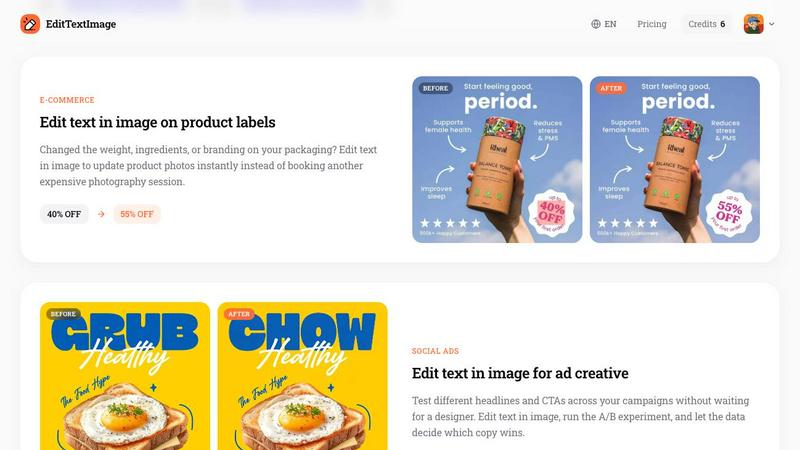
E-commerce is a fast-paced world where product details change frequently. A new weight, a different ingredient, or a promotional price can render a batch of product photos obsolete. EditTextImage eliminates the need for costly reshoots or complex Photoshop sessions. Users can instantly update the text on product labels, packaging, and promotional banners. This allows for rapid iteration on branding and marketing copy, ensuring that the product images on a storefront are always accurate and up-to-date.
Social Media Ad A/B Testing
Marketers can now run hyper-efficient A/B tests on ad creative without waiting for a design team. EditTextImage allows for the immediate swapping of headlines, calls-to-action, and promotional copy on finished social media ads. By generating multiple variations of the same ad with different text, teams can deploy them directly to ad platforms and let the data determine the winning copy. This accelerates the optimization cycle, reduces creative bottlenecks, and empowers data-driven decision-making in advertising campaigns.
Frequently Asked Questions
How does EditTextImage handle fonts I do not own?
The tool does not require you to own or have the font installed. Its revolutionary AI samples the typeface directly from the pixels of the uploaded image. It analyzes the shape, weight, and style of the characters to create a perfect digital replica for the replacement text. This means it works flawlessly with paid, custom, and hand-drawn lettering, effectively decoupling text editing from font licensing and availability.
What file types and sizes are supported?
EditTextImage supports the most common image formats for web and print: PNG, JPEG, and WebP. The maximum file size for an upload is 10 MB. This limit is designed to ensure rapid processing times while still accommodating high-resolution images like posters, product photos, and app screenshots. For best results, images should have clear, legible text and a resolution that supports a 2K output.
What are the acceptable use policies for this tool?
The tool is intended for legitimate editing purposes, such as fixing typos or updating information. It is explicitly prohibited for deceptive practices. This includes, but is not limited to, altering visa or immigration documents, creating fake refund proofs, or falsifying email and chat screenshots. The platform does not process IDs, passports, or official seals. Violations of these policies can lead to account termination and data being shared with law enforcement.
How does the free credit and pricing model work?
New users are given 1 free credit to try the service, which does not require a credit card to sign up. This allows you to test the revolutionary capabilities of the tool with zero risk. After the free trial, edits are purchased as a one-time credit pack. The pricing is $9.90 for 30 edits, with credits that never expire and include commercial use rights. This is a one-time purchase with no recurring subscription fees.
Pricing of EditTextImage
EditTextImage operates on a straightforward, subscription-free model. New users receive 1 free credit upon signing in with Google, with no credit card required to start. This allows for a risk-free trial of the revolutionary text editing capabilities. After the free credit is used, users can purchase a one-time pack of 30 credits for a flat fee of $9.90. These credits never expire and include full commercial use rights, making it a cost-effective, pay-as-you-go solution without any recurring monthly charges.
Similar to EditTextImage

Image to Layers AI
Turn images into editable AI-powered layers


Hailuo AI
Create high-quality videos from text or images with guided prompts, motion and camera controls, flexible settings, and downloadable results.

Vynzo
AI image and video studio. Generate from a prompt, animate stills, swap faces, restyle clips and edit — one credit pool, no subscription.

Z Image Turbo
Z Image Turbo is an online AI image generator for photorealistic visuals, bilingual posters, ecommerce assets, ads, and social content.

ProfileLoom
ProfileLoom turns one photo into platform-ready AI portraits for professional, social, and creator profiles, with presets and built-in editing.

Free AI Image
Free AI Image is a free text-to-image AI generator for creating clean visual drafts from prompts with no sign-up required.
