

JSON to Video
Effortlessly create stunning cinematic videos from structured JSON prompts with JSON to Video's revolutionary.
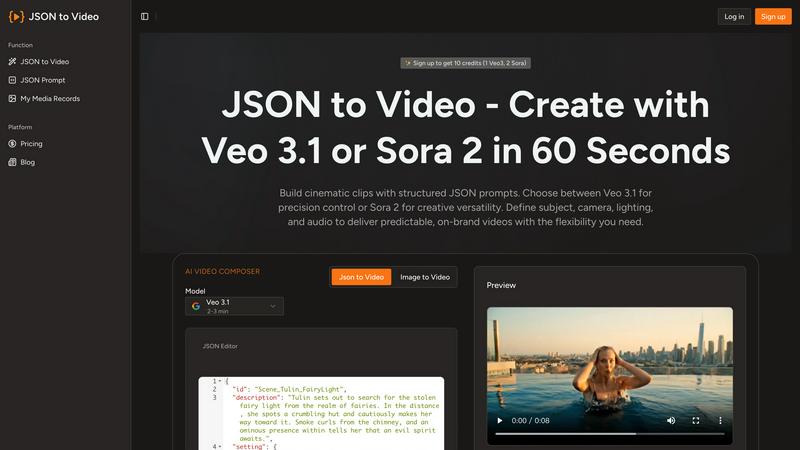
About JSON to Video
JSON to Video is a groundbreaking generative video platform that transforms structured data into stunning cinematic experiences with unprecedented simplicity. Designed for content creators, marketers, and brands, this innovative tool revolutionizes video production by allowing users to harness the power of structured JSON schemas, rather than vague text prompts. By specifying every visual and auditory detail precisely, users can dictate subjects, camera angles, lighting setups, soundtracks, and more, achieving deterministic control over their video outputs. This eliminates the guesswork and iterative processes that are commonplace in traditional video creation. JSON to Video treats JSON inputs as detailed storyboards, enabling creators to encapsulate their unique vision into high-quality videos seamlessly. The platform supports advanced features like Veo 3.1 and Seedance 2, elevating the standard of video generation and ensuring that every project meets the highest professional standards.
Features of JSON to Video
Structured JSON Input
JSON to Video utilizes a structured JSON schema, enabling users to define every aspect of their video. This feature allows for precise control over cinematography, environment, and audio, ensuring that creators can produce high-quality videos that align perfectly with their vision.
Cinematic Quality Control
With the ability to dictate camera movement, lighting conditions, and color grading, users can create cinematic scenes that resonate with their audience. This feature guarantees that every video maintains a professional look and feel, enhancing brand storytelling and engagement.
Multi-Format Support
JSON to Video supports various output formats, catering to diverse platform requirements. Users can easily create videos optimized for social media, websites, or presentations, making it a versatile tool for all types of content distribution.
Quick and Efficient Workflow
The platform allows creators to generate videos in as little as 60 seconds, streamlining the production process. This efficiency is particularly beneficial for marketers and brands who need to produce high-quality content quickly to stay ahead in a competitive landscape.
Use Cases of JSON to Video
Marketing Campaigns
Marketers can leverage JSON to Video to create visually captivating promotional videos that showcase products or services. By using structured data to define key visual elements, they can ensure that their campaigns communicate their brand message effectively and attractively.
Educational Content Creation
Educators and trainers can utilize this platform to develop engaging instructional videos. By controlling the visual narrative and audio elements through JSON, they can create clear and informative content that enhances learning experiences.
Brand Storytelling
Brands looking to tell their story can use JSON to Video to craft immersive narratives. With the ability to specify every detail, from characters to environments, brands can create videos that resonate emotionally with their audience, fostering a deeper connection.
Social Media Engagement
Content creators can produce eye-catching videos for social media platforms that drive engagement and shares. The quick generation time and high-quality output ensure that users can respond to trends promptly while maintaining a strong visual identity.
Frequently Asked Questions
How does JSON to Video work?
JSON to Video works by allowing users to input structured data in a JSON format that specifies every detail of the video. This structured input translates into cinematic scenes, enabling precise control over the visuals and audio.
Can I customize the output format of my videos?
Yes, JSON to Video supports multiple output formats, making it easy for users to create videos tailored for various platforms, whether for social media, websites, or presentations.
What types of videos can I create with JSON to Video?
You can create a wide range of videos, including promotional videos, educational content, brand stories, and social media clips. The structured input allows for diverse applications across different industries.
Is there a learning curve for using JSON to Video?
While there may be an initial learning curve for those unfamiliar with JSON, the platform is designed to be user-friendly. With clear instructions and examples, users can quickly grasp how to utilize the features effectively for their video projects.
Explore more in this category:
Similar to JSON to Video

Bicep Heart
Turn one photo into a 7-second bicep heart video with outdoor, standing or seated scenes and a silent vertical MP4.

AI Tiny Desk
Make a 19-second desk-concert video with lead and sax, full band, Halloween or pet-band modes; audio and silent MP4.


Outstanding Tiny Desk AI
Upload photos of you and up to 4 friends and get a 15-second Outstanding Tiny Desk AI video with AI-generated sound, in 9:16 for TikTok and Reels.

Tip Toeing in My Jordans
Make your own version of the viral Rumpelstiltskin tip toe meme: upload a photo and get a 12-second AI video with you as the little man.

AIdeaFlow - AI Podcast Generator
AI podcast generator: turn any text into a 2-host show

Genjutsu
Explore runway, dance, music and object video templates. Compare source and remix examples, upload your reference photos and create a new version.

Face Swap Video
Create a face swap video from your photos. Explore trending dance, runway and music video templates, choose a format, and make yourself the star.