

Shrinkpad
Transform your workflow with Shrinkpad, the ultimate tool for batch compressing images and videos on Mac effortlessly.
About Shrinkpad
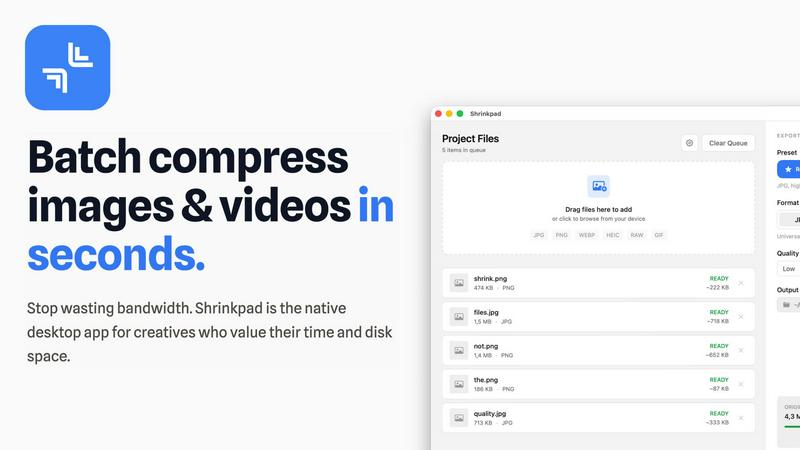
Shrinkpad is a cutting-edge desktop application engineered specifically for macOS, redefining the image and video compression landscape for creative professionals and enthusiasts. By harnessing the power of batch processing, Shrinkpad allows users to effortlessly drop hundreds of files or entire folders, compressing them in seconds while ensuring utmost privacy. The application stands out by performing all media processing locally through native macOS frameworks, which means that users can enjoy complete data security without the need for cloud uploads. This revolutionary approach not only safeguards your sensitive assets but also enhances processing speed and efficiency. With Shrinkpad, users can achieve file size reductions of up to 90% without compromising on visual quality, making it the ideal solution for photographers, designers, content creators, and anyone frustrated by the burden of oversized media files.
Features of Shrinkpad
Batch Compression
Shrinkpad revolutionizes the way assets are managed by offering unlimited batch processing capabilities. Users can drag and drop entire folders filled with images and videos, allowing the application to automatically detect and optimize all supported files in one go, streamlining workflows and saving valuable time.
Smart Detection
The application intelligently identifies over 30 different image formats, including RAW files, and all major video formats. This feature ensures that users can process a diverse range of media types simultaneously, with Shrinkpad applying the optimal compression settings tailored for each specific file type.
Privacy Protection
With Shrinkpad, privacy is paramount. All processing occurs locally on the user's machine, ensuring that no files are ever uploaded to the cloud. This guarantees that sensitive and creative assets remain secure and confidential, allowing users to work with peace of mind.
Auto-Renaming and Metadata Stripping
Shrinkpad offers powerful features that enhance workflow efficiency, such as automatic renaming and metadata stripping. Users can effortlessly export files from design tools like Figma and Photoshop, and Shrinkpad will optimize and rename them in bulk, making asset management seamless and organized.
Use Cases of Shrinkpad
Photographers
Professional photographers can utilize Shrinkpad to compress high-resolution images without sacrificing quality. By reducing file sizes, they can streamline their storage solutions and improve the speed of image uploads and sharing.
Graphic Designers
Graphic designers often work with multiple assets from various sources. Shrinkpad allows them to compress and optimize their design files quickly, ensuring that they maintain high visual standards while minimizing file sizes for faster project turnaround.
Content Creators
Content creators, including videographers and social media influencers, can benefit from Shrinkpad’s ability to handle large video files. With efficient compression, they can produce and share high-quality content without the hassle of bulky files and slow upload speeds.
Development Teams
Development teams working on web applications can leverage Shrinkpad to reduce app bundle sizes and improve website load times. By optimizing media assets, they can achieve faster LCP scores, ultimately enhancing user experience.
Frequently Asked Questions
Can I use Shrinkpad for free?
Yes, Shrinkpad offers a Free Starter plan that includes essential tools for casual use, allowing users to test out the application's capabilities before committing to a paid plan.
What file formats does Shrinkpad support?
Shrinkpad supports a wide range of formats, including JPG, PNG, WEBP, AVIF for images, and MP4, MOV for videos. This extensive compatibility ensures that users can work with various types of media without limitations.
Does Shrinkpad support video compression?
Absolutely! Shrinkpad excels at compressing not just images but also videos, allowing users to optimize their media for storage and performance seamlessly.
How many files can I process at once?
With Shrinkpad's unlimited batch processing feature, users can process thousands of files simultaneously without crashing, making it a powerful tool for handling large projects efficiently.
Explore more in this category:
Similar to Shrinkpad


AIPetGen
AIPetGen turns a photo of your dog, cat, or other pet, or a written description, into a new picture or a short animation.

DanseAI - Alors on Danse AI Video Genera
Make the Alors on Danse AI meme video from two photos, soundtrack included

Opus 5.5 Video Generator
Turn a prompt into a 1080p motion-graphics MP4 planned and coded by Claude Opus 5.5

AI Object Remover
Remove unwanted objects, people, text and watermarks from photos with AI


Hotel Lobby AI Video Generator
Turn two photos into a Hotel Lobby dance video in the orange A COLORS SHOW booth

TryH3 - MiniMax H3 Video Generator
Try MiniMax Hailuo H3 video generation in the browser