

TinyFast
Revolutionize your workflow with TinyFast, the ultimate local solution for lightning-fast image, video, and PDF.
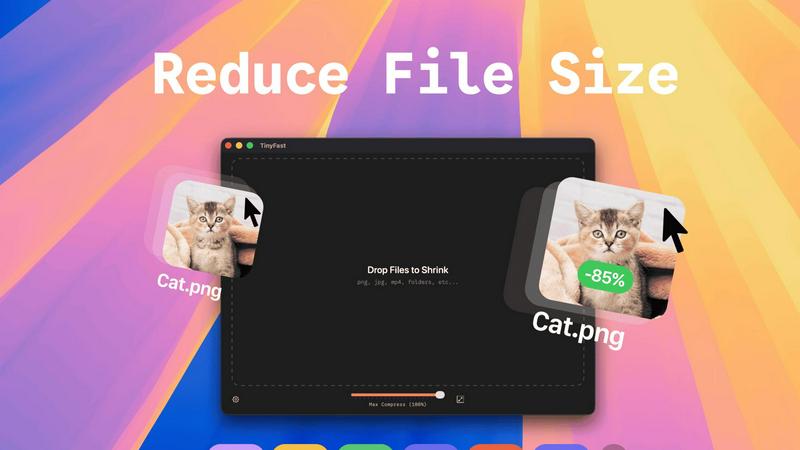
About TinyFast
TinyFast is a groundbreaking macOS application that redefines file compression by marrying speed, security, and simplicity. Designed specifically for developers, designers, and content creators who demand utmost privacy, TinyFast empowers users to compress various file types—ranging from images like PNG and JPEG to videos like MP4 and MOV, as well as documents such as PDFs and audio files like MP3. With an intuitive drag-and-drop interface, users can effortlessly compress their files locally on their Macs, eliminating the risks associated with uploading sensitive data to third-party servers. TinyFast is engineered for efficiency; it allows you to optimize your digital assets swiftly while keeping them securely on your device. Join the thriving community of over 500 Mac users who have unlocked a faster, safer, and more efficient way to manage their files, ensuring they maintain control over their precious data.
Features of TinyFast
Batch & Drag-Drop Shrink
TinyFast's batch processing feature allows you to drop entire folders of files for simultaneous compression. This functionality saves you precious time by delivering optimized outputs in mere seconds, transforming your workflow into a powerhouse of efficiency.
Blazing-Fast Compression
Experience the power of optimized native engines that facilitate lightning-fast compression. TinyFast’s innovative technology ensures that even large files are shrunk in seconds, freeing you from the agonizing delays associated with uploads and downloads while maintaining top-notch quality.
Resize Resolution
TinyFast offers an automatic image and video resolution resizing feature. This allows you to customize the output resolution based on your needs, ensuring that the final product is not only smaller but also tailored for optimal viewing across various platforms.
100% Local & Private
With TinyFast, your privacy is paramount. The application guarantees that your files are never uploaded to the cloud or third-party servers. This non-disclosure approach ensures that your sensitive files remain on your device, providing total security and peace of mind by design.
Use Cases of TinyFast
Web Development
Web developers can use TinyFast to compress images and videos before deploying them online. This ensures that websites load faster and enhance user experience without compromising visual quality, making it an essential tool for efficient web performance.
Graphic Design
Graphic designers can leverage TinyFast to compress high-resolution images, enabling quicker uploads and sharing. Whether it's for client presentations or portfolio showcases, TinyFast ensures that file sizes are manageable while retaining exceptional quality.
Video Production
In video production, TinyFast is invaluable for compressing large video files without losing detail. This allows content creators to share their work more efficiently and store more media on their devices without sacrificing quality, streamlining the entire production workflow.
Document Management
TinyFast simplifies document management for professionals who deal with numerous PDFs and other document types. By compressing these files locally, users can save storage space and ensure that sensitive documents remain secure while still being easily accessible.
Frequently Asked Questions
What types of files can I compress with TinyFast?
TinyFast supports a wide array of file types, including images (PNG, JPG, TIFF, HEIC, WEBP, GIF, BMP, SVG), videos (MP4, MOV, M4V), documents (PDF, DOCX), code files (JS, CSS, JSON), and audio files (MP3). This versatility makes it an ideal solution for various users.
Is TinyFast easy to use for beginners?
Absolutely! TinyFast features a simple drag-and-drop interface that is user-friendly for individuals of all skill levels. Users can quickly compress files without navigating complicated menus or settings, making it accessible even for those new to file compression.
Will my files be safe when using TinyFast?
Yes, your files are completely safe with TinyFast. The application is designed to compress files locally on your Mac without uploading them to any external servers. This ensures that your sensitive data remains private and secure at all times.
Can I try TinyFast before purchasing?
Yes, TinyFast offers a free tier that allows you to compress up to 5 files per day without any cost. Additionally, there is a 3-day trial for the monthly subscription that lets you experience all features before committing to a payment plan, making it risk-free to explore its capabilities.
Explore more in this category:
Similar to TinyFast

Panzoe
Panzoe is an all-in-one AI platform for personal productivity, business automation, AI assistants, content creation, and custom AI solutions.

AIPetGen
AIPetGen turns a photo of your dog, cat, or other pet, or a written description, into a new picture or a short animation.

AI Object Remover
Remove unwanted objects, people, text and watermarks from photos with AI


Sprite Sheet Maker
A free browser-based toolkit for creating, cutting, converting, and previewing sprite sheet animations.

Kody Tools
Free collection of online developer utilities, code formatters, and digital converters designed to streamline your daily workflow.

tallycounterweb.com
Online tally counter for tracking attendance, workouts, inventory, sports scores, visitors, habits, and everyday counting tasks.

Forms Plugin
The #1 Native Form Builder Plugin for Framer - No Code, No Embeds, No External Platforms.