
3D AI Maker vs Video to Text
Side-by-side comparison to help you choose the right AI tool.

3D AI Maker
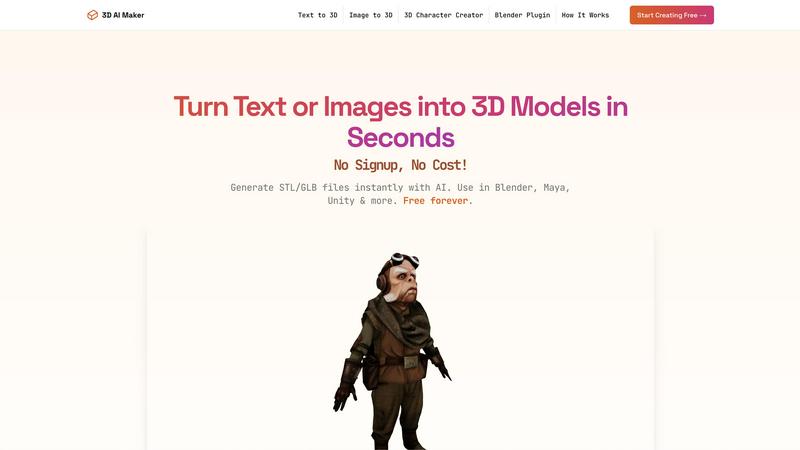
Transform text or images into stunning 3D models instantly, all for free with our revolutionary AI-powered tool.
Last updated: February 28, 2026

Video to Text
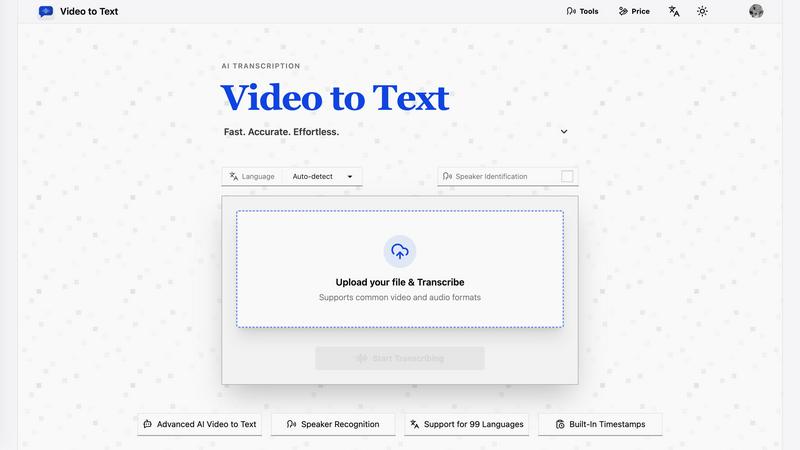
Transform any video or audio into precise text effortlessly in minutes with cutting-edge AI technology and multi-language support.
Last updated: April 13, 2026
Visual Comparison
3D AI Maker
Video to Text
Feature Comparison
3D AI Maker
AI-Powered 3D Generation
3D AI Maker leverages cutting-edge generative AI to transform text prompts or 2D images into fully textured 3D models. This feature allows users to create stunning 3D assets effortlessly, removing the complexities typically associated with traditional 3D modeling software.
Direct Blender Integration
The platform includes a dedicated Blender plugin that enables users to generate models directly within the Blender interface. This seamless integration is perfect for those accustomed to Blender, providing a free alternative to other tools while enhancing productivity and reducing workflow interruptions.
Export GLB & STL Files
Users can easily download their created models in various formats, including GLB for use in animations and real-time applications, and STL for 3D printing. This versatility ensures that 3D AI Maker caters to a broad range of applications, from game development to physical model creation.
Free Forever, No Strings
3D AI Maker is committed to democratizing access to 3D content creation by offering its services entirely for free. There are no hidden costs, no signup requirements, and users can start creating professional-grade 3D characters and assets immediately, ensuring a hassle-free experience.
Video to Text
AI Transcription
Harness the power of advanced AI algorithms that convert audio and video content into text with remarkable accuracy. This feature ensures that even complex dialogues and diverse accents are transcribed correctly, saving users time and effort.
Multi-Language Support
Video to Text supports transcription in 99 languages, equipped with automatic language detection. This feature is essential for users dealing with mixed-language recordings, ensuring that no matter the language, the transcription remains accurate and reliable.
Speaker Diarization
The built-in speaker recognition technology intelligently identifies different speakers in the audio, making it easy to follow conversations, interviews, or multi-part dialogues. This feature enhances clarity and provides context, which is crucial for effective communication.
Flexible Export Options
With the ability to export transcripts in multiple formats such as TXT, SRT, VTT, and CSV, users can choose the format that best suits their needs. Whether for subtitles, plain text, or structured analysis, Video to Text caters to diverse requirements.
Use Cases
3D AI Maker
Custom 3D Characters
Game developers and animators can leverage 3D AI Maker to design unique custom 3D characters tailored to their projects. This feature allows for rapid prototyping and iteration, enhancing creativity and efficiency in character design.
3D Printing Models
Hobbyists and professionals looking to create 3D-printed models can convert their JPG images into STL files effortlessly. This capability opens up new avenues for personalized creations, from keepsakes to functional items, streamlining the 3D printing process.
Rapid Prototyping for VR/AR
With the ability to generate 3D models in seconds, VR and AR creators can quickly prototype and test assets within their environments. This rapid iteration helps bring innovative ideas to life without the delays usually associated with traditional modeling techniques.
Educational Tools
Educators in design and engineering can utilize 3D AI Maker to create engaging teaching materials and interactive models. By simplifying the process of 3D creation, students can focus on learning concepts rather than struggling with complex software.
Video to Text
Content Creation
Creators can effortlessly generate subtitles for YouTube videos, online courses, and social media clips, enhancing accessibility and engagement. Accurate transcriptions ensure that audiences can follow along effortlessly.
Meeting Transcriptions
Transform meetings, webinars, and calls into searchable notes. This use case is invaluable for professionals who need to reference discussions or decisions made during collaborative sessions, improving productivity and accountability.
Journalistic Interviews
Journalists can transcribe interviews quickly and accurately, allowing them to focus on storytelling rather than note-taking. This use case ensures that important quotes and insights are captured verbatim for articles and reports.
Language Learning
Students and language learners can utilize transcripts to practice listening and comprehension skills. This feature enables users to review audio lessons with accompanying text, facilitating a more effective learning experience.
Overview
About 3D AI Maker
3D AI Maker is a groundbreaking, AI-native platform that revolutionizes the landscape of 3D content creation. This innovative tool empowers users to transform simple text prompts or 2D images into fully textured, production-ready 3D models in about 20 seconds, all without requiring any signup or payment. The platform is designed for a wide audience, from seasoned professionals to enthusiastic beginners, making it an invaluable asset for game developers, VR/AR creators, 3D printing hobbyists, and digital artists alike. The main value proposition lies in its unparalleled speed and accessibility, eliminating the previously steep learning curve and hefty costs associated with 3D asset generation. With features such as direct integration into professional workflows via a Blender plugin and versatile export options including GLB for real-time applications and STL for 3D printing, 3D AI Maker stands as the definitive free alternative to paid services, unleashing a new wave of creativity for all.
About Video to Text
Video to Text is an AI-powered transcription service revolutionizing the way creators, teams, and individuals convert video and audio files into precise, exportable text. Designed for those who demand speed and accuracy without the hassle of building their own transcription pipelines, this service stands out with its seamless user experience. Users can effortlessly upload their media files and receive clean, automated transcriptions that are speaker-aware, ensuring clarity in communication. The service also supports a plethora of languages, automatically detecting the spoken language, making it a versatile choice for a global audience. With flexible export options tailored to various workflows, Video to Text not only boosts productivity but also ensures that users can focus on content creation rather than transcription headaches.
Frequently Asked Questions
3D AI Maker FAQ
Is 3D AI Maker really free?
Yes, 3D AI Maker is entirely free to use with no signup required. Users can start creating 3D models immediately without any hidden costs or obligations.
How does this compare to Meshy or other tools?
3D AI Maker provides similar capabilities to Meshy and other tools but stands out with its completely free access, instant model generation, and direct integration with Blender, making it a more accessible option for users.
Can I use models commercially?
Yes, the models generated by 3D AI Maker can be used commercially. Users are empowered to create and utilize these assets in their projects without any licensing fees.
How do I install the Blender plugin?
To install the Blender plugin, simply download it from the 3D AI Maker website and follow the provided installation instructions. Once installed, users can generate 3D models directly within Blender’s interface.
Video to Text FAQ
What is Video to Text?
Video to Text is an AI transcription tool that specializes in converting audio and video files into clean, exportable text. It is designed for anyone needing accurate and efficient transcriptions.
How does the transcription process work?
Users simply upload their audio or video files, and the AI processes the content, providing a transcription that is ready for export. The entire process is straightforward and user-friendly, ensuring minimal effort.
What file formats are supported for upload?
Video to Text supports a wide range of audio and video formats, including MP4, MOV, MKV, WEBM, MP3, WAV, and more. This variety ensures compatibility with most media files.
Is there a limit to how much I can transcribe?
New users receive 30 free transcription minutes to get started. Beyond that, users can purchase additional minutes as needed, with straightforward pay-as-you-go pricing plans available.
Alternatives
3D AI Maker Alternatives
3D AI Maker is a groundbreaking platform that allows users to instantly generate production-ready 3D models from simple text prompts or images, all for free. As a part of the AI Assistants category, it leverages advanced generative AI technology to make 3D modeling accessible to a broad audience, including professionals and novices alike. Users often seek alternatives due to a variety of factors such as pricing, feature sets, and specific platform requirements. When choosing an alternative, it is essential to consider the speed of creation, ease of use, integration capabilities with existing workflows, and export options to ensure that the tool meets both creative and technical demands.
Video to Text Alternatives
Video to Text is a revolutionary AI-powered transcription service designed to transform video and audio files into clean, exportable text rapidly and accurately. As part of the AI Assistants category, it caters to a diverse range of users, including creators, teams, and individuals who seek a seamless way to convert spoken content into written form without the hassle of building their own transcription infrastructure. Users often find themselves exploring alternatives due to various factors such as pricing, feature sets, and platform compatibility. When evaluating potential substitutes, it's crucial to consider the speed and accuracy of transcription, ease of use, the ability to handle various media formats, and the flexibility of export options to ensure the chosen tool aligns with their specific workflow and requirements.