

3D AI Maker
Transform text or images into stunning 3D models instantly, all for free with our revolutionary AI-powered tool.
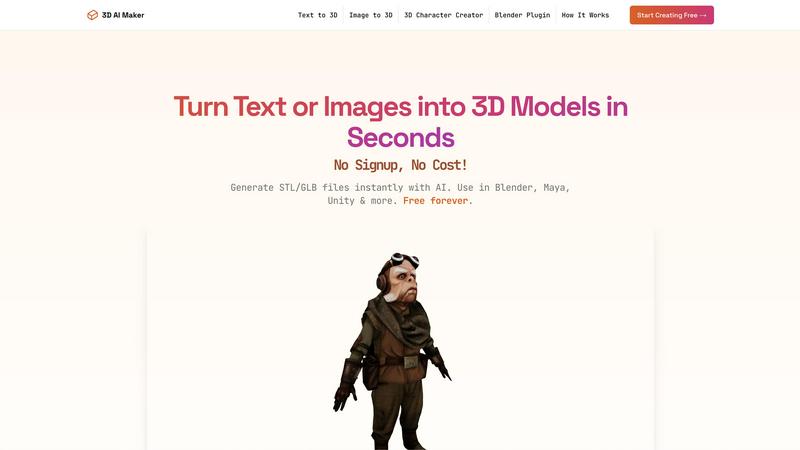
About 3D AI Maker
3D AI Maker is a groundbreaking, AI-native platform that revolutionizes the landscape of 3D content creation. This innovative tool empowers users to transform simple text prompts or 2D images into fully textured, production-ready 3D models in about 20 seconds, all without requiring any signup or payment. The platform is designed for a wide audience, from seasoned professionals to enthusiastic beginners, making it an invaluable asset for game developers, VR/AR creators, 3D printing hobbyists, and digital artists alike. The main value proposition lies in its unparalleled speed and accessibility, eliminating the previously steep learning curve and hefty costs associated with 3D asset generation. With features such as direct integration into professional workflows via a Blender plugin and versatile export options including GLB for real-time applications and STL for 3D printing, 3D AI Maker stands as the definitive free alternative to paid services, unleashing a new wave of creativity for all.
Features of 3D AI Maker
AI-Powered 3D Generation
3D AI Maker leverages cutting-edge generative AI to transform text prompts or 2D images into fully textured 3D models. This feature allows users to create stunning 3D assets effortlessly, removing the complexities typically associated with traditional 3D modeling software.
Direct Blender Integration
The platform includes a dedicated Blender plugin that enables users to generate models directly within the Blender interface. This seamless integration is perfect for those accustomed to Blender, providing a free alternative to other tools while enhancing productivity and reducing workflow interruptions.
Export GLB & STL Files
Users can easily download their created models in various formats, including GLB for use in animations and real-time applications, and STL for 3D printing. This versatility ensures that 3D AI Maker caters to a broad range of applications, from game development to physical model creation.
Free Forever, No Strings
3D AI Maker is committed to democratizing access to 3D content creation by offering its services entirely for free. There are no hidden costs, no signup requirements, and users can start creating professional-grade 3D characters and assets immediately, ensuring a hassle-free experience.
Use Cases of 3D AI Maker
Custom 3D Characters
Game developers and animators can leverage 3D AI Maker to design unique custom 3D characters tailored to their projects. This feature allows for rapid prototyping and iteration, enhancing creativity and efficiency in character design.
3D Printing Models
Hobbyists and professionals looking to create 3D-printed models can convert their JPG images into STL files effortlessly. This capability opens up new avenues for personalized creations, from keepsakes to functional items, streamlining the 3D printing process.
Rapid Prototyping for VR/AR
With the ability to generate 3D models in seconds, VR and AR creators can quickly prototype and test assets within their environments. This rapid iteration helps bring innovative ideas to life without the delays usually associated with traditional modeling techniques.
Educational Tools
Educators in design and engineering can utilize 3D AI Maker to create engaging teaching materials and interactive models. By simplifying the process of 3D creation, students can focus on learning concepts rather than struggling with complex software.
Frequently Asked Questions
Is 3D AI Maker really free?
Yes, 3D AI Maker is entirely free to use with no signup required. Users can start creating 3D models immediately without any hidden costs or obligations.
How does this compare to Meshy or other tools?
3D AI Maker provides similar capabilities to Meshy and other tools but stands out with its completely free access, instant model generation, and direct integration with Blender, making it a more accessible option for users.
Can I use models commercially?
Yes, the models generated by 3D AI Maker can be used commercially. Users are empowered to create and utilize these assets in their projects without any licensing fees.
How do I install the Blender plugin?
To install the Blender plugin, simply download it from the 3D AI Maker website and follow the provided installation instructions. Once installed, users can generate 3D models directly within Blender’s interface.
Explore more in this category:
Similar to 3D AI Maker

screenRIG
Signage and kiosk infrastructure for AI agents. Your agent publishes images, video, streams, web pages and apps to screens via one plugin.screenRIG is

GetYouTubeTranscript
Free YouTube transcripts on the web, a Chrome extension, and an API + MCP server so AI assistants can read YouTube.


Travel Safety Map
A colour-coded safety reference for 168 countries: government advisories, scams, women’s safety, traffic, embassies and emergency numbers.

TryKlingAI
Create Kling AI videos from text, images, audio, and motion references with Kling 3.0, Motion Control, Lip Sync, task tracking, and API access.

AI UGC Video Generator
Create AI UGC video ads from a product URL, image, or script with lifelike creators, voices, captions, product visuals, and clear CTAs.

AudioVideo
Audio to Video AI generator for podcasts, voice, and music.