
Bantr: Offline & Unlimited TTS for Mac vs Video to Text
Side-by-side comparison to help you choose the right AI tool.

Bantr: Offline & Unlimited TTS for Mac
Experience limitless offline text-to-speech on your Mac with Bantr's natural voices, ensuring privacy and no.
Last updated: February 28, 2026

Video to Text
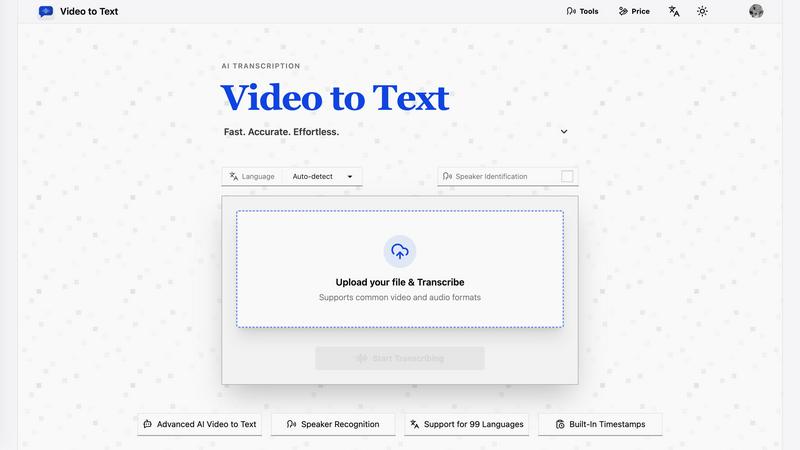
Transform any video or audio into precise text effortlessly in minutes with cutting-edge AI technology and multi-language support.
Last updated: April 13, 2026
Visual Comparison
Bantr: Offline & Unlimited TTS for Mac

Video to Text
Feature Comparison
Bantr: Offline & Unlimited TTS for Mac
Over 150 Natural-Sounding Voices
Bantr harnesses the power of Apple's advanced MLX framework to provide an extensive library of over 150 voices. Each voice is meticulously designed to deliver a natural and expressive audio experience, ensuring that your text comes to life with clarity and emotional depth.
Fully Offline Functionality
Say goodbye to the limitations of cloud-based TTS solutions. Bantr operates entirely offline, allowing you to generate high-quality voiceovers without needing an internet connection. This feature not only enhances your privacy but also grants you limitless access to the app’s capabilities.
One-Time Purchase Model
Bantr redefines affordability with its straightforward one-time purchase model. Users enjoy lifetime access to the full suite of features without the burden of monthly subscriptions or hidden fees. This ensures that you can focus on your projects without worrying about recurring costs or quotas.
Future-Ready Features
Bantr is continually evolving. Future updates promise exciting additions such as the ability to clone custom voices and emotions from short samples, document uploads (pdfs, epubs, docx, etc.), multi-speaker dialogue generation, and expanded support for additional languages, all driven by user feedback.
Video to Text
AI Transcription
Harness the power of advanced AI algorithms that convert audio and video content into text with remarkable accuracy. This feature ensures that even complex dialogues and diverse accents are transcribed correctly, saving users time and effort.
Multi-Language Support
Video to Text supports transcription in 99 languages, equipped with automatic language detection. This feature is essential for users dealing with mixed-language recordings, ensuring that no matter the language, the transcription remains accurate and reliable.
Speaker Diarization
The built-in speaker recognition technology intelligently identifies different speakers in the audio, making it easy to follow conversations, interviews, or multi-part dialogues. This feature enhances clarity and provides context, which is crucial for effective communication.
Flexible Export Options
With the ability to export transcripts in multiple formats such as TXT, SRT, VTT, and CSV, users can choose the format that best suits their needs. Whether for subtitles, plain text, or structured analysis, Video to Text caters to diverse requirements.
Use Cases
Bantr: Offline & Unlimited TTS for Mac
Educational Content Creation
Educators can utilize Bantr to create engaging instructional materials, such as narrated presentations and audiobooks. By converting text into high-quality audio, teachers can cater to diverse learning styles and enhance comprehension for students.
Video Production
Content creators can leverage Bantr to produce captivating voiceovers for videos. Whether for tutorials, product demonstrations, or narrative storytelling, the app's extensive voice selection ensures that each project sounds polished and professional.
Game Development
Game developers can enhance character interactions and storytelling by using Bantr to generate realistic dialogues. The app's expressive voices allow for dynamic character portrayals, enriching the gaming experience for players and creating immersive environments.
Accessibility Support
Bantr serves as an invaluable tool for individuals with reading difficulties, such as dyslexia. By converting written text into spoken word, it aids comprehension and provides an alternative method of accessing information, ensuring that everyone can engage with content equally.
Video to Text
Content Creation
Creators can effortlessly generate subtitles for YouTube videos, online courses, and social media clips, enhancing accessibility and engagement. Accurate transcriptions ensure that audiences can follow along effortlessly.
Meeting Transcriptions
Transform meetings, webinars, and calls into searchable notes. This use case is invaluable for professionals who need to reference discussions or decisions made during collaborative sessions, improving productivity and accountability.
Journalistic Interviews
Journalists can transcribe interviews quickly and accurately, allowing them to focus on storytelling rather than note-taking. This use case ensures that important quotes and insights are captured verbatim for articles and reports.
Language Learning
Students and language learners can utilize transcripts to practice listening and comprehension skills. This feature enables users to review audio lessons with accompanying text, facilitating a more effective learning experience.
Overview
About Bantr: Offline & Unlimited TTS for Mac
Bantr is a revolutionary text-to-speech (TTS) application specifically designed for Mac users, transforming the way you engage with written content. Unlike conventional TTS tools that depend on cloud computing, Bantr functions entirely offline, safeguarding your privacy and ensuring data security. Powered by Apple's cutting-edge MLX framework, it offers over 150 natural-sounding voices capable of delivering your text with incredible expressiveness and clarity. This innovative app caters to a diverse audience, including educators crafting immersive instructional materials and content creators producing high-quality voiceovers for videos. Bantr's unique selling proposition lies in its one-time purchase model, which liberates users from the constraints of subscriptions, logins, and usage quotas. With Bantr, you can effortlessly narrate stories, develop engaging game characters, or present complex information in a user-friendly format, all while enjoying unlimited access to its powerful features. Whether you are a writer, an educator, or a developer, Bantr empowers you to create professional-grade audio content whenever and wherever you need it.
About Video to Text
Video to Text is an AI-powered transcription service revolutionizing the way creators, teams, and individuals convert video and audio files into precise, exportable text. Designed for those who demand speed and accuracy without the hassle of building their own transcription pipelines, this service stands out with its seamless user experience. Users can effortlessly upload their media files and receive clean, automated transcriptions that are speaker-aware, ensuring clarity in communication. The service also supports a plethora of languages, automatically detecting the spoken language, making it a versatile choice for a global audience. With flexible export options tailored to various workflows, Video to Text not only boosts productivity but also ensures that users can focus on content creation rather than transcription headaches.
Frequently Asked Questions
Bantr: Offline & Unlimited TTS for Mac FAQ
Is Bantr compatible with all Mac models?
Bantr is specifically designed for MacOS 15 and above, optimized for Apple Silicon chip models including M1, M2, M3, M4, and M5, ensuring seamless performance.
How does Bantr ensure my data privacy?
Bantr operates completely offline, which means your data is never uploaded to the cloud. There are no logins, quotas, or data collection practices, giving you complete control over your content.
What types of voices are available in Bantr?
Bantr features over 150 distinct voices, each offering a unique sound and style. This extensive selection allows users to choose the best voice that fits their project's needs, enhancing the audio experience.
Are there any subscription fees associated with Bantr?
No, Bantr operates on a one-time payment model. Once you purchase the app, you gain lifetime access to all current features and future updates without any ongoing subscription fees.
Video to Text FAQ
What is Video to Text?
Video to Text is an AI transcription tool that specializes in converting audio and video files into clean, exportable text. It is designed for anyone needing accurate and efficient transcriptions.
How does the transcription process work?
Users simply upload their audio or video files, and the AI processes the content, providing a transcription that is ready for export. The entire process is straightforward and user-friendly, ensuring minimal effort.
What file formats are supported for upload?
Video to Text supports a wide range of audio and video formats, including MP4, MOV, MKV, WEBM, MP3, WAV, and more. This variety ensures compatibility with most media files.
Is there a limit to how much I can transcribe?
New users receive 30 free transcription minutes to get started. Beyond that, users can purchase additional minutes as needed, with straightforward pay-as-you-go pricing plans available.
Alternatives
Bantr: Offline & Unlimited TTS for Mac Alternatives
Bantr: Offline & Unlimited TTS for Mac is a cutting-edge text-to-speech application designed to transform how users engage with written content on their Macs. This innovative tool belongs to the AI Assistants category, offering advanced offline capabilities that prioritize user privacy while providing exceptional voice quality. Users often seek alternatives to TTS solutions like Bantr for various reasons, including pricing structures, feature sets, or specific platform compatibility. When considering alternatives, it's essential to evaluate key aspects such as voice quality, ease of use, offline functionality, and whether the solution aligns with your particular use case or creative needs.
Video to Text Alternatives
Video to Text is a revolutionary AI-powered transcription service designed to transform video and audio files into clean, exportable text rapidly and accurately. As part of the AI Assistants category, it caters to a diverse range of users, including creators, teams, and individuals who seek a seamless way to convert spoken content into written form without the hassle of building their own transcription infrastructure. Users often find themselves exploring alternatives due to various factors such as pricing, feature sets, and platform compatibility. When evaluating potential substitutes, it's crucial to consider the speed and accuracy of transcription, ease of use, the ability to handle various media formats, and the flexibility of export options to ensure the chosen tool aligns with their specific workflow and requirements.