
BlitzCut vs SeeDance Ai
Side-by-side comparison to help you choose the right AI tool.

BlitzCut
Blitzcut is the AI video editor that instantly removes silence and adds captions for viral shorts.
Last updated: February 28, 2026

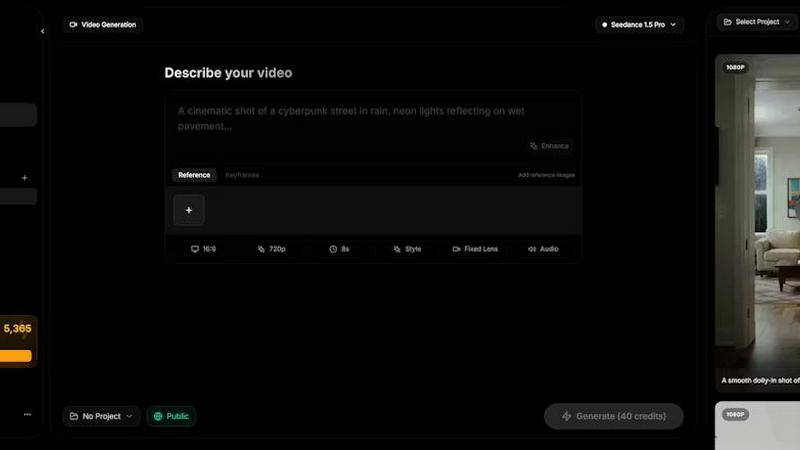
Seedance AI transforms text, images, audio, and video into stunning, cinematic videos with synchronized sound and seamless motion in seconds.
Last updated: April 13, 2026
Visual Comparison
BlitzCut

SeeDance Ai
Feature Comparison
BlitzCut
Neural Silence Removal
BlitzCut's proprietary AI doesn't just detect silence; it intelligently analyzes audio waveforms to surgically identify and remove every pause, filler word gap, and dead-air moment. This on-device processing happens in seconds, eliminating the 15-20 minutes of manual cutting typically required, and condensing video length by 30-60% to maximize viewer retention and engagement without any tedious manual clipping or upload delays.
AI-Powered Caption Engine
Go beyond basic transcription. BlitzCut generates highly accurate captions (95%+ accuracy) and automatically applies dynamic, viral styling optimized for short-form platforms. The AI selects fonts, colors, and animations that enhance readability and shareability, turning a simple transcript into a compelling visual narrative element that hooks viewers in the first few seconds, all without any manual design work.
Text-Based Editing Interface
Edit your video as effortlessly as editing a document. BlitzCut provides a full transcript of your clip, allowing you to delete entire sentences or sections simply by highlighting and removing the text. The corresponding video and audio are automatically spliced out with frame-perfect accuracy, making complex edits and content restructuring an intuitive, text-driven process.
Mobile-First, One-Tap Export Pipeline
Built natively for iPhone, iPad, and Mac, BlitzCut embodies a seamless mobile creation ethos. The entire process—from import to final export—is optimized for touch. With one tap, AI processes your video. Another tap exports the final product in full HDR quality directly to your social media apps or camera roll, enabling true creation and publishing from anywhere.
SeeDance Ai
Multimodal Input System
SeeDance Ai allows users to upload up to 12 reference files, including images, videos, and audio clips, which can be tagged directly in text prompts. This innovative system makes video creation intuitive, reducing guesswork and enabling precise instructions for the AI to follow.
Simultaneous Audio and Video Generation
Unlike traditional AI video tools, SeeDance Ai generates audio and video together in a single pass. This ensures perfect synchronization, allowing sound effects, character speech, and background music to align seamlessly with visual elements, enhancing the overall quality of the output.
Consistent Character Representation
With SeeDance Ai, character drift is a thing of the past. The platform's cross-attention reference system maintains facial geometry, clothing details, and stylistic elements across multiple scenes, making it ideal for serialized content and branded campaigns that require character continuity.
Advanced Camera and Motion Replication
By uploading a reference video, users can instruct SeeDance Ai to replicate intricate camera movements and human choreography. This feature allows for precise tracking shots, dolly zooms, and complex dance sequences, enabling creators to produce professional-grade footage without extensive filming.
Use Cases
BlitzCut
Daily Social Media Content Creation
For influencers, educators, and business owners committed to daily posting on TikTok, Reels, or Shorts, BlitzCut is the essential tool. It turns the daunting hour-long editing session into a sustainable 2-minute task, allowing creators to consistently produce high-engagement, captioned content that maintains audience growth without creative burnout.
Rapid Podcast-to-Short Form Clipping
Content repurposing is revolutionized. Podcasters and live streamers can instantly import long-form recordings, use text-based editing to isolate key viral moments, and have BlitzCut automatically remove pauses and add styled captions. This creates multiple, polished promotional clips ready for social media in a fraction of the time previously needed.
Agile Marketing and Product Demos
Marketing teams and solopreneurs can film quick, authentic product demos or announcements on their phone and have a professional, captioned video ready for launch in minutes. The speed enables rapid iteration and timely content that capitalizes on trends, making marketing agile and responsive.
Educational and Tutorial Content
Educators creating micro-lessons can focus purely on their delivery. BlitzCut handles the post-production, ensuring tutorials are concise (via silence removal) and accessible (via accurate, clear captions), improving comprehension and meeting accessibility standards with zero extra effort from the creator.
SeeDance Ai
Marketing Campaigns
SeeDance Ai is perfect for crafting engaging marketing clips that capture audience attention. By generating polished videos that seamlessly integrate brand messaging and visuals, marketers can enhance their promotional efforts with minimal effort.
Social Media Content Creation
Creators and influencers can leverage SeeDance Ai to produce captivating social media content quickly. Whether it's dance videos or storytelling clips, the platform's capabilities allow for rapid, high-quality output that stands out in crowded feeds.
Dance and Choreography Videos
Dance professionals can utilize SeeDance Ai to visualize complex routines and choreography. The ability to replicate movements with high fidelity makes it an essential tool for creating stunning dance showcases and performance videos.
Educational and Training Videos
Educators can create engaging instructional videos that blend visuals with synchronized audio explanations. SeeDance Ai facilitates the production of content that enhances learning experiences, making information more accessible and enjoyable.
Overview
About BlitzCut
BlitzCut is the paradigm-shifting AI video editor engineered for the velocity of the modern creator economy. It represents a fundamental leap beyond traditional editing suites, discarding bloated feature lists in favor of hyper-focused, intelligent automation. This mobile-first platform is built on a core thesis: that creators should spend their energy on ideation and performance, not on the tedious mechanics of post-production. By leveraging on-device AI processing, BlitzCut delivers a near-instantaneous workflow, transforming raw talking-head clips into polished, platform-optimized content for TikTok, Instagram Reels, and YouTube Shorts in a revolutionary two-minute window. It is designed for social media creators, educators, entrepreneurs, and anyone for whom daily, consistent posting is non-negotiable. Its core value proposition is uncompromising speed and accessibility, automating the most time-consuming tasks—silence removal and caption styling—with precision, thereby making professional-grade video editing not just possible, but sustainable for everyone.
About SeeDance Ai
SeeDance Ai is a revolutionary multimodal AI video generation platform designed to empower creators with the ability to transform text, images, audio, and video references into stunning cinematic videos. This platform offers director-level control, enabling users to create high-quality, multi-shot videos with synchronized sound and seamless motion. Ideal for marketers, social media professionals, dancers, and storytellers, SeeDance Ai eliminates the need for extensive studio resources, making professional video production accessible to a broader audience. By harnessing advanced AI technologies, including a motion-transfer system that respects skeletal integrity, SeeDance Ai ensures that character movements remain realistic and consistent across shots. The platform’s unique approach to audio-visual synchronization enhances the storytelling experience, making it an invaluable tool for those seeking high-fidelity output without the technical pitfalls often associated with AI video generation.
Frequently Asked Questions
BlitzCut FAQ
How does BlitzCut's silence removal work so fast?
BlitzCut utilizes on-device neural processing, meaning the AI analyzes your video's audio directly on your iPhone, iPad, or Mac. This eliminates the time required to upload large files to the cloud, enabling near-instantaneous detection and cutting of silent gaps. The advanced algorithm identifies not just pure silence but also low-energy pauses for a perfectly paced final cut.
Is BlitzCut really free to use?
Yes, BlitzCut is free to download and use its core functionality. This includes automatic silence removal and AI caption generation, allowing you to fully process and export videos without any watermarks or account requirements. The app is built to provide immense value at no upfront cost to the creator community.
How accurate are the automatic captions?
BlitzCut's AI caption engine achieves over 95% accuracy for clear spoken English. It is specifically trained on conversational speech patterns common in creator content. For optimal results, ensure clear audio during recording. You can always review and make minor text adjustments in-app before finalizing your styled captions.
Can I export videos for platforms other than social media?
Absolutely. While optimized for TikTok, Instagram, and YouTube Shorts, BlitzCut exports full-quality HDR video files directly to your device's camera roll. From there, you can share the professional-grade output to any platform, including LinkedIn, Twitter, your website, or use it in other professional editing suites for further refinement.
SeeDance Ai FAQ
What types of media can I use with SeeDance Ai?
SeeDance Ai supports multimodal input, allowing you to use text, images, audio, and video references to create your videos, providing a versatile approach to content generation.
Do I need to have filming experience to use SeeDance Ai?
No filming experience is necessary. SeeDance Ai simplifies the video creation process, allowing anyone to produce high-quality videos with just a few clicks, making it ideal for beginners and professionals alike.
Can I maintain character consistency across multiple scenes?
Absolutely. SeeDance Ai employs a cross-attention reference system that ensures characters remain visually consistent in terms of appearance and motion, eliminating common issues like character drift.
Is there a need for post-production editing after using SeeDance Ai?
While SeeDance Ai produces polished videos with synchronized audio and video, optional post-production editing may still be beneficial for fine-tuning or adding additional effects, depending on your creative goals.
Alternatives
BlitzCut Alternatives
BlitzCut is a next-generation AI video editor, a powerhouse in the content creation category designed to automate the tedious aspects of editing. It leverages artificial intelligence to instantly remove silences, generate high-accuracy captions, and enable text-based editing, all within a mobile-first ecosystem. This positions it as a revolutionary tool for creators who prioritize speed and efficiency in their workflow. Users often explore alternatives for various reasons, including specific budget constraints, the need for different feature sets like advanced color grading or multi-track timelines, or compatibility with other operating systems and platforms. The quest for the right tool is highly personal, driven by individual content style, posting frequency, and desired level of creative control versus automation. When evaluating other solutions, focus on core value alignment. Seek platforms that understand the creator economy's velocity, offering genuine time savings through AI automation without sacrificing essential quality. Prioritize tools that enhance your creative process rather than complicate it, ensuring the technology serves your vision and sustains your daily publishing rhythm.
SeeDance Ai Alternatives
SeeDance Ai is a revolutionary AI video generation platform that falls within the realm of professional cinematography. It utilizes advanced algorithms to transform text, images, audio, and video references into visually stunning, multi-shot videos that boast a director-level command over the output. Users often seek alternatives due to various factors such as pricing structures, feature sets, or the specific platform requirements that may not align with their needs or workflows. When selecting an alternative, it is crucial to consider aspects like output quality, ease of use, and compatibility with existing tools to ensure a seamless creative process.