
Cosy vs FilexHost
Side-by-side comparison to help you choose the right AI tool.

Transform Slack into a dynamic community with automated onboarding, member introductions, and streamlined content.
Last updated: February 28, 2026

FilexHost
Revolutionize file sharing with FilexHost: drag, drop, and get a live shareable link in seconds, effortlessly.
Last updated: February 28, 2026
Visual Comparison
Cosy
FilexHost

Feature Comparison
Cosy
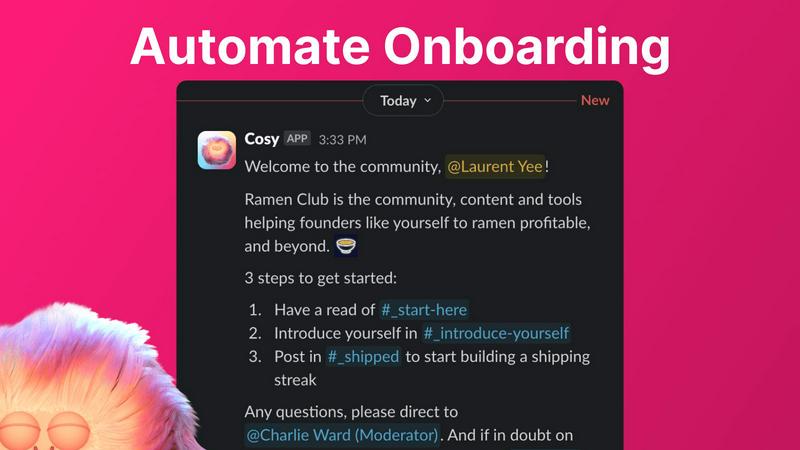
Automate Onboarding
Cosy automates the onboarding process, allowing you to create and deploy up to 10 distinct welcome DM sequences. Members receive personalized messages either immediately or on a customizable delay, ensuring no one feels neglected upon joining. This feature saves significant time and guarantees that every new member is welcomed, even if they join outside of regular hours.
Connect Your Members
Enhance community engagement by automatically introducing members to each other through direct messages. Cosy facilitates meaningful connections by opting-in members for regular introductions based on a customizable schedule. This feature nurtures a sense of belonging and encourages networking, creating a lively community atmosphere.
Member Directory
The intuitive member directory allows community members to create searchable profiles directly within Slack. You can customize fields for each member, enabling them to share relevant information and skills. This seamless integration promotes networking and collaboration without requiring anyone to leave the Slack environment.
Content Highlights
Cosy provides instant access to the most engaging posts in your community with simple slash commands. By using commands like /most-engaged-messages and /unreplied-messages, you can easily surface top content and encourage further interaction among members, ensuring that valuable discussions do not get lost in the noise.
FilexHost
Instant Subdomains
Experience the convenience of instant subdomain creation with FileXHost. Upon uploading, users receive a unique link (your-file.filex.host) with zero setup required. This feature streamlines the process of sharing files, allowing for immediate access and simplifying the collaboration experience.
Free SSL Encryption
Security is paramount with FileXHost, as every link generated comes with free SSL encryption. This ensures that all shared files are protected, providing peace of mind for users who prioritize their data's safety while sharing sensitive information with clients or colleagues.
Smart View Modes
FileXHost enhances user experience with smart view modes that allow for either direct rendering of files or a dedicated download page. Whether users want to present documents interactively or simply provide a downloadable link, this feature caters to all needs, making file sharing more versatile and user-friendly.
Optional Password Protection
For those who need an extra layer of security, FileXHost offers optional password protection along with customizable expiry settings. Users can set links to expire anywhere from 24 hours to indefinitely, ensuring that access to sensitive files remains tightly controlled and secure.
Use Cases
Cosy
Streamlined Onboarding for New Members
Cosy automates the onboarding experience for new members, allowing community managers to focus on building relationships rather than tedious manual tasks. New members receive tailored welcome messages, which help them integrate into the community quickly and effortlessly.
Facilitating Networking Opportunities
By automatically introducing members to each other, Cosy fosters networking opportunities that might not occur organically. This feature is perfect for community managers looking to enhance member interaction and create a vibrant atmosphere where connections can flourish.
Enhancing Member Engagement
With Cosy's content highlights feature, community managers can effortlessly surface the most engaging posts, ensuring that valuable content receives the attention it deserves. This helps to keep discussions alive and encourages members to participate actively.
Building a Cohesive Community
The member directory promotes a sense of unity by allowing members to find and connect with one another based on shared interests and expertise. This not only strengthens relationships but also cultivates a cohesive community culture that drives collaboration.
FilexHost
Client Report Sharing
Professionals can effortlessly share detailed client reports by uploading files to FileXHost and generating secure links. This eliminates the need for cumbersome email attachments and allows clients to view reports in a clean, rendered format, enhancing the overall presentation.
Developer Mock API Hosting
Developers can utilize FileXHost to host landing pages or mock APIs, simplifying the testing and demonstration process. By uploading HTML files or project archives, they can quickly generate links to showcase their work without the hassle of server management.
Digital Product Distribution
Creators and entrepreneurs can distribute digital products—such as eBooks, software, or multimedia content—using FileXHost. The platform's quick sharing capabilities facilitate a smooth transaction process, allowing customers to access their purchases immediately without unnecessary delays.
Frictionless File Delivery
FileXHost serves anyone needing seamless file delivery without tedious "request access" emails or attachment limits. From educators sharing resources to teams collaborating on projects, the platform's ease of use ensures that files are always just a drag and drop away.
Overview
About Cosy
Cosy is a revolutionary AI-driven tool designed to elevate your Slack workspace into a dynamic and engaging community hub. By harnessing advanced automation features, Cosy redefines how communities interact and thrive, making it easier for community managers and team leaders to foster connections and enhance engagement effortlessly. Whether you are welcoming new members or encouraging collaboration, Cosy seamlessly automates the onboarding process, streamlining member introductions and eliminating the manual effort that often accompanies community management. With customizable welcome messages and a searchable member directory, Cosy empowers users to build meaningful relationships that drive success. Its moderation tools ensure a safe environment, while automatic content highlights keep members informed and engaged. Ideal for teams of all sizes, from ambitious startups to established enterprises, Cosy is an essential tool for cultivating a thriving community that not only connects members but also propels collaboration and innovation.
About FilexHost
FileXHost is an innovative and revolutionary file hosting and sharing platform designed to simplify the way individuals and businesses manage their digital assets. With lightning-fast global content delivery, FileXHost allows users to upload any file type—from documents and images to entire websites—without the cumbersome processes typically associated with file sharing. Its "Drop & Share" workflow empowers users to effortlessly drag and drop files, instantly generating secure URLs for sharing without any server configurations or complicated logins. This makes it an ideal solution for professionals, developers, and creators who demand frictionless file delivery systems that prioritize the viewer experience. By ensuring that recipients can access files as intended, beautifully rendered without downloads or plugins, FileXHost stands out as the go-to choice for seamless file hosting needs.
Frequently Asked Questions
Cosy FAQ
How does Cosy automate onboarding?
Cosy automates onboarding by sending personalized welcome DMs to new members based on customizable sequences you set up. This ensures every new joiner receives a warm welcome, even if you are not online.
Can I customize the member directory fields?
Yes, you can fully customize the member directory by selecting up to 10 custom fields for members to fill out. This flexibility allows you to gather relevant information tailored to your community's needs.
What kind of moderation tools does Cosy provide?
Cosy includes moderation tools that allow you to flag abusive and spam messages instantly. This feature helps maintain a safe and respectful environment for all community members.
Is there a limit on the number of members I can onboard?
Cosy offers a free plan for up to 250 members. For larger communities, a 30-day trial is available for unlimited members, allowing you to experience the full capabilities of Cosy.
FilexHost FAQ
What is FileXHost?
FileXHost is a cutting-edge file hosting and sharing platform that allows users to upload any type of file and generate secure, shareable links instantly. It simplifies the file sharing process with features like smart rendering and no login requirements for recipients.
Is it really free?
Yes, FileXHost offers a free plan that allows users to host up to 1,000 files with a maximum size of 25MB per file. The free plan includes a limited 7-day expiry for files and is ad-supported, making it accessible for casual users.
What file types are supported?
FileXHost supports a wide range of file types, including PDFs, images, audio, video, Excel sheets, ZIP archives, and HTML projects. This versatility makes it suitable for various applications, from document sharing to web hosting.
How do I update my site?
To update your hosted files on FileXHost, simply upload the new version of the file. The platform will automatically generate a fresh link, and if you are using the same filename, the old link will redirect to the updated file, ensuring seamless access for recipients.
Alternatives
Cosy Alternatives
Cosy is an innovative, AI-driven tool designed to transform your Slack workspace into a vibrant community hub, enhancing productivity and collaboration. It falls under the category of productivity and management solutions, focusing on community engagement through automated onboarding and content management. Users often seek alternatives to Cosy for various reasons, including pricing structures, feature sets, or specific platform needs that may align better with their organizational goals. When considering an alternative, it's essential to evaluate the functionalities offered, ease of integration with existing systems, user experience, and the overall value it brings to fostering community interaction. --- [{"question": "What is Cosy?", "answer": "Cosy is an AI-driven tool that transforms Slack into a vibrant community hub by automating onboarding, member introductions, and content management."}, {"question": "Who is Cosy for?", "answer": "Cosy is designed for community managers and team leaders looking to enhance engagement and collaboration within their organizations."}, {"question": "Is Cosy free?", "answer": "Specific pricing details for Cosy are not provided, but it is essential to check their official site for subscription options and plans."}, {"question": "What are the main features of Cosy?", "answer": "Cosy's main features include automated welcome messages, member introductions, content highlights, a member directory, and moderation tools for a safe community environment."}]
FilexHost Alternatives
FilexHost is a cutting-edge file hosting and sharing platform that simplifies the way users manage their documents, media, and other digital assets. With its intuitive drag-and-drop interface, it allows users to generate shareable URLs in seconds, making it a go-to solution for professionals and creators alike. As part of the productivity and management category, FilexHost caters to a diverse audience looking for frictionless file delivery. Users often seek alternatives to FilexHost for a variety of reasons, including pricing structures, feature sets, and compatibility with specific platforms or workflows. When exploring alternatives, it is crucial to consider factors such as storage limits, security features, user experience, and the level of customer support available. A well-rounded alternative should enhance productivity while addressing specific user needs.