
3DAIStudio vs JSON to Video
Side-by-side comparison to help you choose the right AI tool.

3DAIStudio
3DAIStudio instantly transforms your text or images into production-ready 3D models with AI-powered magic.
Last updated: April 4, 2026

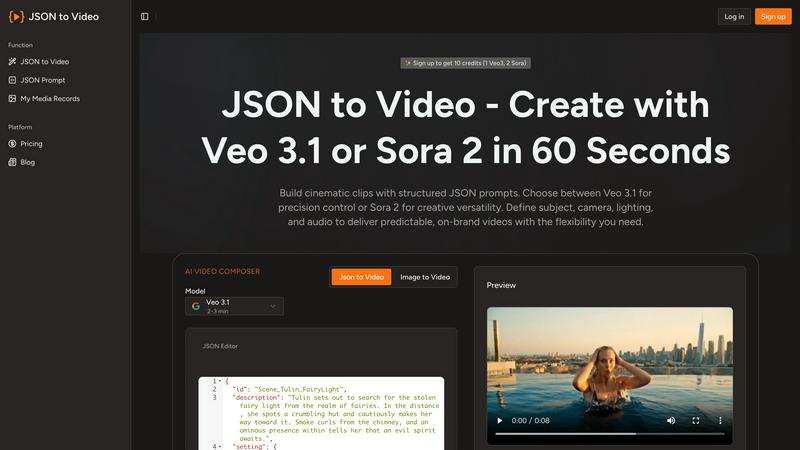
JSON to Video
Effortlessly create stunning cinematic videos from structured JSON prompts with JSON to Video's revolutionary.
Last updated: February 28, 2026
Visual Comparison
3DAIStudio

JSON to Video
Feature Comparison
3DAIStudio
Text to 3D Generation
Harness the power of generative AI to materialize your imagination. Simply type a descriptive prompt—like "realistic fantasy orc warrior with rugged armor"—and watch as the platform instantly interprets your words, constructing a detailed, fully-textured 3D model from scratch. This feature eliminates the gap between concept and creation, enabling rapid prototyping and ideation for characters, props, environments, and more without any manual modeling.
Image to 3D Conversion
Transform any 2D reference—be it a sketch, photograph, or digital illustration—into a three-dimensional asset. Upload your image, and the AI intelligently extrapolates depth, form, and geometry to build a coherent 3D model. This is ideal for bringing existing artwork to life, creating models from concept art, or generating 3D versions of real-world objects captured in photos.
AI-Powered Texturing & Materials
Apply stunning, physically-based rendering (PBR) textures to your models effortlessly. Using AI, you can generate realistic materials from text prompts or paint custom details directly onto the model's surface. This automates the labor-intensive process of UV unwrapping and texture painting, delivering studio-quality surfaces like metal, wood, fabric, and skin with remarkable accuracy.
Quad-Remesh & Topology Optimization
Ensure your generated assets are not just visually impressive but technically production-ready. The automated Quad-Remesh tool intelligently rebuilds your model's mesh topology, creating clean, animation-friendly quad-dominant geometry. It reduces polygon count, fixes mesh issues, and can generate Level of Detail (LOD) models, preparing your asset for seamless integration into game engines, 3D prints, or animation pipelines.
JSON to Video
Structured JSON Input
JSON to Video utilizes a structured JSON schema, enabling users to define every aspect of their video. This feature allows for precise control over cinematography, environment, and audio, ensuring that creators can produce high-quality videos that align perfectly with their vision.
Cinematic Quality Control
With the ability to dictate camera movement, lighting conditions, and color grading, users can create cinematic scenes that resonate with their audience. This feature guarantees that every video maintains a professional look and feel, enhancing brand storytelling and engagement.
Multi-Format Support
JSON to Video supports various output formats, catering to diverse platform requirements. Users can easily create videos optimized for social media, websites, or presentations, making it a versatile tool for all types of content distribution.
Quick and Efficient Workflow
The platform allows creators to generate videos in as little as 60 seconds, streamlining the production process. This efficiency is particularly beneficial for marketers and brands who need to produce high-quality content quickly to stay ahead in a competitive landscape.
Use Cases
3DAIStudio
Game Development & Prototyping
Game developers and indie studios can accelerate their workflow exponentially. Rapidly generate character concepts, weapon props, environmental assets, and entire scene mockups from text descriptions or concept art. This allows for faster iteration, quicker prototyping of game mechanics, and efficient filling of asset libraries, drastically reducing time-to-market for new titles and updates.
Film & Animation Pre-Visualization
Film production and animation studios can use 3DAIStudio for rapid pre-visualization and storyboarding. Directors and artists can quickly generate 3D models of characters, creatures, or set pieces based on script descriptions, enabling dynamic scene blocking, lighting tests, and concept validation before committing to costly, time-intensive traditional modeling and sculpting pipelines.
Product Design & 3D Printing
Product designers and inventors can visualize concepts in three dimensions instantly. Upload a sketch of a new product or describe it with text to generate a tangible 3D model for review, client presentation, or direct preparation for 3D printing. This streamlines the design iteration process and allows for physical prototyping at unprecedented speeds.
Educational Content & AR/VR Experiences
Educators and AR/VR creators can build immersive learning materials and interactive experiences without 3D expertise. Generate accurate 3D models of historical artifacts, biological specimens, or architectural wonders for virtual museums, educational apps, or augmented reality filters, making complex subjects more engaging and accessible.
JSON to Video
Marketing Campaigns
Marketers can leverage JSON to Video to create visually captivating promotional videos that showcase products or services. By using structured data to define key visual elements, they can ensure that their campaigns communicate their brand message effectively and attractively.
Educational Content Creation
Educators and trainers can utilize this platform to develop engaging instructional videos. By controlling the visual narrative and audio elements through JSON, they can create clear and informative content that enhances learning experiences.
Brand Storytelling
Brands looking to tell their story can use JSON to Video to craft immersive narratives. With the ability to specify every detail, from characters to environments, brands can create videos that resonate emotionally with their audience, fostering a deeper connection.
Social Media Engagement
Content creators can produce eye-catching videos for social media platforms that drive engagement and shares. The quick generation time and high-quality output ensure that users can respond to trends promptly while maintaining a strong visual identity.
Overview
About 3DAIStudio
3DAIStudio represents a paradigm shift in digital content creation, leveraging cutting-edge artificial intelligence to democratize and accelerate the generation of high-quality 3D assets. This revolutionary platform empowers users to transform simple text prompts or 2D images into fully-realized, textured 3D models in a matter of seconds. It dismantles the traditional barriers of complex software and steep learning curves, making professional-grade 3D modeling accessible to everyone from complete beginners to seasoned industry veterans. Designed for a new era of creators, it serves game developers, film and VFX artists, product designers, architects, educators, and marketing professionals who require rapid, iterative, and high-fidelity 3D content. Its core value proposition lies in its unprecedented speed and simplicity: what once required days of specialized manual labor can now be achieved in minutes with AI-powered precision, delivering production-ready assets optimized for major engines like Unity and Unreal Engine.
About JSON to Video
JSON to Video is a groundbreaking generative video platform that transforms structured data into stunning cinematic experiences with unprecedented simplicity. Designed for content creators, marketers, and brands, this innovative tool revolutionizes video production by allowing users to harness the power of structured JSON schemas, rather than vague text prompts. By specifying every visual and auditory detail precisely, users can dictate subjects, camera angles, lighting setups, soundtracks, and more, achieving deterministic control over their video outputs. This eliminates the guesswork and iterative processes that are commonplace in traditional video creation. JSON to Video treats JSON inputs as detailed storyboards, enabling creators to encapsulate their unique vision into high-quality videos seamlessly. The platform supports advanced features like Veo 3.1 and Seedance 2, elevating the standard of video generation and ensuring that every project meets the highest professional standards.
Frequently Asked Questions
3DAIStudio FAQ
What file formats can I export my 3D models in?
3DAIStudio is built for professional pipelines, offering exports in industry-standard formats. You can typically download your generated models as OBJ, FBX, or GLTF/GLB files, complete with embedded PBR texture maps (like Albedo, Normal, Roughness). These formats ensure seamless compatibility with major software like Blender, Maya, Unity, Unreal Engine, and web-based platforms like Three.js.
Do I need any prior 3D modeling experience to use 3DAIStudio?
Absolutely not. 3DAIStudio is designed to be intuitive and accessible. The core process involves typing what you want or uploading an image. The AI handles all the complex tasks of geometry generation, texturing, and topology optimization. This makes it perfect for beginners, while its powerful output and advanced tools provide immense value for experienced 3D artists seeking to speed up their workflow.
How does the AI handle complex or specific text prompts?
The platform's AI is trained on vast datasets to understand nuanced language and context. For best results, use descriptive, detailed prompts. Instead of "a car," try "a futuristic electric sports car with sleek cyan bodywork, glowing neon underlights, and an angular design." The more visual detail you provide, the more accurate and impressive the generated 3D model will be, allowing for highly specific and creative outcomes.
Is the output from 3DAIStudio ready for commercial projects?
Yes, models generated through 3DAIStudio are production-ready and can be used in commercial projects, including games, films, and products. The tools like Quad-Remesh ensure the models have clean topology suitable for animation and rendering, while the AI texturing provides high-quality PBR materials. It is always recommended to review the platform's specific Terms of Service regarding licensing and usage rights for the generated assets.
JSON to Video FAQ
How does JSON to Video work?
JSON to Video works by allowing users to input structured data in a JSON format that specifies every detail of the video. This structured input translates into cinematic scenes, enabling precise control over the visuals and audio.
Can I customize the output format of my videos?
Yes, JSON to Video supports multiple output formats, making it easy for users to create videos tailored for various platforms, whether for social media, websites, or presentations.
What types of videos can I create with JSON to Video?
You can create a wide range of videos, including promotional videos, educational content, brand stories, and social media clips. The structured input allows for diverse applications across different industries.
Is there a learning curve for using JSON to Video?
While there may be an initial learning curve for those unfamiliar with JSON, the platform is designed to be user-friendly. With clear instructions and examples, users can quickly grasp how to utilize the features effectively for their video projects.
Alternatives
3DAIStudio Alternatives
3DAIStudio is a pioneering AI-native platform in the generative 3D content creation space. It leverages advanced neural networks to instantly transmute simple text prompts or 2D images into high-fidelity, production-ready 3D models. This technology represents a paradigm shift, democratizing 3D asset generation for a new wave of digital creators. Even with such revolutionary capabilities, users often explore the broader ecosystem. Motivations can range from seeking different pricing models or subscription tiers to needing specialized export formats for specific game engines or rendering pipelines. Others may prioritize platforms with integrated editing suites, collaborative features, or different AI model architectures that better align with their unique creative vision. When evaluating other solutions in this frontier, key considerations include the core AI's output quality and consistency, the speed of generation, and the flexibility of the resulting 3D assets. Assess the platform's integration capabilities with your existing digital toolchain, its commitment to ongoing model training, and the overall user experience designed for a seamless, futuristic workflow.
JSON to Video Alternatives
JSON to Video is a groundbreaking generative video platform that revolutionizes how structured data is transformed into cinematic visuals. By utilizing a unique JSON schema, it allows users to specify an array of visual and auditory elements with unmatched precision, making it a vital tool in the video production landscape. This innovative approach caters to the needs of content creators, marketers, and brands aiming for high-quality video outputs. Users often seek alternatives to JSON to Video for various reasons, including pricing structures, specific feature sets, or compatibility with their existing platforms. When exploring alternatives, it is crucial to consider factors such as the ease of use, the level of creative control offered, and how well the platform can integrate into existing workflows. Finding a solution that aligns with both creative vision and operational needs is essential for maximizing the potential of video content.