
LLMWise vs Video to Text
Side-by-side comparison to help you choose the right AI tool.

LLMWise revolutionizes AI access with one API to seamlessly compare, blend, and pay only for the best models per use.
Last updated: February 28, 2026

Video to Text
Transform any video or audio into precise text effortlessly in minutes with cutting-edge AI technology and multi-language support.
Last updated: April 13, 2026
Visual Comparison
LLMWise

Video to Text
Feature Comparison
LLMWise
Smart Routing
Smart routing is a game-changing feature that intelligently directs prompts to the most suitable model. Whether it is coding queries sent to GPT, creative writing tasks assigned to Claude, or translation requests handled by Gemini, the system ensures optimal performance by matching tasks with the best-suited AI capabilities.
Compare & Blend
With the compare and blend functionality, users can run prompts simultaneously across various models, allowing them to evaluate responses side-by-side. The blend feature synthesizes the best parts of different outputs into a single, cohesive answer, significantly enhancing the quality and relevance of the information provided.
Always Resilient
LLMWise is built with resilience in mind, featuring a circuit-breaker failover system that reroutes requests to backup models when a primary provider experiences downtime. This ensures that applications remain operational and reliable at all times, preventing disruptions caused by external factors.
Test & Optimize
The test and optimize capabilities include benchmarking suites, batch tests, and optimization policies aimed at enhancing speed, cost-effectiveness, and reliability. Automated regression checks also help maintain high standards in output quality, allowing developers to continuously refine and improve their applications.
Video to Text
AI Transcription
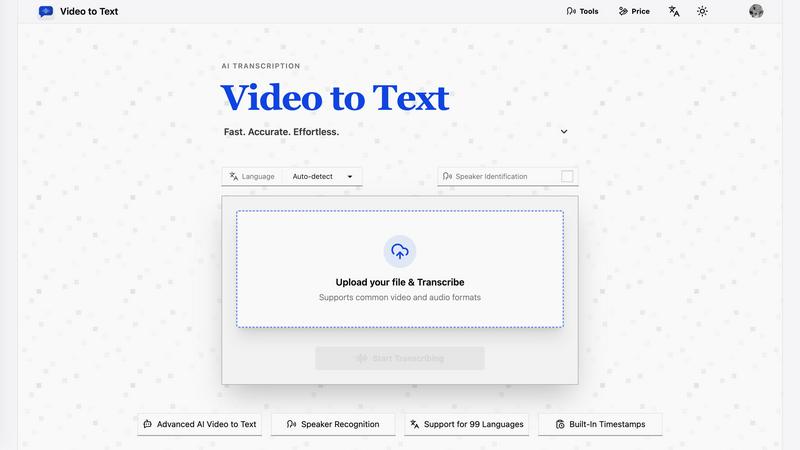
Harness the power of advanced AI algorithms that convert audio and video content into text with remarkable accuracy. This feature ensures that even complex dialogues and diverse accents are transcribed correctly, saving users time and effort.
Multi-Language Support
Video to Text supports transcription in 99 languages, equipped with automatic language detection. This feature is essential for users dealing with mixed-language recordings, ensuring that no matter the language, the transcription remains accurate and reliable.
Speaker Diarization
The built-in speaker recognition technology intelligently identifies different speakers in the audio, making it easy to follow conversations, interviews, or multi-part dialogues. This feature enhances clarity and provides context, which is crucial for effective communication.
Flexible Export Options
With the ability to export transcripts in multiple formats such as TXT, SRT, VTT, and CSV, users can choose the format that best suits their needs. Whether for subtitles, plain text, or structured analysis, Video to Text caters to diverse requirements.
Use Cases
LLMWise
Rapid Prototyping
LLMWise enables developers to prototype quickly by providing access to 30 free models that can be tested without incurring costs. This allows teams to experiment and iterate on ideas swiftly, fostering innovation and creativity in their AI-driven projects.
Cost Management
By consolidating multiple AI models under one API, LLMWise helps organizations save on costs associated with multiple subscriptions. Developers can pay only for what they use, thereby optimizing their budget while still leveraging top-tier AI capabilities.
Enhanced Debugging
Developers can utilize the compare mode to run the same prompt across various models, instantly identifying which one performs best for specific edge cases. This feature significantly reduces debugging time and enhances the accuracy of AI-generated responses.
Dynamic Content Creation
Content creators can harness LLMWise's blend mode to generate high-quality articles, marketing materials, or creative writing. By combining insights from multiple models, users can produce richer and more nuanced content that resonates with their audience.
Video to Text
Content Creation
Creators can effortlessly generate subtitles for YouTube videos, online courses, and social media clips, enhancing accessibility and engagement. Accurate transcriptions ensure that audiences can follow along effortlessly.
Meeting Transcriptions
Transform meetings, webinars, and calls into searchable notes. This use case is invaluable for professionals who need to reference discussions or decisions made during collaborative sessions, improving productivity and accountability.
Journalistic Interviews
Journalists can transcribe interviews quickly and accurately, allowing them to focus on storytelling rather than note-taking. This use case ensures that important quotes and insights are captured verbatim for articles and reports.
Language Learning
Students and language learners can utilize transcripts to practice listening and comprehension skills. This feature enables users to review audio lessons with accompanying text, facilitating a more effective learning experience.
Overview
About LLMWise
LLMWise is a revolutionary AI tool that simplifies the complexity of managing multiple language model providers. Designed for developers and teams seeking the best AI capabilities for diverse tasks, LLMWise consolidates access to the most advanced large language models (LLMs) in one unified API. With LLMWise, users can seamlessly utilize models from industry giants like OpenAI, Anthropic, Google, Meta, xAI, and DeepSeek without the hassle of juggling multiple subscriptions. The intelligent routing feature ensures that each prompt is automatically matched to the optimal model based on task requirements. This not only enhances efficiency but also enables users to compare, blend, and optimize responses, ensuring they always receive the highest quality output. LLMWise empowers developers to focus on innovation and results rather than on the complexities of model management.
About Video to Text
Video to Text is an AI-powered transcription service revolutionizing the way creators, teams, and individuals convert video and audio files into precise, exportable text. Designed for those who demand speed and accuracy without the hassle of building their own transcription pipelines, this service stands out with its seamless user experience. Users can effortlessly upload their media files and receive clean, automated transcriptions that are speaker-aware, ensuring clarity in communication. The service also supports a plethora of languages, automatically detecting the spoken language, making it a versatile choice for a global audience. With flexible export options tailored to various workflows, Video to Text not only boosts productivity but also ensures that users can focus on content creation rather than transcription headaches.
Frequently Asked Questions
LLMWise FAQ
How does LLMWise ensure optimal model selection?
LLMWise employs intelligent routing that automatically matches prompts with the most appropriate model based on the task at hand, ensuring optimal performance and quality.
Can I use my existing API keys with LLMWise?
Yes, LLMWise supports Bring Your Own Keys (BYOK), allowing users to integrate their existing API keys for models, which can help reduce costs and maintain flexibility.
Is there a subscription fee for using LLMWise?
No, LLMWise operates on a pay-as-you-go model. Users can start for free and only pay for the credits they consume, eliminating the need for recurring subscription fees.
What happens if a model provider goes down?
LLMWise features a circuit-breaker failover system that automatically reroutes requests to backup models, ensuring that your applications continue to function smoothly without interruptions.
Video to Text FAQ
What is Video to Text?
Video to Text is an AI transcription tool that specializes in converting audio and video files into clean, exportable text. It is designed for anyone needing accurate and efficient transcriptions.
How does the transcription process work?
Users simply upload their audio or video files, and the AI processes the content, providing a transcription that is ready for export. The entire process is straightforward and user-friendly, ensuring minimal effort.
What file formats are supported for upload?
Video to Text supports a wide range of audio and video formats, including MP4, MOV, MKV, WEBM, MP3, WAV, and more. This variety ensures compatibility with most media files.
Is there a limit to how much I can transcribe?
New users receive 30 free transcription minutes to get started. Beyond that, users can purchase additional minutes as needed, with straightforward pay-as-you-go pricing plans available.
Alternatives
LLMWise Alternatives
LLMWise is an advanced API platform that consolidates access to major language models such as GPT, Claude, and Gemini, among others. It belongs to the AI Assistants category, empowering developers to utilize the best-suited model for each task without the hassle of managing multiple AI providers. Users often seek alternatives due to various reasons, including pricing structures, feature sets, and specific platform requirements that may cater better to their unique needs. When exploring alternatives, it is essential to consider factors like the flexibility of payment options, the range of models available, and the capability for intelligent routing to ensure optimal performance. Additionally, users should evaluate the platform's resilience, testing and optimization features, and the ease of integration with existing systems to make a well-informed decision.
Video to Text Alternatives
Video to Text is a revolutionary AI-powered transcription service designed to transform video and audio files into clean, exportable text rapidly and accurately. As part of the AI Assistants category, it caters to a diverse range of users, including creators, teams, and individuals who seek a seamless way to convert spoken content into written form without the hassle of building their own transcription infrastructure. Users often find themselves exploring alternatives due to various factors such as pricing, feature sets, and platform compatibility. When evaluating potential substitutes, it's crucial to consider the speed and accuracy of transcription, ease of use, the ability to handle various media formats, and the flexibility of export options to ensure the chosen tool aligns with their specific workflow and requirements.