
MeetingMind vs Video to Text
Side-by-side comparison to help you choose the right AI tool.

MeetingMind
MeetingMind is your on-device AI that automatically records, transcribes, and summarizes Zoom meetings.
Last updated: February 28, 2026

Video to Text
Transform any video or audio into precise text effortlessly in minutes with cutting-edge AI technology and multi-language support.
Last updated: April 13, 2026
Visual Comparison
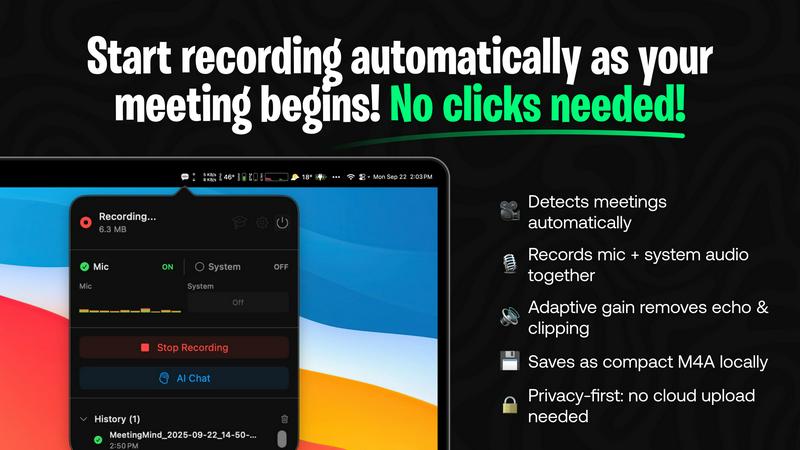
MeetingMind
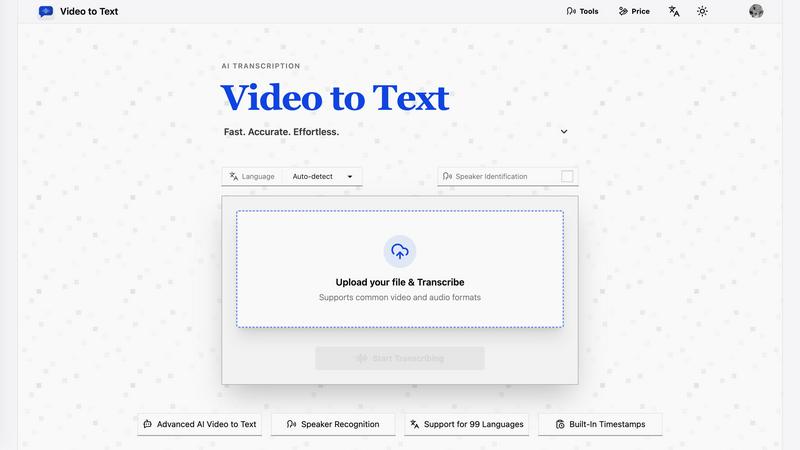
Video to Text
Feature Comparison
MeetingMind
Autonomous Meeting Detection
MeetingMind operates with intelligent foresight, automatically detecting when you join a Zoom meeting and initiating recording without requiring a single click. This seamless, zero-effort activation ensures you never forget to record an important session, allowing you to transition into meeting mode instantly and with complete confidence that every word is being captured for later review and analysis.
Localized, Private AI Processing
Privacy and speed are non-negotiable. MeetingMind processes all audio data locally on your Mac using its powerful on-device AI engine. Your sensitive meeting conversations never leave your computer, ensuring absolute confidentiality. You can also choose your AI provider, opting for a local Ollama model or a cloud-based OpenRouter connection for generating summaries and insights, giving you unparalleled control over your data pipeline.
Intelligent Post-Meeting Synthesis
The magic happens after the meeting ends. MeetingMind's AI doesn't just transcribe; it synthesizes. It automatically generates comprehensive summaries, extracts clear action items with assignees, and formats the entire output—full transcript and summary—into beautifully structured Markdown files. This transforms raw audio into immediately usable, shareable, and searchable documentation.
Unobtrusive Menu Bar Operation
Designed for a frictionless workflow, MeetingMind resides quietly in your macOS menu bar. It is instantly accessible when you need it, yet completely invisible when you don't. This elegant design philosophy ensures the tool serves you without ever interrupting you, embodying the principle of ambient computing where powerful assistance is always available but never intrusive.
Video to Text
AI Transcription
Harness the power of advanced AI algorithms that convert audio and video content into text with remarkable accuracy. This feature ensures that even complex dialogues and diverse accents are transcribed correctly, saving users time and effort.
Multi-Language Support
Video to Text supports transcription in 99 languages, equipped with automatic language detection. This feature is essential for users dealing with mixed-language recordings, ensuring that no matter the language, the transcription remains accurate and reliable.
Speaker Diarization
The built-in speaker recognition technology intelligently identifies different speakers in the audio, making it easy to follow conversations, interviews, or multi-part dialogues. This feature enhances clarity and provides context, which is crucial for effective communication.
Flexible Export Options
With the ability to export transcripts in multiple formats such as TXT, SRT, VTT, and CSV, users can choose the format that best suits their needs. Whether for subtitles, plain text, or structured analysis, Video to Text caters to diverse requirements.
Use Cases
MeetingMind
The Project Manager's Command Center
For project managers orchestrating complex initiatives, MeetingMind is indispensable. It automatically captures every detail from sprint planning, daily stand-ups, and stakeholder syncs. The AI-generated action item tracking ensures accountability is never ambiguous, and the searchable transcripts provide a single source of truth for project decisions, dramatically reducing miscommunication and keeping timelines on track.
The Educator's Lecture Capture Tool
Educators and trainers can revolutionize their content delivery. By recording lectures, workshops, or tutoring sessions, MeetingMind creates perfect, searchable notes. This allows students to focus on understanding concepts rather than frantic scribbling. The educator can also export summaries as study guides, ensuring key takeaways from every session are preserved and easily accessible for all participants.
The Legal and Compliance Professional's Audit Trail
In fields where precise wording and compliance are critical, MeetingMind provides a verifiable, accurate record. It creates a secure, local transcript of client consultations, negotiations, or internal reviews. The speaker-attributed dialogue offers clarity on who said what, serving as a reliable audit trail that supports due diligence and protects all parties involved.
The Remote Team's Collaboration Hub
For distributed teams, MeetingMind bridges the communication gap. It ensures team members across time zones have access to perfect meeting records, eliminating the "I missed that note" problem. The AI summaries can be quickly shared to align everyone, while the ability to live-query past discussions turns your meeting history into a collaborative knowledge base that fuels asynchronous work.
Video to Text
Content Creation
Creators can effortlessly generate subtitles for YouTube videos, online courses, and social media clips, enhancing accessibility and engagement. Accurate transcriptions ensure that audiences can follow along effortlessly.
Meeting Transcriptions
Transform meetings, webinars, and calls into searchable notes. This use case is invaluable for professionals who need to reference discussions or decisions made during collaborative sessions, improving productivity and accountability.
Journalistic Interviews
Journalists can transcribe interviews quickly and accurately, allowing them to focus on storytelling rather than note-taking. This use case ensures that important quotes and insights are captured verbatim for articles and reports.
Language Learning
Students and language learners can utilize transcripts to practice listening and comprehension skills. This feature enables users to review audio lessons with accompanying text, facilitating a more effective learning experience.
Overview
About MeetingMind
MeetingMind is the definitive intelligent meeting assistant, engineered to fundamentally transform the professional meeting landscape. This cutting-edge macOS application represents a paradigm shift in meeting management by automating the entire capture and comprehension process. It is designed for busy professionals, educators, and collaborative teams who demand maximum productivity and clarity from their discussions. The core value proposition is profound: reclaim your cognitive focus. By eliminating the distraction of manual note-taking, MeetingMind allows you to engage fully in the conversation while it silently and intelligently documents everything. Leveraging powerful on-device AI, it delivers real-time, speaker-attributed transcripts and post-meeting summaries, ensuring no critical detail, action item, or insight is ever lost. It seamlessly integrates with your workflow, automatically detecting and recording Zoom meetings to create a searchable, actionable knowledge base from every interaction, fostering a new standard of accountability and operational intelligence.
About Video to Text
Video to Text is an AI-powered transcription service revolutionizing the way creators, teams, and individuals convert video and audio files into precise, exportable text. Designed for those who demand speed and accuracy without the hassle of building their own transcription pipelines, this service stands out with its seamless user experience. Users can effortlessly upload their media files and receive clean, automated transcriptions that are speaker-aware, ensuring clarity in communication. The service also supports a plethora of languages, automatically detecting the spoken language, making it a versatile choice for a global audience. With flexible export options tailored to various workflows, Video to Text not only boosts productivity but also ensures that users can focus on content creation rather than transcription headaches.
Frequently Asked Questions
MeetingMind FAQ
How does the automatic Zoom detection work?
MeetingMind integrates deeply with macOS to intelligently monitor system activity. When it detects that the Zoom application is actively in a meeting state—using audio inputs and outputs—it automatically triggers the recording process. This happens entirely locally on your device, requiring no connection to Zoom's servers, ensuring a private and reliable start to every captured session.
Is my meeting data truly private?
Yes, privacy is foundational. In its default and recommended configuration, all audio processing, transcription, and AI summarization occur locally on your Mac using on-device models. Your meeting audio and transcripts never leave your computer, are not sent to any cloud service, and are not accessible to us or any third parties, guaranteeing complete data sovereignty.
What is included in the free 60 min/day plan?
The free tier is fully-featured but time-limited. You receive 60 minutes of total recording time per day, which is perfect for daily stand-ups or short meetings. It includes automatic Zoom detection, live transcription, AI-powered summaries and action item extraction, local processing for privacy, and Markdown export. This plan is free forever.
What are the benefits of the one-time Unlimited purchase?
The Unlimited license is a single, upfront payment that removes the daily 60-minute recording limit, granting you unrestricted usage. It includes all features from the free tier—automatic detection, AI summaries, local processing—with no subscriptions, no recurring fees, and includes lifetime updates. It's designed for professionals with back-to-back meetings who require reliable, limitless capture.
Video to Text FAQ
What is Video to Text?
Video to Text is an AI transcription tool that specializes in converting audio and video files into clean, exportable text. It is designed for anyone needing accurate and efficient transcriptions.
How does the transcription process work?
Users simply upload their audio or video files, and the AI processes the content, providing a transcription that is ready for export. The entire process is straightforward and user-friendly, ensuring minimal effort.
What file formats are supported for upload?
Video to Text supports a wide range of audio and video formats, including MP4, MOV, MKV, WEBM, MP3, WAV, and more. This variety ensures compatibility with most media files.
Is there a limit to how much I can transcribe?
New users receive 30 free transcription minutes to get started. Beyond that, users can purchase additional minutes as needed, with straightforward pay-as-you-go pricing plans available.
Alternatives
MeetingMind Alternatives
MeetingMind is a cutting-edge, on-device AI meeting assistant in the productivity and management category. It revolutionizes meetings by auto-recording, transcribing, and summarizing Zoom discussions with powerful, real-time intelligence. Users often explore alternatives for various reasons, such as budget constraints, specific feature requirements like integration with other platforms, or a need for different deployment models like cloud-based processing versus on-device AI. When evaluating other solutions, key considerations include the core AI's accuracy, data privacy and security protocols, the depth of integration with your existing workflow, and the overall value proposition beyond simple transcription. The goal is to find a tool that not only captures words but actively enhances meeting productivity and accountability.
Video to Text Alternatives
Video to Text is a revolutionary AI-powered transcription service designed to transform video and audio files into clean, exportable text rapidly and accurately. As part of the AI Assistants category, it caters to a diverse range of users, including creators, teams, and individuals who seek a seamless way to convert spoken content into written form without the hassle of building their own transcription infrastructure. Users often find themselves exploring alternatives due to various factors such as pricing, feature sets, and platform compatibility. When evaluating potential substitutes, it's crucial to consider the speed and accuracy of transcription, ease of use, the ability to handle various media formats, and the flexibility of export options to ensure the chosen tool aligns with their specific workflow and requirements.