
Nano AI vs Shrinkpad
Side-by-side comparison to help you choose the right AI tool.

Nano AI
Nano AI is your all-in-one creative platform for ultra-fast AI image generation and editing.
Last updated: February 28, 2026

Shrinkpad
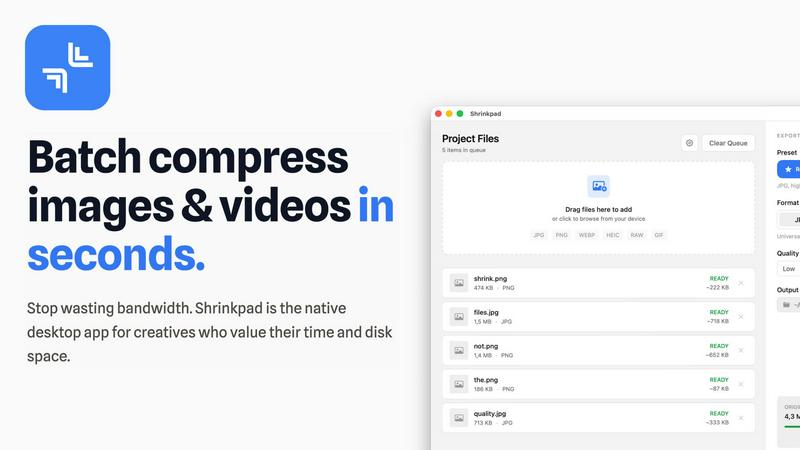
Transform your workflow with Shrinkpad, the ultimate tool for batch compressing images and videos on Mac effortlessly.
Last updated: February 28, 2026
Visual Comparison
Nano AI

Shrinkpad
Feature Comparison
Nano AI
Flash-Speed Nano Banana AI Model
The proprietary Nano Banana model is the revolutionary engine powering the platform. It specializes in sub-10-second generation times for both text-to-image and image-to-image tasks, a feat achieved through advanced flash-speed inference orchestration. This model goes beyond simple prompt execution; it honors layered instructions, stylistic cues, and complex constraints without requiring extensive prompt engineering, making high-fidelity generation deceptively simple and incredibly fast.
Unified Creative Workspace
Nano AI demolishes the need for a dozen disparate apps by integrating AI image generation, granular editing, and team collaboration into one seamless interface. Move from a text prompt to using the Magic Edit tool for inpainting and outpainting, then apply Deep Style Tuning, and finally share to a team gallery—all in a continuous, unbroken workflow. This unified space is designed to eliminate context-switching and keep creative momentum at its peak.
Deep Style Tuning & Magic Edit
Move beyond generic filters. Deep Style Tuning grants granular, prompt-based control over lighting, texture, and composition—describe a "Renaissance lighting on cyberpunk geometry" and the Nano Banana model faithfully executes. Complementing this is Magic Edit, which allows for inpainting and outpainting using natural language. Simply highlight an area and describe the change to alter objects, colors, or expand backgrounds instantly.
Upcoming 4K Neural Upscaling & Tool Suite
The platform is future-proof with powerful features on the horizon. The upcoming 4K Neural Upscaler intelligently hallucinates believable detail—like skin pores or fabric texture—to transform drafts into production-ready, billboard-sized assets. Furthermore, Nano AI includes a growing library of utility tools like Background Removal, Image to Prompt conversion, and specialized effects (e.g., Photo to Watercolor) for a complete asset finishing suite.
Shrinkpad
Batch Compression
Shrinkpad revolutionizes the way assets are managed by offering unlimited batch processing capabilities. Users can drag and drop entire folders filled with images and videos, allowing the application to automatically detect and optimize all supported files in one go, streamlining workflows and saving valuable time.
Smart Detection
The application intelligently identifies over 30 different image formats, including RAW files, and all major video formats. This feature ensures that users can process a diverse range of media types simultaneously, with Shrinkpad applying the optimal compression settings tailored for each specific file type.
Privacy Protection
With Shrinkpad, privacy is paramount. All processing occurs locally on the user's machine, ensuring that no files are ever uploaded to the cloud. This guarantees that sensitive and creative assets remain secure and confidential, allowing users to work with peace of mind.
Auto-Renaming and Metadata Stripping
Shrinkpad offers powerful features that enhance workflow efficiency, such as automatic renaming and metadata stripping. Users can effortlessly export files from design tools like Figma and Photoshop, and Shrinkpad will optimize and rename them in bulk, making asset management seamless and organized.
Use Cases
Nano AI
Rapid Marketing & Ad Campaign Prototyping
Marketing teams can ideate and visualize campaign concepts at unprecedented speed. Generate multiple ad variations, social media banners, and product mockups in minutes instead of days. The ability to quickly iterate on styles, swap elements with Magic Edit, and produce a polished gallery of options allows for rapid client feedback and faster campaign deployment, perfectly aligning with agile marketing sprints.
Concept Art & Creative Exploration
Artists and concept designers can use Nano AI as a powerful brainstorming partner. Rapidly generate mood boards, character concepts, and environment sketches from text descriptions. The Deep Style Tuning feature allows for precise exploration of visual aesthetics, while the unified workspace lets artists refine and edit promising generations on the spot, dramatically accelerating the early creative development phase.
E-commerce & Product Visualization
E-commerce managers and entrepreneurs can generate high-quality product visuals and lifestyle imagery without expensive photoshoots. Create models wearing apparel, visualize products in different settings, or generate complementary items. The Background Remover and quick editing tools enable the creation of clean, consistent asset libraries for websites and catalogs at a fraction of the traditional cost and time.
Streamlined Design Team Collaboration
Design teams can centralize their workflow within Nano AI's shared environment. Generate initial concepts, store them in shared galleries for team review, and use collaborative features to comment and iterate. The platform ensures everyone works from the latest version, drastically reducing feedback loops and version confusion, enabling teams to ship cohesive visual projects faster.
Shrinkpad
Photographers
Professional photographers can utilize Shrinkpad to compress high-resolution images without sacrificing quality. By reducing file sizes, they can streamline their storage solutions and improve the speed of image uploads and sharing.
Graphic Designers
Graphic designers often work with multiple assets from various sources. Shrinkpad allows them to compress and optimize their design files quickly, ensuring that they maintain high visual standards while minimizing file sizes for faster project turnaround.
Content Creators
Content creators, including videographers and social media influencers, can benefit from Shrinkpad’s ability to handle large video files. With efficient compression, they can produce and share high-quality content without the hassle of bulky files and slow upload speeds.
Development Teams
Development teams working on web applications can leverage Shrinkpad to reduce app bundle sizes and improve website load times. By optimizing media assets, they can achieve faster LCP scores, ultimately enhancing user experience.
Overview
About Nano AI
Nano AI is the definitive creative platform engineered for the post-wait era of visual production. It shatters the archaic, fragmented creative workflow by unifying the entire visual pipeline—from initial concept to final asset—into a single, hyper-streamlined workspace. At its core is the revolutionary Nano Banana model, a proprietary AI engine that delivers sub-10-second text-to-image and image-to-image results through flash-speed orchestration. This isn't just about raw speed; it's about preserving the sacred creative flow. Users can ideate, generate, and then granularly edit with tools like inpainting, outpainting, and deep style tuning, all without ever switching contexts or suffering render delays. Designed for creators, marketers, designers, and agile production teams, Nano AI's value proposition is uncompromising: obliterate tool-hopping and render queues to ship professional, commercially viable visuals at the velocity of thought. With features like shared galleries, upcoming 4K neural upscaling, and robust API access, it transforms fleeting inspiration into shippable assets before the brainstorming meeting even concludes. Nano AI is where the future of creative work converges into one powerful, intuitive, and instantaneous experience.
About Shrinkpad
Shrinkpad is a cutting-edge desktop application engineered specifically for macOS, redefining the image and video compression landscape for creative professionals and enthusiasts. By harnessing the power of batch processing, Shrinkpad allows users to effortlessly drop hundreds of files or entire folders, compressing them in seconds while ensuring utmost privacy. The application stands out by performing all media processing locally through native macOS frameworks, which means that users can enjoy complete data security without the need for cloud uploads. This revolutionary approach not only safeguards your sensitive assets but also enhances processing speed and efficiency. With Shrinkpad, users can achieve file size reductions of up to 90% without compromising on visual quality, making it the ideal solution for photographers, designers, content creators, and anyone frustrated by the burden of oversized media files.
Frequently Asked Questions
Nano AI FAQ
What makes Nano AI different from other AI image generators?
Nano AI differentiates itself through its all-in-one, unified workspace and its foundational speed. While many tools offer generation, Nano AI combines flash-speed (sub-10-second) AI generation via its Nano Banana model with granular editing tools, style control, and team collaboration features in a single platform. This eliminates the need to juggle multiple apps, preserving creative flow and drastically reducing total project time from idea to final asset.
What is the Nano Banana model?
Nano Banana is the proprietary AI engine at the core of Nano AI. It is specifically engineered for flash-speed inference, delivering image generation results in under 10 seconds. More than just fast, it is adept at understanding layered and nuanced prompts, allowing users to describe complex styles and constraints in natural language without requiring advanced prompt engineering techniques to get high-quality, usable results.
Can I use Nano AI for commercial projects?
Yes, Nano AI is designed to produce commercially viable visuals. The platform's focus on high-quality output, professional editing tools like 4K upscaling (coming soon), and style control ensures the assets you create are suitable for professional use in marketing materials, advertising, product visualization, and other commercial applications. Always review the specific terms of service for licensing details.
What are "Magic Edit" and "Deep Style Tuning"?
Magic Edit is an advanced inpainting/outpainting tool that lets you edit specific parts of an image using natural language. Highlight an area, type a command (e.g., "change shirt to blue"), and the AI regenerates that section. Deep Style Tuning provides granular control over the artistic style of an image through text prompts, allowing you to dictate specific lighting, texture, and compositional qualities beyond simple filter presets.
Shrinkpad FAQ
Can I use Shrinkpad for free?
Yes, Shrinkpad offers a Free Starter plan that includes essential tools for casual use, allowing users to test out the application's capabilities before committing to a paid plan.
What file formats does Shrinkpad support?
Shrinkpad supports a wide range of formats, including JPG, PNG, WEBP, AVIF for images, and MP4, MOV for videos. This extensive compatibility ensures that users can work with various types of media without limitations.
Does Shrinkpad support video compression?
Absolutely! Shrinkpad excels at compressing not just images but also videos, allowing users to optimize their media for storage and performance seamlessly.
How many files can I process at once?
With Shrinkpad's unlimited batch processing feature, users can process thousands of files simultaneously without crashing, making it a powerful tool for handling large projects efficiently.
Alternatives
Nano AI Alternatives
Nano AI is a hyper-streamlined, all-in-one creative platform engineered for ultra-fast AI image generation and editing. It belongs to the category of AI-powered visual production tools, designed to unify ideation, granular editing, and collaboration into a single, frictionless workspace. Its core promise is to obliterate render delays and maintain creative momentum. Users explore alternatives for various reasons, from budget constraints and specific feature requirements to different platform integrations or workflow needs. Some may seek tools with a stronger focus on a particular niche, like 3D rendering or open-source model access, while others prioritize different pricing structures or standalone applications over an all-in-one platform. When evaluating an alternative, key considerations should include generation speed and quality, the depth of editing and control tools, collaboration features for teams, and the overall cost-to-value ratio. The goal is to find a solution that aligns with your specific creative velocity and production pipeline, ensuring it enhances rather than interrupts your workflow.
Shrinkpad Alternatives
Shrinkpad is a cutting-edge desktop application tailored for macOS, designed to simplify the compression of images and videos for creatives and professionals. By allowing users to effortlessly batch compress files, Shrinkpad stands at the forefront of the image and video optimization category, providing a seamless experience that prioritizes quality and efficiency. Users often seek alternatives to Shrinkpad for various reasons, including pricing models, feature sets, or specific platform compatibility. When choosing an alternative, it is crucial to consider factors such as ease of use, compression quality, privacy measures, and the ability to handle a variety of file types. The right alternative should not only meet your technical needs but also align with your workflow and preferences, ensuring a smooth transition and optimal performance.