
Seedream 5.0 AI vs Shrinkpad
Side-by-side comparison to help you choose the right AI tool.

Seedream 5.0 AI generates stunning 2K images and cinematic videos from your text.
Last updated: February 28, 2026

Shrinkpad
Transform your workflow with Shrinkpad, the ultimate tool for batch compressing images and videos on Mac effortlessly.
Last updated: February 28, 2026
Visual Comparison
Seedream 5.0 AI

Shrinkpad
Feature Comparison
Seedream 5.0 AI
Ultra-High-Fidelity 2K Image Generation
Experience studio-grade output with images generated at a breathtaking 2048x2048 resolution. The model captures photography-level details, from the intricate weave of fabric and lifelike skin textures to precise light reflections and shadows, delivering visuals that stand up to professional scrutiny and commercial use.
Advanced Multi-Subject Scene Composition
Move beyond single-subject generation. Seedream 5.0 AI excels at composing complex scenes with three or more distinct subjects, maintaining individual attributes, accurate spatial relationships, and natural interactions within a single, coherent image, unlocking new possibilities for narrative and conceptual artwork.
Native Style Control & Image-to-Image Editing
Seamlessly switch between a vast spectrum of visual aesthetics including photorealism, anime, cyberpunk, watercolor, and 3D rendering using simple text commands. Furthermore, upload any image and instruct edits in natural language for precise style transfer, object removal, or background swaps.
Cinematic Video Generation with Seedance 2.0
Expand your creativity into motion with integrated cinematic video generation. Powered by the Seedance 2.0 model, transform text prompts or images into synchronized audio-video sequences ranging from three to fifteen seconds, perfect for dynamic social content, storyboards, and short promotional clips.
Shrinkpad
Batch Compression
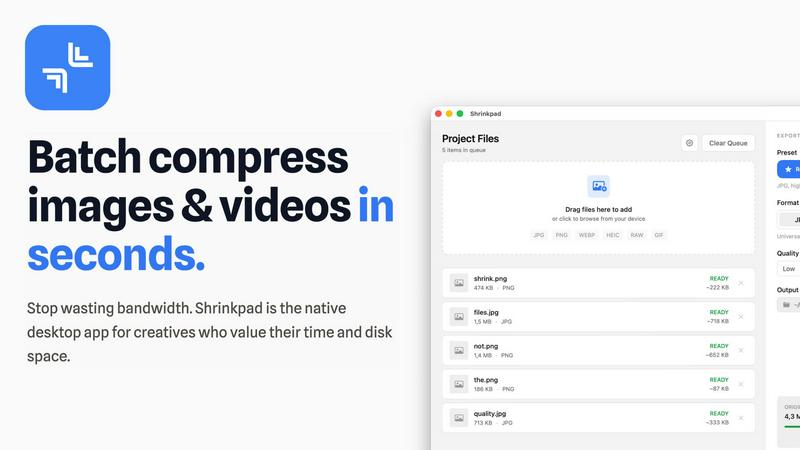
Shrinkpad revolutionizes the way assets are managed by offering unlimited batch processing capabilities. Users can drag and drop entire folders filled with images and videos, allowing the application to automatically detect and optimize all supported files in one go, streamlining workflows and saving valuable time.
Smart Detection
The application intelligently identifies over 30 different image formats, including RAW files, and all major video formats. This feature ensures that users can process a diverse range of media types simultaneously, with Shrinkpad applying the optimal compression settings tailored for each specific file type.
Privacy Protection
With Shrinkpad, privacy is paramount. All processing occurs locally on the user's machine, ensuring that no files are ever uploaded to the cloud. This guarantees that sensitive and creative assets remain secure and confidential, allowing users to work with peace of mind.
Auto-Renaming and Metadata Stripping
Shrinkpad offers powerful features that enhance workflow efficiency, such as automatic renaming and metadata stripping. Users can effortlessly export files from design tools like Figma and Photoshop, and Shrinkpad will optimize and rename them in bulk, making asset management seamless and organized.
Use Cases
Seedream 5.0 AI
Marketing & Advertising Asset Creation
Rapidly produce high-conversion visual content for campaigns, social media, and product launches. Generate photorealistic product shots, diverse model portraits, and compelling ad banners in specific brand styles, drastically reducing photoshoot costs and accelerating time-to-market.
Concept Art & Entertainment Pre-Visualization
Visualize characters, environments, and keyframes with unparalleled speed and detail. Game developers, filmmakers, and authors can iterate on cyberpunk cityscapes, fantasy creatures, or cinematic scenes, using the tool to flesh out concepts and create compelling pitch materials.
Professional Design & Content Production
Empower graphic designers, web developers, and content creators with an endless stream of custom visuals. Create unique website hero images, editorial illustrations, book covers, and blog graphics that are perfectly tailored to the project's theme and aesthetic requirements.
Personalized Creative Projects & Prototyping
Bring personal visions to life, from designing custom anime characters and envisioning architectural concepts to creating personalized artwork. Entrepreneurs can prototype product ideas visually, while artists can explore new styles and compositions without traditional material constraints.
Shrinkpad
Photographers
Professional photographers can utilize Shrinkpad to compress high-resolution images without sacrificing quality. By reducing file sizes, they can streamline their storage solutions and improve the speed of image uploads and sharing.
Graphic Designers
Graphic designers often work with multiple assets from various sources. Shrinkpad allows them to compress and optimize their design files quickly, ensuring that they maintain high visual standards while minimizing file sizes for faster project turnaround.
Content Creators
Content creators, including videographers and social media influencers, can benefit from Shrinkpad’s ability to handle large video files. With efficient compression, they can produce and share high-quality content without the hassle of bulky files and slow upload speeds.
Development Teams
Development teams working on web applications can leverage Shrinkpad to reduce app bundle sizes and improve website load times. By optimizing media assets, they can achieve faster LCP scores, ultimately enhancing user experience.
Overview
About Seedream 5.0 AI
Seedream 5.0 AI represents a paradigm shift in creative generation, a fifth-generation diffusion transformer model engineered to obliterate the boundaries between imagination and visual reality. This is not merely an image generator; it is a comprehensive creative suite that empowers creators, designers, and production teams to materialize professional-grade visuals and cinematic videos from simple text descriptions. At its core, Seedream 5.0 AI leverages a revolutionary architecture to deliver unprecedented 2K resolution output, rivaling the fidelity of high-end photography with its meticulous detail, photorealistic textures, and dynamic lighting. The platform's advanced neural language comprehension ensures complex prompts are interpreted with surgical precision, accurately rendering spatial layouts, artistic styles, and nuanced moods. Coupled with its sibling model, Seedance 2.0 for multimodal video generation, it offers a unified workflow for next-generation content creation. Designed for the visionary professional, Seedream 5.0 AI is the ultimate solution for generating stunning visuals for marketing, entertainment, design, and beyond, transforming conceptual sparks into finished assets in seconds.
About Shrinkpad
Shrinkpad is a cutting-edge desktop application engineered specifically for macOS, redefining the image and video compression landscape for creative professionals and enthusiasts. By harnessing the power of batch processing, Shrinkpad allows users to effortlessly drop hundreds of files or entire folders, compressing them in seconds while ensuring utmost privacy. The application stands out by performing all media processing locally through native macOS frameworks, which means that users can enjoy complete data security without the need for cloud uploads. This revolutionary approach not only safeguards your sensitive assets but also enhances processing speed and efficiency. With Shrinkpad, users can achieve file size reductions of up to 90% without compromising on visual quality, making it the ideal solution for photographers, designers, content creators, and anyone frustrated by the burden of oversized media files.
Frequently Asked Questions
Seedream 5.0 AI FAQ
What is the resolution of images generated by Seedream 5.0 AI?
Seedream 5.0 AI generates images at an ultra-high-definition 2K resolution, specifically 2048 pixels by 2048 pixels. This professional-grade resolution ensures exceptional detail and clarity, making the images suitable for print, digital displays, and commercial applications.
Can I edit existing images with Seedream 5.0 AI?
Yes, the platform features powerful image-to-image editing capabilities. You can upload any image and describe the desired edits using natural language. The AI will then perform tasks such as changing the artistic style, removing unwanted objects, swapping backgrounds, or altering specific elements as instructed.
How does the multi-subject composition feature work?
This advanced feature allows you to describe a scene containing multiple distinct subjects (e.g., "a knight, a dragon, and a wizard in a forest clearing"). Seedream 5.0 AI's sophisticated model understands and renders each subject with its defined attributes while correctly composing their spatial relationships and interactions within a single, coherent image.
What is Seedance 2.0 and how is it integrated?
Seedance 2.0 is a state-of-the-art multimodal video generation model integrated within the Seedream ecosystem. It allows you to create short, cinematic videos (3-15 seconds) directly from text prompts or by using an image as a starting point, complete with synchronized audio, all within the same seamless workflow.
Shrinkpad FAQ
Can I use Shrinkpad for free?
Yes, Shrinkpad offers a Free Starter plan that includes essential tools for casual use, allowing users to test out the application's capabilities before committing to a paid plan.
What file formats does Shrinkpad support?
Shrinkpad supports a wide range of formats, including JPG, PNG, WEBP, AVIF for images, and MP4, MOV for videos. This extensive compatibility ensures that users can work with various types of media without limitations.
Does Shrinkpad support video compression?
Absolutely! Shrinkpad excels at compressing not just images but also videos, allowing users to optimize their media for storage and performance seamlessly.
How many files can I process at once?
With Shrinkpad's unlimited batch processing feature, users can process thousands of files simultaneously without crashing, making it a powerful tool for handling large projects efficiently.
Alternatives
Seedream 5.0 AI Alternatives
Seedream 5.0 AI represents the vanguard of generative AI, a fifth-generation diffusion transformer model engineered to produce photorealistic 2K visuals from simple text prompts. It stands as a paradigm-shifting tool within the AI image generation landscape, designed for creators who demand studio-grade output. Users often explore the broader ecosystem for various reasons. Some seek different pricing models or subscription tiers, while others prioritize specific workflows, integration capabilities, or unique stylistic outputs not covered by a single platform. The quest for an alternative is a natural part of navigating a rapidly evolving technological frontier. When evaluating other solutions, key considerations include the model's core architecture, output resolution and fidelity, nuanced prompt understanding, and the overall ecosystem's support for iterative creative workflows. The ideal platform should align with your specific production needs and creative vision.
Shrinkpad Alternatives
Shrinkpad is a cutting-edge desktop application tailored for macOS, designed to simplify the compression of images and videos for creatives and professionals. By allowing users to effortlessly batch compress files, Shrinkpad stands at the forefront of the image and video optimization category, providing a seamless experience that prioritizes quality and efficiency. Users often seek alternatives to Shrinkpad for various reasons, including pricing models, feature sets, or specific platform compatibility. When choosing an alternative, it is crucial to consider factors such as ease of use, compression quality, privacy measures, and the ability to handle a variety of file types. The right alternative should not only meet your technical needs but also align with your workflow and preferences, ensuring a smooth transition and optimal performance.