
SimpleDraw vs Supermachine
Side-by-side comparison to help you choose the right AI tool.

SimpleDraw
SimpleDraw is the AI-native platform that instantly generates precise architectural drawings and floor plans.
Last updated: February 28, 2026

Supermachine
Supermachine empowers creators to effortlessly craft stunning, commercial-ready AI images and videos using over 60 innovative models.
Last updated: March 18, 2026
Visual Comparison
SimpleDraw
Supermachine

Feature Comparison
SimpleDraw
Intelligent Floor Plan Mode
This dedicated mode is a specialized environment for architectural ideation. With a single click, users can draw walls and instantly populate them with standardized doors and windows. A comprehensive library of interior fixtures for kitchens, bathrooms, and living spaces allows for rapid, realistic visualization. All measurements update in real-time as you adjust your design, providing a dynamic and accurate blueprint for any spatial project, completely free of charge.
Adaptive Smart Alignment System
SimpleDraw features a context-aware alignment engine that intelligently assists in precision placement. As you move your cursor, the system predicts your intent, snapping points and lines to logical positions with clear visual feedback. For ultimate control, you can lock movements to vertical or horizontal axes using keyboard shortcuts, or zoom in to override the AI's suggestion and place elements with pixel-perfect accuracy, blending automated assistance with manual mastery.
Non-Destructive, Fully Editable Canvas
Every element in your drawing exists in a state of perpetual malleability. This 100% non-destructive editing paradigm means any line, shape, or fixture can be modified, moved, or adjusted at any point in your workflow. Combine this with robust undo/redo functionality and the ability to group, copy, and paste elements, and you have a fluid, iterative workspace that eliminates the fear of making permanent mistakes.
Dynamic Precision & Measurement Suite
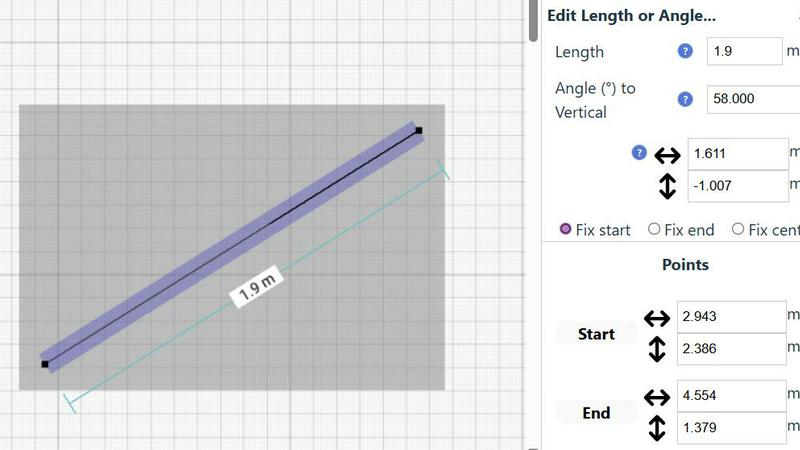
The platform offers a comprehensive and flexible measurement system. Precision intelligently adapts to your zoom level but can also be manually controlled. You can choose between metric and US standard units (feet/inches) and have fine-grained control over which measurements are displayed. Contextual measurements appear dynamically as you work, and you can input exact dimensions, lengths, and angles directly via keyboard for mathematically perfect designs.
Supermachine
ControlNet
ControlNet is a groundbreaking feature that allows creators to guide AI-generated images through advanced control mechanisms. It empowers users to define specific attributes and styles, ensuring that generated visuals align closely with their creative vision. This results in a more tailored and satisfying creative process.
Instruction Model
The Instruction Model is designed to interpret user commands and translate them into high-quality visual outputs. By understanding nuanced instructions, this feature enables creators to achieve precise results without needing to be AI experts. It significantly reduces the learning curve associated with AI-based content creation.
Video Generation
With the Video Generation feature, users can effortlessly create captivating short-form videos that capture attention and engage audiences. This feature leverages the power of AI to automate video production, enabling users to focus on storytelling rather than the technicalities of video editing.
AI Edit Image (Photoshop AI)
The AI Edit Image feature brings the power of Photoshop to your fingertips. This advanced tool allows users to make intricate edits and enhancements to their images using AI-driven techniques. Whether you need to retouch portraits or enhance landscapes, this feature simplifies the editing process while delivering professional-grade results.
Use Cases
SimpleDraw
Home Renovation & Remodel Planning
Materialize your renovation vision before the first hammer swings. Plan kitchen and bathroom layouts with accurate measurements, ensuring appliances, cabinets, and fixtures fit perfectly. Test multiple design iterations in minutes to optimize workflow and aesthetics, transforming vague ideas into actionable, precise construction plans without costly software or professional draftsman fees.
Furniture & Interior Space Planning
Eliminate the guesswork from furnishing a room. Visualize your bedroom, living room, or office layout to scale. Test if your desired sofa, bed, or desk will fit and allow for proper walkways. This proactive planning prevents costly purchasing mistakes and helps create harmonious, functional living spaces tailored to your exact dimensions and lifestyle needs.
Complete Residential Floor Plan Creation
Create detailed, professional-grade floor plans for entire houses or apartments. Ideal for homeowners planning additions, landlords creating rental listings, or individuals managing a move. Document room dimensions, door swings, and window placements to communicate spatial relationships clearly for contractors, real estate purposes, or personal project management.
Technical Schematics & DIY Project Drafting
Beyond floor plans, leverage the precision-drafting engine for a wide array of technical drawings. Design workshop layouts, garden plans, custom furniture builds, or simple mechanical schematics. The combination of smart alignment, direct numerical input, and scale accuracy makes it an indispensable tool for any project requiring a clear, measured diagram.
Supermachine
Social Media Content Creation
Supermachine is the perfect companion for social media managers seeking to produce eye-catching content quickly. With its ability to generate stunning images and videos in seconds, users can maintain a consistent posting schedule without sacrificing quality or creativity.
Marketing Campaigns
Marketers can leverage Supermachine to craft compelling visuals for their campaigns. The platform's robust features allow for rapid iteration and experimentation, enabling teams to develop engaging advertisements that resonate with their target audience and drive conversions.
Digital Art Exploration
Artists looking to explore digital mediums will find Supermachine a valuable tool. The platform's extensive library of AI models encourages experimentation, allowing users to push the boundaries of their creativity and discover new styles and techniques in their artwork.
Small Business Advertising
Small business owners can harness the power of Supermachine to create professional-quality ads that capture attention and drive sales. With a user-friendly interface and quick turnaround times, business owners can focus on their core operations while ensuring their marketing materials are top-notch.
Overview
About SimpleDraw
SimpleDraw is a paradigm-shifting, browser-native spatial design platform that redefines accessible precision drafting. It is a revolutionary tool engineered to transform casual ideation into professional-grade, accurate scale drawings and floor plans without the traditional barriers of complex CAD software. Designed for the visionary DIY enthusiast, the proactive homeowner, and the agile project planner, SimpleDraw democratizes technical drawing by merging intuitive, pen-and-paper simplicity with computational precision. Its core value proposition is a frictionless, zero-commitment creative environment: it operates entirely within your browser, requires no downloads, installations, or user registration, and is completely free to use. This platform empowers users to materialize their spatial concepts—from room renovations and home layouts to technical schematics—with a toolset that is both powerfully flexible and deliberately simple, ensuring that the focus remains on creation, not on learning cumbersome software. It is a quantum leap in design accessibility, delivering CAD-level precision through an interface that feels instantly familiar.
About Supermachine
Supermachine is an innovative all-in-one creative studio that revolutionizes the way creators generate high-quality images and videos. Powered by cutting-edge artificial intelligence, Supermachine is tailored for individuals at every skill level, from seasoned professionals to enthusiastic beginners. The platform eliminates the complexities typically associated with content creation, enabling users to effortlessly produce professional-grade visuals in mere seconds. Whether you are a social media manager in need of engaging daily content, a marketer crafting compelling campaign visuals, an artist diving into digital art, or a small business owner developing captivating advertisements, Supermachine is your go-to solution. Its standout value proposition lies in its speed and user-friendly interface: with the ability to create stunning stock photos, illustrations, thumbnails, NFTs, and short-form videos in under 15 seconds, you do not need to master intricate prompt engineering. Trusted by over 100,000 creators who collectively generate a million images weekly, Supermachine distinguishes itself by offering a carefully curated selection of over 60 high-performing AI models. This selective integration ensures that users receive only the most effective tools, making Supermachine the ultimate choice for reliable and top-tier creative results.
Frequently Asked Questions
SimpleDraw FAQ
Is SimpleDraw really free to use with no hidden costs?
Yes, absolutely. SimpleDraw is committed to democratizing design and is completely free to use. There are no subscription tiers, premium feature locks, or hidden costs. The platform operates on a zero-commitment model: no software downloads, installations, or user account registration is required. You can access all current features directly in your web browser at no charge.
Do I need any prior CAD or technical drawing experience?
Not at all. SimpleDraw is engineered specifically to eliminate the steep learning curve of traditional CAD software. Its interface leverages intuitive, pen-and-paper metaphors combined with intelligent assistance like the Smart Alignment System. You can start creating meaningful, accurate drawings within minutes, making professional-grade drafting accessible to complete beginners.
Can I use SimpleDraw on any device or computer?
SimpleDraw is a browser-native application, meaning it runs entirely within your web browser. It is compatible with most modern browsers on desktop and laptop computers, including those running Chrome, Firefox, Safari, and Edge. For the optimal experience with precise cursor control, using a computer with a mouse is recommended over a touchscreen device.
How does SimpleDraw incorporate user feedback into development?
SimpleDraw is built on a community-driven development model. The evolution of the platform is directly influenced by real user feedback and requests. Users are actively encouraged to join the official Discord community to suggest new features, report issues, and participate in discussions that shape the product's future roadmap, ensuring it grows in a direction that serves its users' needs.
Supermachine FAQ
What types of content can I create with Supermachine?
With Supermachine, you can create a diverse range of content, including stock photos, illustrations, thumbnails, NFTs, and short-form videos, all powered by advanced AI technology.
Is Supermachine suitable for beginners?
Absolutely! Supermachine is designed for creators of all skill levels. Its intuitive interface and simplified processes make it easy for beginners to start creating stunning visuals without needing extensive technical knowledge.
How quickly can I generate content using Supermachine?
Supermachine allows you to generate high-quality images and videos in under 15 seconds, enabling you to produce content rapidly and efficiently, regardless of your experience level.
Can I customize the AI-generated outputs?
Yes, Supermachine offers features like ControlNet and AI Edit Image that allow users to customize and refine their AI-generated outputs according to their specific creative preferences and needs.
Alternatives
SimpleDraw Alternatives
SimpleDraw is a paradigm-shifting, browser-native spatial design platform that redefines accessible precision drafting. It belongs to the category of AI-native design tools, engineered to instantly generate professional-grade scale drawings and floor plans directly within your web browser. Users may explore alternatives for various reasons, such as seeking advanced features for complex architectural projects, requiring offline desktop software, or needing integrated solutions within a larger professional ecosystem. The quest often centers on specific workflow requirements, platform compatibility, or specialized toolset demands. When evaluating other platforms, consider the core value proposition: frictionless access, computational precision, and intuitive operation. Key decision factors include the learning curve, deployment model, cost structure, and the balance between raw power and deliberate simplicity that keeps the focus on creation.
Supermachine Alternatives
Supermachine is a cutting-edge platform that empowers creators to generate stunning, commercial-ready AI images and videos with remarkable speed and simplicity. As an all-in-one creative studio, it serves a diverse range of users, from social media managers to small business owners, who seek to elevate their visual content effortlessly. The platform's advanced features and curated selection of over 60 high-performing AI models make it a revolutionary tool in the design category. Users commonly seek alternatives to Supermachine for various reasons, including pricing considerations, specific feature requirements, or compatibility with distinct platform needs. When exploring alternative solutions, it’s vital to assess factors such as the quality of the AI models offered, the ease of use, the range of creative capabilities, and the overall reliability of the platform. Finding the right alternative hinges on identifying a tool that aligns with your creative objectives while delivering unparalleled results.