

ButterKit
ButterKit revolutionizes app growth by seamlessly generating stunning localized screenshots and metadata across all App Store languages.
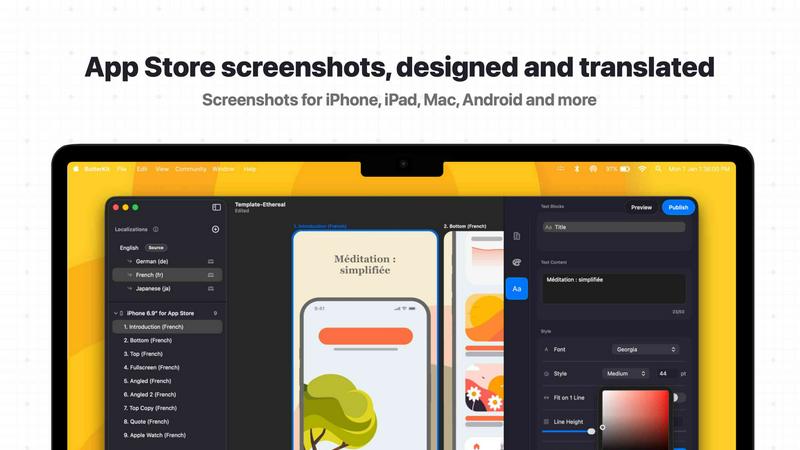
About ButterKit
ButterKit is a revolutionary, native macOS application engineered to obliterate the friction from the App Store publishing workflow for Apple developers. It is a futuristic, all-in-one command center designed for developers, design studios, and marketing agencies who demand speed, precision, and global reach. At its core, ButterKit transforms the tedious, multi-step process of creating App Store assets into a single, automated, and intelligent pipeline. The product's primary value proposition is its ability to capture screenshots directly from the Xcode Simulator, instantly place them into stunning, photorealistic 3D device frames, and then translate all associated metadata into 50 App Store Connect languages using advanced AI models. This eliminates the manual drudgery of localization and design iteration. Beyond mere asset creation, ButterKit integrates seamlessly with the App Store Connect API, enabling one-click uploads of polished screenshots and metadata. It is built for efficiency, linking entire folders for input and output, making it a natural and powerful component for CI/CD pipelines and Fastlane workflows. Created by a solo developer for developers, ButterKit is a paradigm shift, turning a chaotic, error-prone process into a smooth, efficient, and even enjoyable experience. It is not just a tool; it is a strategic advantage for any developer looking to conquer the global App Store.
Features of ButterKit
Intelligent Screenshot Capture and Placement
ButterKit revolutionizes the initial asset creation phase. Users can drag and drop PNG or JPG images directly onto high-fidelity 3D device frames, or leverage the deep integration with Xcode Simulator to capture screenshots directly from running app builds. This native integration allows for rapid iteration, ensuring the perfect design is captured and placed in a photorealistic context instantly. Furthermore, the ability to link an entire folder of pre-generated screenshots, such as those from Fastlane or Xcode UI tests, automates the entire process, handling batches of images with localizations effortlessly.
Advanced 3D Design and Rendering Engine
ButterKit is powered by a sophisticated 3D rendering engine built on Metal, delivering blazing-fast performance up to 120fps. It offers a library of high-resolution, photorealistic 3D devices that are not just static placeholders but fully adjustable objects. Users can span these 3D devices across multiple artboards to create seamless, panoramic backgrounds that tell a compelling visual story. The suite includes professional editing tools for full control over fonts, gradients, backgrounds, and device positioning, allowing for the creation of polished, high-conversion screenshots from scratch or via one-click professional templates.
AI-Powered Multilingual Translation and Localization
This feature acts as a global launchpad, obliterating language barriers. ButterKit utilizes advanced AI models to instantly translate all app metadata into all 50 App Store Connect localizations. This goes beyond simple text translation; the tool ensures that designs, including text within screenshots, remain perfectly synced and styled across every language. This removes the monumental hassle of manual localization, allowing developers to reach users in every App Store market with consistent, high-quality visuals and copy, all from a single source of truth.
Seamless App Store Connect Integration and Publishing
ButterKit closes the loop on the publishing workflow with its deep integration into the App Store Connect API. This feature enables developers to batch export all finalized images or, more powerfully, upload their complete designs directly to App Store Connect with a single click. The upload process is intelligent, ensuring screenshots are placed in the correct order and metadata is mapped to the correct localizations. This eliminates the need for manual web uploads and reduces the risk of errors, making the final step of publishing as smooth and automated as the asset creation process.
Use Cases of ButterKit
Solo Developer Launching a Global App
An independent developer has created a new productivity app. Using ButterKit, they capture screenshots directly from the Xcode Simulator, instantly frame them in a 3D device, and use the AI translation feature to localize the app's description and keywords into 50 languages. With one click, they upload the complete, polished set of assets to App Store Connect, transforming what would be days of work into a single afternoon, allowing them to compete globally from day one.
Design Agency Creating Assets for Multiple Clients
A design studio manages App Store assets for numerous clients. They use ButterKit to create a library of branded templates. For each client, they link a folder of Fastlane-generated screenshots. ButterKit automatically applies the template, translates the metadata via AI, and generates a preview of how the app's story will look on every device and in every language. This allows the agency to scale its services, maintain brand consistency, and deliver high-quality, localized assets with unprecedented speed.
Marketing Team Running a Global Campaign
A marketing team is preparing for a major app update with a global marketing push. They use ButterKit to rapidly iterate on different visual styles and messaging for the App Store listing. The team can quickly swap in new screenshots, adjust the 3D device orientation, and see the results in real-time. Once approved, they use the AI translation to prepare the campaign for all target markets and upload everything directly, ensuring the App Store listing is perfectly synchronized with their global marketing launch.
CI/CD Pipeline for Continuous Delivery
A development team has integrated ButterKit into their CI/CD pipeline using Fastlane. Every time a new build is created, the pipeline automatically generates screenshots using Xcode UI tests. These screenshots are fed into ButterKit via a linked folder. The tool then automatically applies the latest design template, translates the metadata, and uploads the final assets to App Store Connect for TestFlight review. This creates a fully automated loop, ensuring the App Store listing is always up-to-date with the latest app version without any manual intervention.
Frequently Asked Questions
How does ButterKit handle screenshots from Xcode UI tests and Fastlane?
ButterKit is engineered for seamless automation. You can link a folder of images generated by your Xcode UI tests or Fastlane workflow. The app will automatically process all images in the folder, apply your chosen design template and device frames, and prepare them for translation and upload. This makes it a perfect fit for automated CI/CD pipelines, ensuring your assets are always generated from the latest build without manual steps.
Can I use my own custom fonts and design elements in the templates?
Absolutely. ButterKit provides a full suite of professional editing tools that give you complete control over your designs. You can use any font installed on your macOS system, adjust gradients, modify backgrounds, and position text and images with pixel-perfect precision. The templates serve as a starting point, but you have the freedom to create entirely custom designs from scratch or modify existing ones to match your brand identity perfectly.
How does the AI translation feature work and which languages are supported?
ButterKit utilizes advanced AI models to instantly translate your app's metadata, including the description, keywords, and promotional text, into all 50 App Store Connect localizations. The translation is context-aware and designed to maintain the tone and meaning of your original copy. The tool also ensures that your designs, including any text within screenshots, remain synced across all languages, providing a consistent user experience globally.
Can I preview how my App Store page will look before publishing?
Yes, ButterKit includes a powerful App Store preview feature. Before you upload anything, you can see exactly how your app's story will appear on every device and in every language. This allows you to review the visual flow, check for any text truncation or layout issues, and ensure the overall presentation is compelling. This pre-flight check is crucial for catching errors and optimizing your listing before it goes live.
Similar to ButterKit

Forms Plugin
The #1 Native Form Builder Plugin for Framer - No Code, No Embeds, No External Platforms.


TryKlingAI
Create Kling AI videos from text, images, audio, and motion references with Kling 3.0, Motion Control, Lip Sync, task tracking, and API access.


