

ProcessSpy
ProcessSpy revolutionizes macOS process monitoring with advanced features for real-time insights, ensuring seamless performance and deep system.
About ProcessSpy
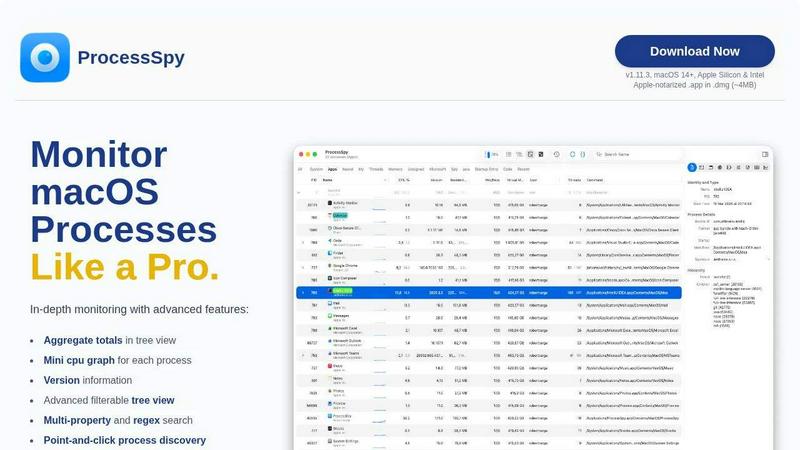
ProcessSpy is the revolutionary macOS Process Explorer and Advanced Monitor designed exclusively for power users, developers, and tech enthusiasts eager to harness the full capabilities of their systems. Unlike traditional tools like Activity Monitor, ProcessSpy unveils the hidden intricacies of macOS processes, empowering users to visualize process trees, inspect open files, and access environment variables. With its advanced features, users can swiftly kill stubborn applications, employ Javascript filters for complex queries, and explore detailed command-line information. Built with native APIs, ProcessSpy ensures a fluid, Mac-first experience, eliminating bloated cross-platform dependencies. This tool is not just about monitoring; it’s about mastering your environment and optimizing your workflow. Whether you're juggling multiple Java applications or developing sophisticated software, ProcessSpy delivers unparalleled insights to help you maintain control over your macOS ecosystem.
Features of ProcessSpy
Advanced Tree View
ProcessSpy's advanced tree view presents a hierarchical representation of processes, complete with real-time filtering and search capabilities. Users can view aggregate totals for CPU, Memory, and Threads, making it easy to analyze resource consumption across complex workflows.
Javascript Filters
With Javascript filters, users can define intricate filter conditions that transcend basic functionality. This enables the creation of multi-layered queries, allowing for precise identification of processes based on a variety of parameters, including command-line arguments and environment settings.
Process History Recording
This powerful feature allows users to record historical data for CPU, Memory, and Threads. By storing aggregate values and application status over time, users can export this data into CSV format for further analysis, ensuring a comprehensive view of application performance.
Environment Variables Insight
Unlocking the ability to view environment variables of running processes, this feature is essential for developers needing to troubleshoot and optimize applications. By providing deeper context into the operational environment, ProcessSpy enhances the diagnostic capabilities of its users.
Use Cases of ProcessSpy
Development and Debugging
For software developers, ProcessSpy is an indispensable tool for debugging applications. By revealing command-line arguments and environment variables, developers can quickly diagnose issues and optimize performance, ensuring that applications run smoothly under various conditions.
System Monitoring
IT professionals can leverage ProcessSpy to monitor system performance and resource usage in real-time. With advanced filtering and search capabilities, users can identify resource hogs and optimize system performance, ensuring stability and efficiency in mission-critical environments.
Security Auditing
Security analysts can utilize ProcessSpy to conduct thorough investigations of running processes. By examining entitlements and Info.plist files, analysts can identify potential vulnerabilities and ensure compliance with security protocols, safeguarding the integrity of the system.
Process Management
For users managing multiple applications, ProcessSpy provides a streamlined way to identify, tag, and manage processes. With the ability to kill stubborn applications instantly and remember finished processes, users can maintain a tidy workspace and enhance productivity.
Frequently Asked Questions
Is ProcessSpy safe to install on my Mac?
Yes, ProcessSpy is fully Apple-notarized and distributed as a signed application within a .dmg. It has been verified for safety and reliability on both Intel and Apple Silicon Macs, ensuring a secure user experience.
Does ProcessSpy support older versions of macOS?
No, ProcessSpy is optimized for macOS 14 and newer versions. Users with older macOS versions will not be able to utilize the advanced features and functionality that ProcessSpy provides.
What is the license model for ProcessSpy?
The license for ProcessSpy is valid for one user across unlimited devices. It includes lifetime updates and access to new features, ensuring that users can continuously benefit from enhancements and improvements to the tool.
How does ProcessSpy compare to Activity Monitor?
ProcessSpy outperforms Activity Monitor with its ability to display full command-line details, distinguish between identically named processes, and provide aggregate values in a hierarchical view. Additionally, it supports advanced filtering, environment variable inspection, and historical data recording, making it a superior choice for users who demand more from their monitoring tools.
Similar to ProcessSpy

Sprite Sheet Maker
A free browser-based toolkit for creating, cutting, converting, and previewing sprite sheet animations.

Forms Plugin
The #1 Native Form Builder Plugin for Framer - No Code, No Embeds, No External Platforms.


TryKlingAI
Create Kling AI videos from text, images, audio, and motion references with Kling 3.0, Motion Control, Lip Sync, task tracking, and API access.


