

QUVIAI
QUVIAI empowers you to effortlessly create stunning architectural visuals, videos, and music, transforming your ideas into reality.
About QUVIAI
QUVIAI is the revolutionary all-in-one AI-powered creative platform tailored specifically for architects, designers, and creators seeking to transform their imaginative concepts into stunning visuals. This platform empowers users to upload sketches, images, or 3D models and seamlessly convert them into photorealistic renders, cinematic videos, multi-angle views, floor plans, 3D objects, and even original music, all within a single ecosystem. It is designed to streamline the creative workflow, allowing users to model, render, and iterate within a built-in 3D workspace without the hassle of switching between various tools. QUVIAI's intuitive interface invites creativity while offering advanced capabilities such as scene editing with text prompts and the generation of furniture and decorative objects. Available on web, iOS, and Android, QUVIAI provides the tools needed to turn visions into reality, making it accessible for professionals and hobbyists alike. Experience a new era of creativity with QUVIAI, where innovation meets inspiration.
Features of QUVIAI
AI Image Generation
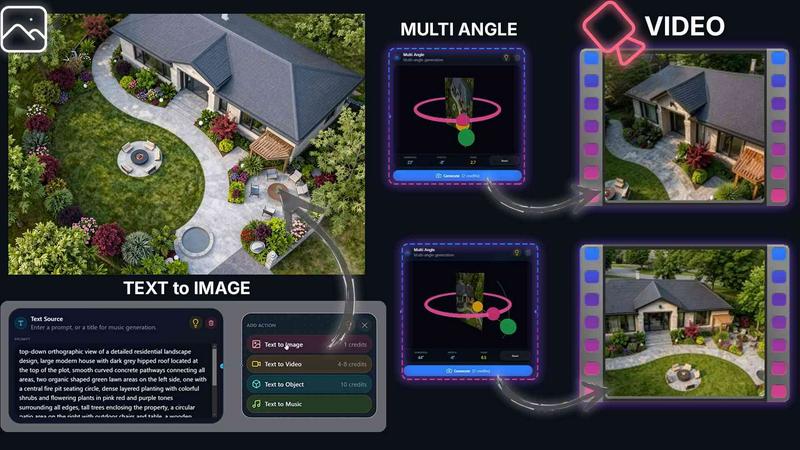
QUVIAI's AI image generation feature allows users to transform any text prompt or reference into breathtaking photorealistic architectural renders within seconds. This capability not only enhances creativity but also expedites the design process, making it invaluable for architects and designers.
AI Video Creation
With the AI video creation tool, users can animate still images, generate immersive walkthroughs, or craft cinematic sequences from a single prompt. This feature elevates storytelling in design presentations, providing a dynamic way to showcase projects.
Multi Angle Camera
The multi-angle camera feature enables the generation of multiple architectural viewpoints from a single source image. This rich perspective set is essential for creating comprehensive presentations, allowing clients to visualize concepts from various angles effortlessly.
Object Staging
QUVIAI's object staging functionality allows users to seamlessly integrate generated 3D objects into scene backgrounds. This feature ensures polished compositions with consistent lighting, crucial for producing high-quality architectural visuals that captivate audiences.
Use Cases of QUVIAI
Architectural Visualization
Architects can use QUVIAI to create stunning visual representations of their designs. By converting sketches and models into photorealistic renders and animations, they can effectively communicate their vision to clients and stakeholders.
Interior Design Presentations
Interior designers can leverage QUVIAI to produce detailed room layouts and design concepts. The platform's ability to generate multiple angles and realistic lighting helps in creating compelling presentations that resonate with clients.
Real Estate Marketing
Real estate professionals can utilize QUVIAI to enhance property listings with captivating visual content. By generating high-quality renders and videos, they can showcase properties in a dynamic way, attracting potential buyers and investors.
Creative Storytelling
Artists and creators can harness QUVIAI's capabilities to tell their stories through visual media. Whether it is creating animated videos or stunning visuals, QUVIAI provides the tools to bring creative ideas to life in an impactful manner.
Frequently Asked Questions
What types of files can I upload to QUVIAI?
Users can upload various file types including sketches, images, and 3D models. This flexibility allows for a wide range of creative possibilities and ensures that users can work with their existing materials.
Is QUVIAI suitable for beginners?
Absolutely! QUVIAI is designed with an intuitive interface that caters to users of all skill levels. Beginners can quickly learn to navigate the platform and start creating stunning visuals without extensive training.
Can I access QUVIAI on mobile devices?
Yes, QUVIAI is available on web, iOS, and Android platforms. This accessibility allows users to create and edit their projects on-the-go, making it a versatile tool for busy professionals.
Does QUVIAI offer a free trial?
Yes, QUVIAI provides a free trial that includes credits, allowing users to explore its features and generate their first render without any financial commitment. This trial encourages users to experience the platform's capabilities firsthand.
Similar to QUVIAI

Image to Layers AI
Turn images into editable AI-powered layers


Hailuo AI
Create high-quality videos from text or images with guided prompts, motion and camera controls, flexible settings, and downloadable results.

Vynzo
AI image and video studio. Generate from a prompt, animate stills, swap faces, restyle clips and edit — one credit pool, no subscription.

Z Image Turbo
Z Image Turbo is an online AI image generator for photorealistic visuals, bilingual posters, ecommerce assets, ads, and social content.

ProfileLoom
ProfileLoom turns one photo into platform-ready AI portraits for professional, social, and creator profiles, with presets and built-in editing.

Free AI Image
Free AI Image is a free text-to-image AI generator for creating clean visual drafts from prompts with no sign-up required.
