
Sketch To
Elevate your creativity by effortlessly transforming images into stunning sketches with Sketch To's AI-powered.
About Sketch To
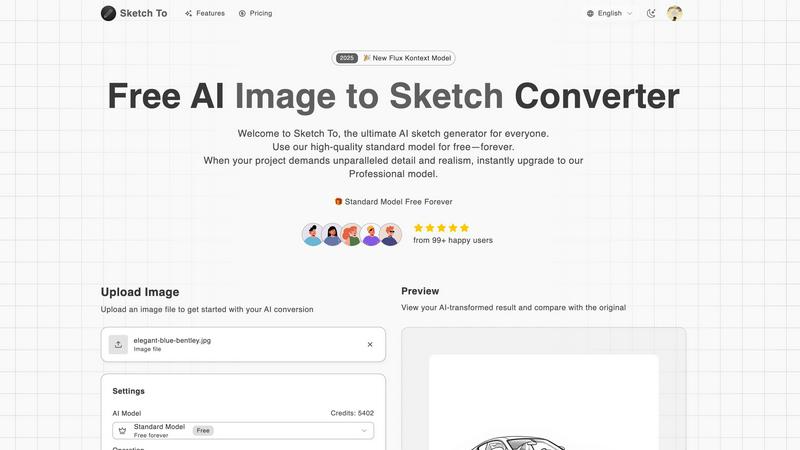
Sketch To is a groundbreaking AI-driven platform specifically designed to revolutionize the way artists and designers create and visualize their work. It offers a powerful dual functionality that allows users to convert images into exquisite sketches and transform sketches back into photorealistic images. Catering to a diverse audience ranging from casual hobbyists to seasoned professionals, Sketch To seamlessly integrates creativity with cutting-edge technology. The platform’s user-friendly interface makes it accessible for anyone looking to explore their artistic potential. With advanced AI algorithms, users can achieve high-quality conversions that enhance their creative projects, whether for social media, intricate artwork, or academic endeavors. The standout feature of Sketch To is its ability to handle both conversions with remarkable ease, making it a must-have tool in the arsenal of digital art enthusiasts. Additionally, new users are greeted with trial credits, enabling them to dive into the creative experience without any financial commitment, ensuring they can appreciate the innovative capabilities of Sketch To right from the start.
Features of Sketch To
AI Image to Sketch Conversion
Sketch To employs advanced AI technology to transform photos into stunning pencil sketches, offering artists and designers a unique way to reinterpret their visual input. This feature is perfect for creating artistic renditions that maintain the essence of the original image while adding a hand-drawn quality.
Sketch to Image Transformation
The innovative Pro model allows users to convert their sketches into highly detailed and realistic images. This feature is ideal for professionals looking to add depth and realism to their artwork, making it suitable for commercial projects or detailed portfolios.
Instant Processing
With its powerful AI processing engine, Sketch To delivers instant results, ensuring that users can quickly see their transformations without long waiting times. This efficiency is crucial for those working on tight deadlines or needing immediate feedback on their creative endeavors.
High-Resolution Output
Sketch To guarantees that all creations can be downloaded in high resolution, making them suitable for both print and professional use. This feature ensures that users do not compromise on quality, whether for personal projects or commercial applications.
Use Cases of Sketch To
Social Media Enhancement
Artists and content creators can use Sketch To to enhance their social media presence by converting their photos into unique sketches. This artistic approach can help them stand out and attract more engagement from their audience, making their posts more visually appealing.
Educational Projects
Students can utilize Sketch To for school projects that require artistic interpretations of images or concepts. By converting photos into sketches, they can create visually engaging presentations that showcase their understanding of the subject matter in a creative format.
Professional Artwork Creation
Professional artists can leverage the Pro model to transform their sketches into photorealistic images, allowing them to present their work in a polished and market-ready format. This capability is essential for those looking to sell their art or submit it for exhibitions.
Creative Exploration
Casual users and hobbyists can explore their artistic side with Sketch To. By experimenting with different styles and models, they can create personalized artwork that reflects their creativity and allows them to discover new artistic techniques.
Frequently Asked Questions
What types of images can I upload to Sketch To?
Sketch To supports various image formats, allowing users to upload photos and sketches seamlessly. Users can easily drag and drop their files onto the platform to begin the conversion process.
How does the trial credits system work?
New users are provided with trial credits that allow them to explore Sketch To's features without any initial investment. This enables users to experience the platform's capabilities before committing to a paid plan.
Can I upgrade from the Standard Model to the Pro model?
Yes, users can easily upgrade from the Standard Model to the Pro model whenever they need enhanced quality and realism. This flexibility allows users to choose the model that best fits their current project requirements.
How long does it take to process an image?
Sketch To's advanced AI processing engine ensures that image conversions are completed instantly. Users can expect to see their transformed images in a matter of seconds, making it an efficient tool for creatives.
Similar to Sketch To

LinkIntel
MCP server giving your AI assistant your X post results and X’s ranking weights, with sources.

screenRIG
Signage and kiosk infrastructure for AI agents. Your agent publishes images, video, streams, web pages and apps to screens via one plugin.screenRIG is

GetYouTubeTranscript
Free YouTube transcripts on the web, a Chrome extension, and an API + MCP server so AI assistants can read YouTube.


Speechyou
AI transcription for voice notes, meetings, and audio files in 1,700 languages, with AI summaries and subtitle export and unlimited chat ai usage.