

Subclip
Subclip is a revolutionary AI platform that edits, captions, and dubs your videos with voice cloning, reclaiming 80% of your time.
About Subclip
Subclip is a revolutionary, AI-powered video editor designed to obliterate the complexities of traditional editing workflows. It is built for creators, marketers, educators, and content teams who are tired of staring at timelines and scrubbing through hours of raw footage. Subclip reimagines video editing as intuitively as editing a text document: simply upload a video, and its transcript becomes your control panel. The core value proposition is reclaiming up to 80% of your time by automating the most tedious tasks. This all-in-one browser-based platform allows you to edit videos by cutting text, automatically removing silences and filler words, generating stunning, dynamic auto-captions in over 48 languages, and dubbing your content into 21+ languages using advanced AI voice cloning that preserves your original tone and emotion. Beyond editing, Subclip features an AI engine that scans for viral moments and high-energy segments, turning long-form content into high-retention clips. It also includes powerful audio enhancement tools to clean noise and polish vocals, seamless team collaboration features, and built-in scheduling for platforms like YouTube and X. For those who need advanced color grading or effects, Subclip allows one-click export to professional NLE timelines for DaVinci Resolve, Final Cut Pro, and Adobe Premiere Pro. Whether you are a YouTuber, podcaster, course creator, coach, vlogger, or agency, Subclip delivers a futuristic, streamlined video production workflow that is both fast and simple, replacing hours of manual grind with cutting-edge AI intelligence.
Features of Subclip
Rough Cut Editing via Text Transcript
This feature transforms video editing into a text-based experience. Instead of manipulating a complex timeline, you can edit your video by simply dragging, deleting, or rearranging words in the auto-generated transcript. Removing a mistake, a pause, or an entire section is as easy as backspacing a sentence. This intuitive workflow instantly updates the video timeline, eliminating the need for manual rework and making the rough cut process incredibly fast. For advanced users, the final timeline can be exported as a .fcpxml file to professional editors like DaVinci Resolve, Final Cut Pro, and Adobe Premiere Pro.
AI-Powered Clipping and Viral Score
Subclip’s intelligence engine automatically scans your long-form videos to identify the most engaging segments. It analyzes the content for high-energy moments, punchlines, key emotional shifts, and audience retention patterns. The system then assigns a "Viral Score" and "Engagement" percentage to each potential clip, allowing you to instantly turn a one-hour podcast or lecture into multiple short, high-retention clips for social media. This feature eliminates the guesswork and hours of manual searching required to find your best content, enabling you to 10x your viewership with zero extra effort.
One-Click Unlimited Captions and Subtitles
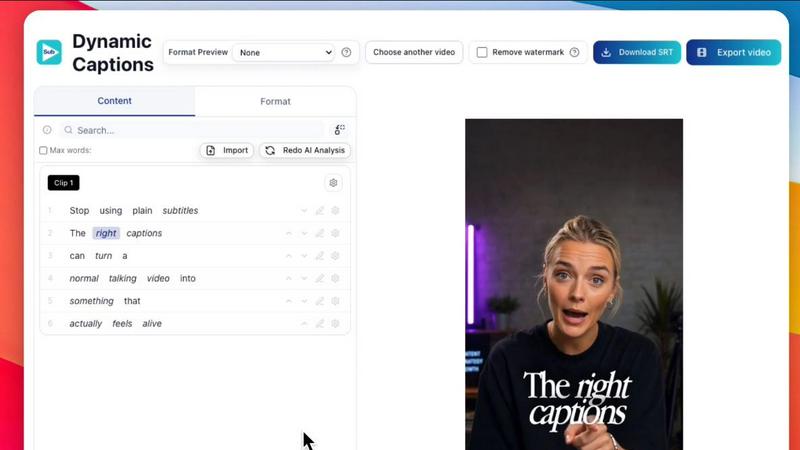
Subclip provides a powerful, unlimited captioning engine that supports local transcription in over 48 languages. With a single click, you can generate accurate, dynamic subtitles for any video clip. The platform allows for deep customization of text, font, and formatting, ensuring your captions match your brand and style. Unlike other tools that limit minutes or exports, Subclip offers unlimited subtitle generation and export, making it an indispensable tool for accessibility, audience engagement, and silent viewing on social media platforms.
AI Dubbing with Voice Cloning
This feature allows you to transcend language barriers without losing your unique vocal identity. Subclip can translate your video into over 21 languages and generate a new audio track using an AI clone of your voice. The technology is designed to preserve your original tone, emotion, and pacing, creating a natural-sounding dub that feels like you. This is a game-changer for educators, coaches, and global creators who want to distribute content worldwide without the time and expense of hiring voice actors or re-recording audio, all while maintaining the original background music.
Use Cases of Subclip
For Creators and Podcasters
Long-form podcasters and video creators can use Subclip to dramatically increase their output and reach. Instead of manually editing hours of raw conversation, they can use the text transcript to quickly trim mistakes, remove awkward pauses, and tighten the narrative. The AI clipping feature then automatically identifies the most viral-worthy moments, allowing them to create dozens of short, high-engagement clips for TikTok, YouTube Shorts, and Instagram Reels in minutes. This workflow transforms a single recording session into a multi-platform content strategy, freeing up immense time for creative development.
For Coaches and Course Creators
Coaches and educators who produce recorded courses or training videos can leverage Subclip to globalize their content instantly. They can record a course once in their native language and then use the AI dubbing with voice clone feature to translate it into over 20 languages. The final output sounds like they are speaking each language fluently, maintaining their personal teaching style and authority. This removes the barrier of re-recording or subtitling, allowing them to expand their student base across the world and increase the value of their intellectual property with minimal additional effort.
For Vloggers and Social Media Marketers
Vloggers and social media marketers can streamline their entire production pipeline with Subclip. From raw footage, they can add captions, overlay B-roll, enhance audio by removing background noise and room echo, and export the final video in the optimal aspect ratio (16:9, 9:16, 1:1) all in one click. The built-in scheduling feature allows them to plan and post content directly to YouTube and X from a single calendar. This eliminates the need to juggle multiple apps for editing, captioning, and publishing, creating a seamless, efficient workflow for high-volume content production.
For Agencies and Freelancers
Agencies and freelancers handling multiple client projects can use Subclip to increase their output at a fraction of the cost. The platform offers unlimited transcription, export, and team collaboration features, allowing multiple editors to work on projects within a shared workspace. They can collect feedback, share drafts like a Google Doc, and quickly iterate on edits. The ability to export NLE timelines to professional editing software means they can use Subclip for the heavy lifting of rough cuts and captioning, then hand off a polished timeline for final color grading and effects, drastically reducing billable hours.
Frequently Asked Questions
How does Subclip’s text-based video editing work?
Subclip uses AI to transcribe your video into a text document. You can then edit the video by simply editing the text. If you want to remove a section of the video, you delete the corresponding words in the transcript. If you want to rearrange the order of clips, you can cut and paste sentences. The video timeline is automatically updated to reflect your text edits, making the process as simple and intuitive as using a word processor. This eliminates the need for traditional timeline scrubbing and manual cutting.
Can Subclip really clone my voice for dubbing?
Yes. Subclip uses advanced AI voice cloning technology to create a digital replica of your voice. When you choose to dub a video into another language, the AI analyzes your original speech patterns, tone, and emotion. It then generates a new audio track in the target language that sounds like you speaking that language naturally. The process is designed to preserve the authenticity of your delivery, making the dubbed version feel personal and engaging rather than robotic or generic.
What languages are supported for transcription and dubbing?
Subclip supports local transcription in over 48 languages, allowing you to generate accurate subtitles for a vast global audience. For AI dubbing with voice cloning, the platform currently supports over 21 languages, including English, Spanish, French, German, Japanese, and many more. The platform is continuously expanding its language library to provide broader global reach for creators and businesses.
Is Subclip compatible with professional video editing software?
Yes. Subclip is designed to fit into a professional workflow. After you have created your rough cut and applied captions or dubbing, you can export your project timeline as a .fcpxml file. This file format is compatible with industry-standard NLEs (Non-Linear Editors) like DaVinci Resolve, Final Cut Pro, and Adobe Premiere Pro. This allows you to use Subclip for the initial, time-consuming stages of editing and then move the project to your preferred editor for final color grading, effects, and fine-tuning.
Similar to Subclip

ScriptGecko
Turn public Instagram Reels into clean, timestamped transcripts you can copy or download.


Oravaa
Oravaa deploys hyper-realistic Voice AI to autonomously qualify leads, resolve support tickets, and schedule appointments across 30+ languages.

Hush Touch | Voice-to-Text for MacOS
Unlock seamless offline voice-to-text dictation on macOS that learns your vocabulary and enhances accuracy with every.

Glossa
Break language barriers effortlessly with Glossa's AI-powered real-time translation for churches in over 100 languages.

ATOZAITOOLS
Unlock unparalleled productivity with ATOZAITOOLS' innovative AI solutions designed to revolutionize your work.

Bantr: Offline & Unlimited TTS for Mac
Experience limitless offline text-to-speech on your Mac with Bantr's natural voices, ensuring privacy and no.

KaiCalls
KaiCalls is your 24/7 AI phone agent that captures and qualifies every lead instantly.