

xyOps
xyOps revolutionizes workflow automation with powerful job scheduling, real-time monitoring, and intelligent alerting for any infrastructure scale.
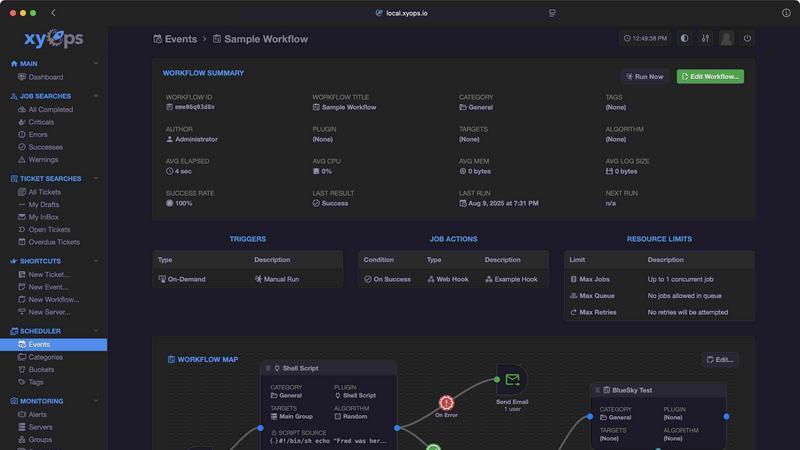
About xyOps
xyOps™ is the revolutionary orchestration platform designed to redefine how developers and operations teams manage their automation processes. This next-generation system seamlessly integrates job scheduling, workflow automation, server monitoring, alerting, and incident response into a singular, cohesive interface. Empowered with an open and extensible architecture, xyOps champions the principles of transparency and freedom, allowing users to maintain complete control over their automation stack without sacrificing data integrity or visibility. With no hidden features and no telemetry forced back to third parties, xyOps stands as a beacon for those seeking a truly independent automation solution. Whether you are managing a handful of servers or scaling across thousands, xyOps transforms the way you orchestrate your entire infrastructure, making it simpler, smarter, and supremely efficient.
Features of xyOps
Job Scheduling Reimagined
xyOps revolutionizes job scheduling by transcending traditional cron capabilities. It allows users to schedule jobs across diverse environments, ensuring that every task is executed at the optimal time. Multiple schedules can be assigned to individual events, and crontab import support streamlines the transition from legacy systems.
Visual Workflow Builder
The visual workflow builder empowers users to create complex workflows with ease. By connecting events, triggers, actions, and monitors, teams can construct meaningful pipelines that are visually intuitive. This drag-and-drop interface simplifies the chaining of jobs with conditional logic, allowing seamless data and file transfers between workflow steps.
Smart Alerts
xyOps offers advanced alerting features that provide rich customization options and complex triggering rules. Users can create tailored notifications that include snapshots of server states, allowing for immediate context in incident response. Alerts can also trigger automatic actions, such as creating tickets or initiating custom jobs, ensuring that teams are always in the loop.
Integrated Ticketing System
With xyOps, incident response is streamlined through a built-in ticketing system. Alerts and failed jobs can automatically generate tickets, which can attach relevant files and even execute jobs for CI/CD systems. This fully scriptable API allows teams to respond to incidents quickly while maintaining a comprehensive overview of system health.
Use Cases of xyOps
DevOps Automation
xyOps is perfect for DevOps teams looking to automate their workflows. With its robust job scheduling and monitoring capabilities, teams can ensure that deployments happen on time, every time, while tracking performance in real-time.
Incident Response Management
When incidents occur, xyOps shines as a powerful tool for incident response. The integrated ticketing system automatically logs failures and alerts the appropriate personnel, enabling rapid response and resolution to minimize downtime.
Performance Monitoring
IT teams can leverage xyOps to monitor server performance across their entire fleet. With customizable metrics and real-time dashboards, teams can proactively address issues before they escalate into critical failures, maintaining optimal system performance.
Scalable Infrastructure Management
Whether managing five servers or five thousand, xyOps scales effortlessly to meet the needs of any organization. With features designed for redundancy and failover, teams can ensure continuous operation and reliability across their infrastructure, regardless of size.
Frequently Asked Questions
What platforms does xyOps support?
xyOps is designed to run on multiple operating systems, including macOS, Linux, and Windows, providing teams with the flexibility to deploy in diverse environments.
Is xyOps really open source?
Yes, xyOps is 100% free and open source under the BSD 3-Clause license. All features will remain open source forever, ensuring users have complete access and control over their automation tools.
How does xyOps handle scalability?
xyOps allows users to run multiple hot backups for redundancy and can scale to thousands of worker servers in your cluster. This ensures that uptime is maximized and jobs are not interrupted during primary failover.
Can I create custom plugins for xyOps?
Absolutely! xyOps supports a simple JSON over STDIO Plugin API, allowing users to write plugins in any programming language without needing an SDK. This enables limitless customization and integration possibilities.
Similar to xyOps


saasgrow.ai
saasgrow.ai organises SaaS growth tools by the job you're trying to do.

Tools Network
Curated directory of the best AI tools across 25+ categories. Compare ratings, pricing, and features to find the right one fast.

Free Gemini Omni
Create, remix, and edit cinematic AI videos online with text, image, audio, and video prompts.

Submify
Directory submission platform for organizing, managing, and tracking product listings across relevant online directories.

UseWok
Done-for-You SaaS Visibility for Search & AI | UseWok

Postqued
Schedule and publish social content across 10 platforms with one dashboard, API, and MCP built for teams and AI agents.