
3D AI Maker vs dmaya
Side-by-side comparison to help you choose the right AI tool.

3D AI Maker
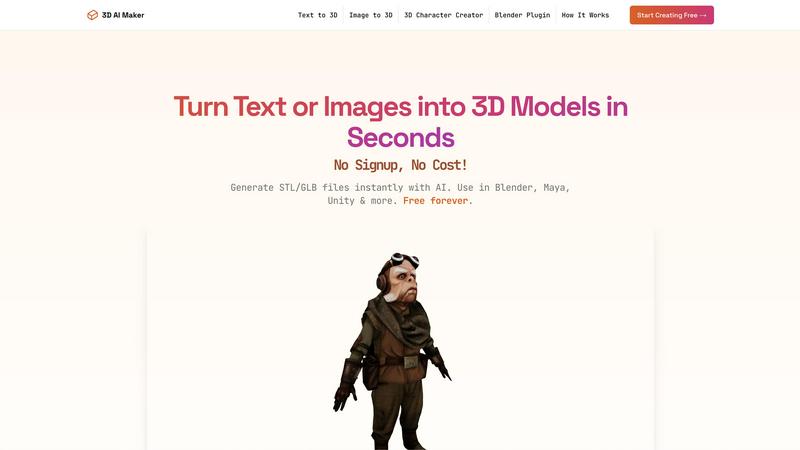
Transform text or images into stunning 3D models instantly, all for free with our revolutionary AI-powered tool.
Last updated: February 28, 2026

dmaya
dMaya is an AI design platform that empowers teams to generate, collaborate on, and export production-ready UI designs at lightning speed.
Last updated: April 13, 2026
Visual Comparison
3D AI Maker
dmaya
Feature Comparison
3D AI Maker
AI-Powered 3D Generation
3D AI Maker leverages cutting-edge generative AI to transform text prompts or 2D images into fully textured 3D models. This feature allows users to create stunning 3D assets effortlessly, removing the complexities typically associated with traditional 3D modeling software.
Direct Blender Integration
The platform includes a dedicated Blender plugin that enables users to generate models directly within the Blender interface. This seamless integration is perfect for those accustomed to Blender, providing a free alternative to other tools while enhancing productivity and reducing workflow interruptions.
Export GLB & STL Files
Users can easily download their created models in various formats, including GLB for use in animations and real-time applications, and STL for 3D printing. This versatility ensures that 3D AI Maker caters to a broad range of applications, from game development to physical model creation.
Free Forever, No Strings
3D AI Maker is committed to democratizing access to 3D content creation by offering its services entirely for free. There are no hidden costs, no signup requirements, and users can start creating professional-grade 3D characters and assets immediately, ensuring a hassle-free experience.
dmaya
AI-Powered Design Generation
Harness the power of AI by describing your design needs in straightforward language. dMaya translates your text into fully realized UI designs, complete with layouts and responsive components, in mere seconds. This feature eliminates the time-consuming initial design phase, allowing for rapid prototyping.
Multi-Screen Canvas
Experience a flexible workspace where you can work on desktop and mobile frames simultaneously on an infinite canvas. dMaya offers intuitive drag-and-drop functionality akin to Figma, enabling users to organize screens efficiently while benefiting from AI assistance that handles the heavy lifting of design tasks.
Built for Teams & Collaboration
Enhance teamwork with dMaya's collaboration features, which allow you to invite team members and share projects with clients. Real-time feedback, comments, and role-based access ensure that everyone stays in the right lane, making it easier to manage design projects collaboratively.
Client Presentation Mode
Transform client interactions with polished, interactive previews that can be shared through a single link. This feature requires no account for viewers, allowing clients to leave feedback effortlessly. The streamlined review process accelerates iterations, helping you gather approval without delays.
Use Cases
3D AI Maker
Custom 3D Characters
Game developers and animators can leverage 3D AI Maker to design unique custom 3D characters tailored to their projects. This feature allows for rapid prototyping and iteration, enhancing creativity and efficiency in character design.
3D Printing Models
Hobbyists and professionals looking to create 3D-printed models can convert their JPG images into STL files effortlessly. This capability opens up new avenues for personalized creations, from keepsakes to functional items, streamlining the 3D printing process.
Rapid Prototyping for VR/AR
With the ability to generate 3D models in seconds, VR and AR creators can quickly prototype and test assets within their environments. This rapid iteration helps bring innovative ideas to life without the delays usually associated with traditional modeling techniques.
Educational Tools
Educators in design and engineering can utilize 3D AI Maker to create engaging teaching materials and interactive models. By simplifying the process of 3D creation, students can focus on learning concepts rather than struggling with complex software.
dmaya
Agency Design Projects
Agencies can leverage dMaya to generate design concepts during discovery calls, presenting multiple UI directions to stakeholders in hours instead of weeks. This capability accelerates client acquisition and enhances project win rates.
Product Development Teams
Product teams can use dMaya to explore various UI directions before committing engineering resources. By collaborating across design, product, and engineering in a single workspace, teams can significantly reduce the gap between designed and built products.
Freelance Design Services
Freelancers can take advantage of dMaya to streamline their workflow, delivering more projects without extending their working hours. The AI-driven design process allows freelancers to impress clients with rapid iterations and professional outputs.
Rapid Prototyping for Startups
Startups can utilize dMaya for quick prototyping of their app or web interfaces, gaining valuable design feedback early in the process. This approach enables them to pivot and adapt designs based on client feedback, ensuring a product-market fit before full-scale development.
Overview
About 3D AI Maker
3D AI Maker is a groundbreaking, AI-native platform that revolutionizes the landscape of 3D content creation. This innovative tool empowers users to transform simple text prompts or 2D images into fully textured, production-ready 3D models in about 20 seconds, all without requiring any signup or payment. The platform is designed for a wide audience, from seasoned professionals to enthusiastic beginners, making it an invaluable asset for game developers, VR/AR creators, 3D printing hobbyists, and digital artists alike. The main value proposition lies in its unparalleled speed and accessibility, eliminating the previously steep learning curve and hefty costs associated with 3D asset generation. With features such as direct integration into professional workflows via a Blender plugin and versatile export options including GLB for real-time applications and STL for 3D printing, 3D AI Maker stands as the definitive free alternative to paid services, unleashing a new wave of creativity for all.
About dmaya
dMaya is a revolutionary AI design platform meticulously crafted for agencies, collaborative teams, and freelancers who understand the importance of thoughtful design before diving into coding. Unlike traditional tools that leap directly into development, dMaya emphasizes the design process, allowing users to articulate their vision through simple text descriptions. Imagine describing a SaaS dashboard or an e-commerce flow, and within seconds, dMaya generates polished, professional UI designs tailored to your needs. This tool fosters seamless interaction with an AI agent to facilitate real-time iterations, ensuring that every detail—be it colors, layouts, or typography—aligns with your vision. The instant feedback loop and design tokens maintain consistency across various screens, significantly streamlining the workflow. When the design meets approval, users can effortlessly export the output as clean HTML, CSS, and JS code, ready to be handed off to any coding agent. dMaya is designed for the modern professional, empowering teams to present, approve, and ship with unparalleled confidence and speed.
Frequently Asked Questions
3D AI Maker FAQ
Is 3D AI Maker really free?
Yes, 3D AI Maker is entirely free to use with no signup required. Users can start creating 3D models immediately without any hidden costs or obligations.
How does this compare to Meshy or other tools?
3D AI Maker provides similar capabilities to Meshy and other tools but stands out with its completely free access, instant model generation, and direct integration with Blender, making it a more accessible option for users.
Can I use models commercially?
Yes, the models generated by 3D AI Maker can be used commercially. Users are empowered to create and utilize these assets in their projects without any licensing fees.
How do I install the Blender plugin?
To install the Blender plugin, simply download it from the 3D AI Maker website and follow the provided installation instructions. Once installed, users can generate 3D models directly within Blender’s interface.
dmaya FAQ
How does dMaya generate designs from text descriptions?
dMaya uses advanced AI algorithms to interpret user-provided text descriptions and transform them into fully realized UI designs. This process involves generating layouts, component systems, and responsive variants within seconds, making design fast and efficient.
Can I collaborate with my team in real time using dMaya?
Yes, dMaya is built for collaboration, allowing you to invite team members, share projects, and leave comments in real time. This feature ensures effective communication and teamwork throughout the design process.
What happens after my design is approved?
Once your design receives client approval, you can export it as clean HTML, CSS, and JS code. This code can then be handed over to a preferred coding agent, like Claude Code or Cursor, for development in any framework, including React and Next.js.
Is there a limit to the number of screens I can design in dMaya?
No, dMaya offers an infinite canvas where you can design as many screens as needed. You can work across various frames simultaneously without worrying about space limitations, providing flexibility for complex projects.
Alternatives
3D AI Maker Alternatives
3D AI Maker is a groundbreaking platform that allows users to instantly generate production-ready 3D models from simple text prompts or images, all for free. As a part of the AI Assistants category, it leverages advanced generative AI technology to make 3D modeling accessible to a broad audience, including professionals and novices alike. Users often seek alternatives due to a variety of factors such as pricing, feature sets, and specific platform requirements. When choosing an alternative, it is essential to consider the speed of creation, ease of use, integration capabilities with existing workflows, and export options to ensure that the tool meets both creative and technical demands.
dmaya Alternatives
dMaya is a revolutionary AI vibe design platform specifically crafted for agencies, teams, and freelancers. It empowers users to create stunning UI designs through natural language interactions with an AI agent, effectively bridging the gap between design and coding. As a design tool, dMaya streamlines the design process, enabling rapid iterations and collaborative client feedback, ensuring that teams can present polished designs before moving into the development phase. Users often seek alternatives to dMaya for various reasons, including pricing structures, feature sets, and compatibility with different platforms. When considering an alternative, it’s essential to evaluate the capabilities it offers, such as design flexibility, ease of collaboration, and the ability to efficiently export to code. A suitable alternative should enhance the design process and meet specific project needs while maintaining a seamless workflow.