
Blueberry vs Shrinkpad
Side-by-side comparison to help you choose the right AI tool.

Blueberry
Blueberry is the AI-native workspace that unifies your editor, terminal, and browser for seamless product development.
Last updated: February 28, 2026

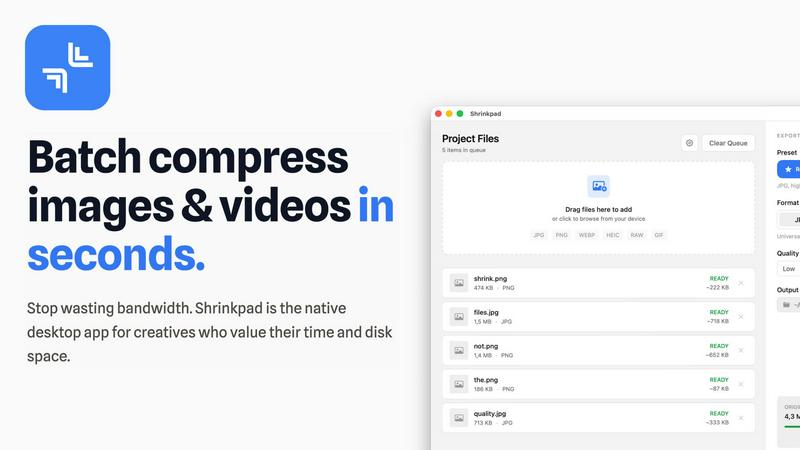
Transform your workflow with Shrinkpad, the ultimate tool for batch compressing images and videos on Mac effortlessly.
Last updated: February 28, 2026
Visual Comparison
Blueberry

Shrinkpad
Feature Comparison
Blueberry
Unified AI-Native Workspace
Blueberry deconstructs the traditional, siloed development workflow by fusing a powerful code editor, system terminal, and device-aware preview browser into one seamless interface. This triad operates not as separate apps but as interconnected panels within a single window, sharing state and context fluidly. The environment is built from the ground up to feed real-time data to integrated AI, creating a symbiotic workflow where your tools and your intelligence are perfectly aligned, eliminating friction and tab overload.
Full-Context AI via MCP Integration
The platform's groundbreaking integration with the Model Context Protocol (MCP) provides your chosen AI assistant with a live, comprehensive feed of your development state. Unlike basic chat plugins, Blueberry's built-in MCP server allows models to see your open files, real-time code changes, terminal commands and outputs, and even the visual state of your preview browser simultaneously. This constant, rich context enables the AI to offer precise, actionable guidance, debug with awareness, and generate code that fits perfectly into your running application.
Visual Context & Pinned Apps
Blueberry extends context beyond code to include your entire digital product ecosystem. The screenshot and direct element selection tool allows you to give your AI visual references from the preview browser. Furthermore, you can dock essential web apps like GitHub, Linear, Figma, and PostHog directly within the workspace. These "Pinned Apps" load with your project and share their live context with the AI, creating a holistic command center for product development.
Professional Editor with Git Integration
Despite its AI-centric design, Blueberry does not compromise on core developer tooling. It includes a fully-featured, professional code editor equipped with advanced syntax highlighting, multi-cursor support, robust find-and-replace, and built-in Git integration. This ensures you have all the power and precision of a modern editor, which simultaneously serves as the primary data source for your AI's deep understanding of the project structure and history.
Shrinkpad
Batch Compression
Shrinkpad revolutionizes the way assets are managed by offering unlimited batch processing capabilities. Users can drag and drop entire folders filled with images and videos, allowing the application to automatically detect and optimize all supported files in one go, streamlining workflows and saving valuable time.
Smart Detection
The application intelligently identifies over 30 different image formats, including RAW files, and all major video formats. This feature ensures that users can process a diverse range of media types simultaneously, with Shrinkpad applying the optimal compression settings tailored for each specific file type.
Privacy Protection
With Shrinkpad, privacy is paramount. All processing occurs locally on the user's machine, ensuring that no files are ever uploaded to the cloud. This guarantees that sensitive and creative assets remain secure and confidential, allowing users to work with peace of mind.
Auto-Renaming and Metadata Stripping
Shrinkpad offers powerful features that enhance workflow efficiency, such as automatic renaming and metadata stripping. Users can effortlessly export files from design tools like Figma and Photoshop, and Shrinkpad will optimize and rename them in bulk, making asset management seamless and organized.
Use Cases
Blueberry
Rapid Full-Stack Web Development
Developers building modern web applications can leverage Blueberry to streamline the entire stack workflow. Write backend API logic in the editor, run and debug servers in the integrated terminal, and see frontend changes render instantly in the live preview browser—all while asking your AI to explain a complex route, generate a component based on the current UI, or diagnose a server error using the combined terminal and code context.
AI-Powered Debugging and Refactoring
When encountering bugs or planning a code refactor, use Blueberry's unified context to supercharge the process. Your AI can analyze the error output in the terminal, cross-reference it with the relevant code files open in the editor, and even inspect the broken UI state in the browser preview. This holistic view allows for accurate root-cause analysis and safe, context-aware suggestions for fixes and improvements.
Collaborative Design-to-Code Implementation
Designers and frontend developers working in tandem can use Blueberry to bridge the gap between design and implementation. Pin the Figma mockup in the workspace, use the browser's element selector to reference components, and instruct the AI to generate or adjust React/Vue code to match the design precisely, with immediate visual feedback in the multi-device preview pane.
Interactive Learning and Code Exploration
Students and developers exploring a new codebase or technology can use Blueberry as an interactive learning platform. Open a project, run it, and freely ask the AI questions about how specific files (like route.ts) work, request explanations of terminal commands, or get walkthroughs of the component hierarchy, with the AI guiding you through the actual, running code in real-time.
Shrinkpad
Photographers
Professional photographers can utilize Shrinkpad to compress high-resolution images without sacrificing quality. By reducing file sizes, they can streamline their storage solutions and improve the speed of image uploads and sharing.
Graphic Designers
Graphic designers often work with multiple assets from various sources. Shrinkpad allows them to compress and optimize their design files quickly, ensuring that they maintain high visual standards while minimizing file sizes for faster project turnaround.
Content Creators
Content creators, including videographers and social media influencers, can benefit from Shrinkpad’s ability to handle large video files. With efficient compression, they can produce and share high-quality content without the hassle of bulky files and slow upload speeds.
Development Teams
Development teams working on web applications can leverage Shrinkpad to reduce app bundle sizes and improve website load times. By optimizing media assets, they can achieve faster LCP scores, ultimately enhancing user experience.
Overview
About Blueberry
Blueberry is the paradigm-shifting, AI-native product development platform engineered for the modern builder. It transcends the traditional, fragmented development environment by unifying your essential tools—a professional-grade code editor, a fully-featured terminal, and a live preview browser—into a single, hyper-focused workspace. Designed specifically for macOS, Blueberry eliminates the cognitive overhead and constant context-switching of juggling multiple application windows. Its revolutionary core is the integrated Model Context Protocol (MCP) server, which grants AI models like Claude, Gemini, or Codex a real-time, panoramic view of your entire project context: the code you're writing, the terminal output, and the live browser preview. This means you stop wasting cycles on manual copy-pasting of context and start collaborating with an AI that truly understands your workspace. Built for developers, designers, and product pioneers who ship web applications, Blueberry is more than an IDE; it's the first cohesive environment where human intuition and artificial intelligence converge to accelerate creation, from initial concept to a delightful, shippable product.
About Shrinkpad
Shrinkpad is a cutting-edge desktop application engineered specifically for macOS, redefining the image and video compression landscape for creative professionals and enthusiasts. By harnessing the power of batch processing, Shrinkpad allows users to effortlessly drop hundreds of files or entire folders, compressing them in seconds while ensuring utmost privacy. The application stands out by performing all media processing locally through native macOS frameworks, which means that users can enjoy complete data security without the need for cloud uploads. This revolutionary approach not only safeguards your sensitive assets but also enhances processing speed and efficiency. With Shrinkpad, users can achieve file size reductions of up to 90% without compromising on visual quality, making it the ideal solution for photographers, designers, content creators, and anyone frustrated by the burden of oversized media files.
Frequently Asked Questions
Blueberry FAQ
What is MCP and why is it important?
MCP (Model Context Protocol) is an open protocol that allows AI models to securely connect to and retrieve context from external tools and data sources. In Blueberry, the built-in MCP server is revolutionary because it gives your AI a live, read-only stream of your entire workspace—your code, terminal, and browser. This moves AI interaction beyond simple chat into true situational awareness, enabling vastly more accurate and helpful assistance without manual copy-pasting.
Can I use any AI model with Blueberry?
Yes, Blueberry is designed to be model-agnostic through its MCP support. While it showcases seamless integration with models like Claude, Gemini, and Codex, you can connect any AI assistant that supports the MCP protocol. This future-proofs your workspace, allowing you to choose and switch between the most advanced AI models as they evolve.
Is Blueberry only for web development?
While Blueberry is exceptionally optimized for building web applications—with its integrated preview browser and frontend/backend tooling—its core unification of editor, terminal, and AI context is beneficial for many types of software development and scripting tasks on macOS. Any project that involves writing code, running commands, and benefiting from AI insight can be accelerated within the Blueberry workspace.
How does the preview browser work?
Blueberry's preview browser is not a simple web view; it's a fully functional, device-aware browser built into the workspace. It can render your local development server (e.g., localhost:3000) and allows you to instantly switch between desktop, tablet, and mobile screen emulations. This provides an accurate, real-time representation of what end-users will see without requiring external browser windows or device testing tools.
Shrinkpad FAQ
Can I use Shrinkpad for free?
Yes, Shrinkpad offers a Free Starter plan that includes essential tools for casual use, allowing users to test out the application's capabilities before committing to a paid plan.
What file formats does Shrinkpad support?
Shrinkpad supports a wide range of formats, including JPG, PNG, WEBP, AVIF for images, and MP4, MOV for videos. This extensive compatibility ensures that users can work with various types of media without limitations.
Does Shrinkpad support video compression?
Absolutely! Shrinkpad excels at compressing not just images but also videos, allowing users to optimize their media for storage and performance seamlessly.
How many files can I process at once?
With Shrinkpad's unlimited batch processing feature, users can process thousands of files simultaneously without crashing, making it a powerful tool for handling large projects efficiently.
Alternatives
Blueberry Alternatives
Blueberry is a revolutionary AI-native development environment for macOS that converges your editor, terminal, and browser into a single, focused workspace. It belongs to the cutting-edge category of AI-integrated developer tools, designed to eliminate context switching and supercharge workflow by allowing connected AI models to perceive your entire working context in real-time. Users often seek alternatives for various reasons, including platform limitations, as Blueberry is currently exclusive to macOS. Others may look for different feature integrations, specific AI model compatibilities, or long-term pricing structures beyond its current free beta phase. The desire for a tool that aligns perfectly with a unique tech stack or workflow philosophy also drives exploration. When evaluating alternatives, prioritize core capabilities: seamless AI integration, the depth of context provided to models, and the elegance of unifying critical development surfaces. The ideal tool should not just combine windows but intelligently connect them, creating a symbiotic environment where your AI assistant operates with full situational awareness, turning your intent into execution without friction.
Shrinkpad Alternatives
Shrinkpad is a cutting-edge desktop application tailored for macOS, designed to simplify the compression of images and videos for creatives and professionals. By allowing users to effortlessly batch compress files, Shrinkpad stands at the forefront of the image and video optimization category, providing a seamless experience that prioritizes quality and efficiency. Users often seek alternatives to Shrinkpad for various reasons, including pricing models, feature sets, or specific platform compatibility. When choosing an alternative, it is crucial to consider factors such as ease of use, compression quality, privacy measures, and the ability to handle a variety of file types. The right alternative should not only meet your technical needs but also align with your workflow and preferences, ensuring a smooth transition and optimal performance.