
SparkPix vs TinyFast
Side-by-side comparison to help you choose the right AI tool.

SparkPix
Transform your photos effortlessly with SparkPix, the AI-powered editor that enhances, restores, and styles images just by typing your commands.
Last updated: March 11, 2026

Revolutionize your workflow with TinyFast, the ultimate local solution for lightning-fast image, video, and PDF.
Last updated: February 28, 2026
Visual Comparison
SparkPix

TinyFast
Feature Comparison
SparkPix
AI Photo Editor
The AI Photo Editor allows users to make transformative edits by simply typing in commands. Whether you want to change the background, restore an old photo, or enhance image quality, SparkPix's AI processes these instructions in under 30 seconds, making photo editing accessible and efficient for everyone.
Background Remover
With the one-click Background Remover feature, you can instantly isolate subjects from their backgrounds. This tool is particularly useful for creating professional-looking portraits, product images, or marketing materials, allowing users to focus on what truly matters in their photos without the hassle.
Unblur Image
The Unblur Image feature employs advanced AI algorithms to fix motion blur, out-of-focus shots, and unsightly compression artifacts. With just a few clicks, users can restore clarity and sharpness to their images, ensuring that every detail is crisp and visually appealing.
Photo Restoration
SparkPix excels in photo restoration, enabling users to repair old, faded, scratched, or damaged photographs with ease. This feature is a blessing for anyone looking to preserve family memories or historical images, allowing you to bring life back to cherished moments.
TinyFast
Batch & Drag-Drop Shrink
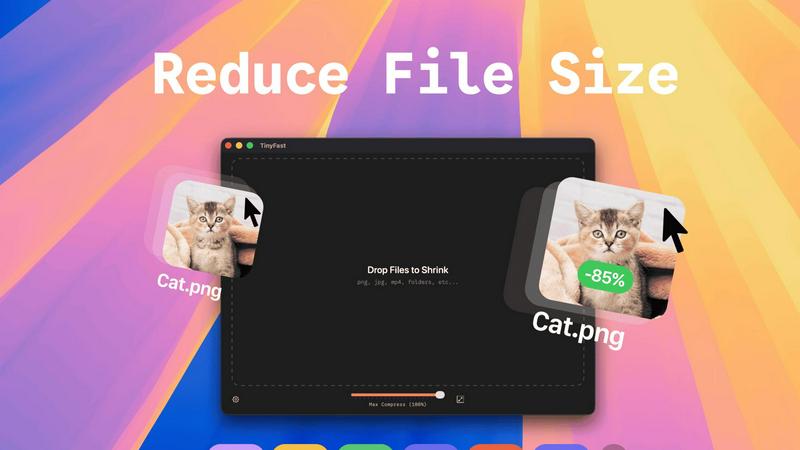
TinyFast's batch processing feature allows you to drop entire folders of files for simultaneous compression. This functionality saves you precious time by delivering optimized outputs in mere seconds, transforming your workflow into a powerhouse of efficiency.
Blazing-Fast Compression
Experience the power of optimized native engines that facilitate lightning-fast compression. TinyFast’s innovative technology ensures that even large files are shrunk in seconds, freeing you from the agonizing delays associated with uploads and downloads while maintaining top-notch quality.
Resize Resolution
TinyFast offers an automatic image and video resolution resizing feature. This allows you to customize the output resolution based on your needs, ensuring that the final product is not only smaller but also tailored for optimal viewing across various platforms.
100% Local & Private
With TinyFast, your privacy is paramount. The application guarantees that your files are never uploaded to the cloud or third-party servers. This non-disclosure approach ensures that your sensitive files remain on your device, providing total security and peace of mind by design.
Use Cases
SparkPix
Social Media Marketing
Social media managers can leverage SparkPix to quickly create eye-catching visuals for posts and ads. With features like background removal and style transfer, they can tailor images to fit brand aesthetics and engage audiences effectively.
E-commerce Product Photography
E-commerce businesses can benefit from SparkPix’s ability to enhance product images. The AI-driven tools allow sellers to create high-quality product photos that attract buyers, ultimately boosting sales and improving online presence.
Personal Photo Archiving
For individuals looking to preserve family memories, SparkPix’s photo restoration and enhancement features make it easy to restore old photographs. Users can revive faded images and create beautiful keepsakes without professional help.
Creative Projects
Artists and designers can utilize SparkPix’s style transfer capabilities to transform their photos into unique artworks. By converting images into various artistic styles, users can create stunning visuals for portfolios, presentations, or personal enjoyment.
TinyFast
Web Development
Web developers can use TinyFast to compress images and videos before deploying them online. This ensures that websites load faster and enhance user experience without compromising visual quality, making it an essential tool for efficient web performance.
Graphic Design
Graphic designers can leverage TinyFast to compress high-resolution images, enabling quicker uploads and sharing. Whether it's for client presentations or portfolio showcases, TinyFast ensures that file sizes are manageable while retaining exceptional quality.
Video Production
In video production, TinyFast is invaluable for compressing large video files without losing detail. This allows content creators to share their work more efficiently and store more media on their devices without sacrificing quality, streamlining the entire production workflow.
Document Management
TinyFast simplifies document management for professionals who deal with numerous PDFs and other document types. By compressing these files locally, users can save storage space and ensure that sensitive documents remain secure while still being easily accessible.
Overview
About SparkPix
SparkPix is a revolutionary AI-powered photo editing tool that transforms the way you edit images. Designed for everyone from casual users to professional photographers, SparkPix eliminates the need for complex photo editing software like Photoshop. With its intuitive interface, users can simply type in their desired edits, such as "remove background" or "enhance colors," and watch as the AI executes these commands in a matter of seconds. This cutting-edge platform is perfect for those who want to quickly enhance their images without the steep learning curve. By offering a suite of powerful features, SparkPix empowers users to create stunning visuals effortlessly, making it an essential tool for social media managers, e-commerce businesses, and photography enthusiasts alike.
About TinyFast
TinyFast is a groundbreaking macOS application that redefines file compression by marrying speed, security, and simplicity. Designed specifically for developers, designers, and content creators who demand utmost privacy, TinyFast empowers users to compress various file types—ranging from images like PNG and JPEG to videos like MP4 and MOV, as well as documents such as PDFs and audio files like MP3. With an intuitive drag-and-drop interface, users can effortlessly compress their files locally on their Macs, eliminating the risks associated with uploading sensitive data to third-party servers. TinyFast is engineered for efficiency; it allows you to optimize your digital assets swiftly while keeping them securely on your device. Join the thriving community of over 500 Mac users who have unlocked a faster, safer, and more efficient way to manage their files, ensuring they maintain control over their precious data.
Frequently Asked Questions
SparkPix FAQ
How does SparkPix work?
SparkPix utilizes advanced AI algorithms to interpret user commands for photo editing. Simply type in what you want to change, and the AI processes the request, applying edits in seconds.
Is SparkPix free to use?
Yes, SparkPix offers a free tier that provides users with 5 credits to start editing. This allows you to explore its features without any upfront cost or credit card requirement.
What types of images can I edit with SparkPix?
You can edit a wide variety of images, including personal photos, product images, and artwork. SparkPix is versatile enough to handle portraits, landscapes, and more, catering to diverse editing needs.
Can I use SparkPix on my mobile device?
Absolutely! SparkPix is a web-based platform that is accessible on desktop, iPhone, and Android devices. You can edit photos on the go without any downloads or installations required.
TinyFast FAQ
What types of files can I compress with TinyFast?
TinyFast supports a wide array of file types, including images (PNG, JPG, TIFF, HEIC, WEBP, GIF, BMP, SVG), videos (MP4, MOV, M4V), documents (PDF, DOCX), code files (JS, CSS, JSON), and audio files (MP3). This versatility makes it an ideal solution for various users.
Is TinyFast easy to use for beginners?
Absolutely! TinyFast features a simple drag-and-drop interface that is user-friendly for individuals of all skill levels. Users can quickly compress files without navigating complicated menus or settings, making it accessible even for those new to file compression.
Will my files be safe when using TinyFast?
Yes, your files are completely safe with TinyFast. The application is designed to compress files locally on your Mac without uploading them to any external servers. This ensures that your sensitive data remains private and secure at all times.
Can I try TinyFast before purchasing?
Yes, TinyFast offers a free tier that allows you to compress up to 5 files per day without any cost. Additionally, there is a 3-day trial for the monthly subscription that lets you experience all features before committing to a payment plan, making it risk-free to explore its capabilities.
Alternatives
SparkPix Alternatives
SparkPix is an innovative AI-driven photo editor that allows users to edit images simply by typing commands. This cutting-edge tool falls within the image and photo editing category, making it accessible to anyone seeking to enhance their visual content without the need for extensive technical skills. Users often explore alternatives to SparkPix due to varying needs such as pricing plans, unique features, or specific platform compatibility, as different projects may require tailored solutions that meet individual preferences. When searching for an alternative to SparkPix, users should consider several factors. Key elements include the range of editing features offered, the ease of use, the pricing structure, and the availability of the platform across different devices. By evaluating these aspects, users can identify a photo editing solution that aligns with their creative goals and operational requirements.
TinyFast Alternatives
TinyFast is a cutting-edge macOS application that transforms the user experience of compressing files by emphasizing speed and privacy. As part of the tech tools category, it caters to developers, designers, and creators who value the integrity of their digital assets. Users often seek alternatives to TinyFast for various reasons, including pricing structures, feature sets, or compatibility with different platforms. When considering an alternative, it's essential to evaluate factors such as local compression capabilities, the range of file formats supported, and the overall ease of use, ensuring that any new solution aligns with personal or professional requirements. --- [{"question": "What is TinyFast?", "answer": "TinyFast is a macOS application designed for fast and secure compression of images, videos, and PDFs without compromising user privacy."}, {"question": "Who is TinyFast for?", "answer": "TinyFast is ideal for developers, designers, and creators who need efficient file compression while maintaining control over their sensitive assets."}, {"question": "Is TinyFast free?", "answer": "The pricing details for TinyFast are not specified, so users should check the official website for the latest information on costs."}, {"question": "What are the main features of TinyFast?", "answer": "TinyFast allows users to compress various file types locally, including PNG, JPEG, MP4, MOV, PDF, SVG, WebP, MP3, and GIF, with a simple drag-and-drop interface."}]