
Daily vs SupaSidebar
Side-by-side comparison to help you choose the right AI tool.

Daily transforms your mental clutter into clarity, empowering you to prioritize and progress with ease in a serene planning space.
Last updated: April 13, 2026

SupaSidebar
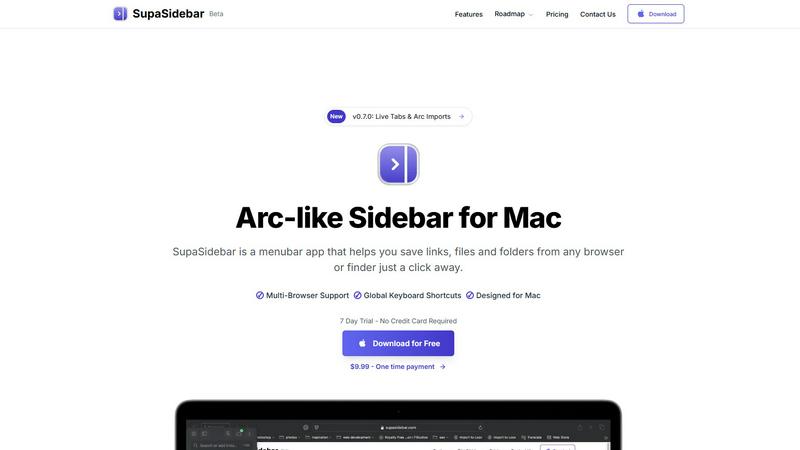
SupaSidebar is your AI-powered command center for effortlessly accessing links, files, and apps on Mac in an instant.
Last updated: February 28, 2026
Visual Comparison
Daily

SupaSidebar
Feature Comparison
Daily
A Place to Put Things Down
Daily provides a dedicated space for users to release their mental load by collecting tasks and reminders. This feature allows users to offload their thoughts, easing the pressure on their minds and enabling a more relaxed approach to daily responsibilities.
See What Matters Today
The fresh daily view of Daily helps users return to clarity by displaying only the tasks and priorities that need immediate attention. This design encourages a focused mindset, allowing users to concentrate on what actually matters each day without distractions.
Simple and Natural to Use
Daily boasts a keyboard-first flow and gentle interactions, providing a clutter-free environment for planning. This simplicity in design ensures that users can effectively manage their day without feeling overwhelmed by unnecessary features or complexity.
Customization Options
Users can personalize Daily to suit their unique workflows with flexible layouts and themes. This customization allows individuals to create a digital workspace that feels comfortable and tailored to their personal organizing style.
SupaSidebar
Instant Access to Everything
SupaSidebar provides immediate access to your essential apps, websites, and files through powerful keyboard shortcuts. No more wasting time searching for what you need; simply press a few keys and find everything instantly.
Unified Command Hub
With SupaSidebar, all your links, files, and folders from major browsers like Safari, Chrome, and Firefox, as well as Finder, are aggregated into one streamlined sidebar. This unification eliminates the chaos of navigating multiple platforms.
Recents & Favorites
SupaSidebar features a Recents tab that tracks every website you have visited in the last 48 hours, making it easy to return to your latest work. Additionally, you can pin your favorite items at the top of the sidebar for quick access.
Global Keyboard Shortcuts
Designed for speed and efficiency, SupaSidebar offers global keyboard shortcuts that allow you to save URLs and copy links with ease. Simply press CMD CTRL S to save or CMD CTRL C to copy, optimizing your workflow.
Use Cases
Daily
For Busy Professionals
Daily serves as an essential tool for busy professionals who juggle multiple responsibilities. It allows them to offload tasks and focus on immediate priorities, thereby enhancing productivity while maintaining mental clarity.
For Students
Students can utilize Daily to manage their academic workload effectively. By providing a space to collect assignments, deadlines, and study sessions, Daily helps them prioritize tasks and navigate their educational commitments with ease.
For Creative Minds
Daily is perfect for creatives looking to capture spontaneous ideas and inspirations. By offering a place to jot down thoughts without the pressure of organization, Daily fosters a nurturing environment for creativity to flourish.
For Mental Wellness
Individuals seeking to maintain their mental well-being can rely on Daily to reduce anxiety associated with overwhelming tasks. By allowing users to offload their mental clutter, Daily promotes a calm state of mind and encourages a balanced approach to daily life.
SupaSidebar
Research Efficiency
For researchers who often juggle multiple tabs and sources, SupaSidebar simplifies the process by consolidating all references in one location. This enables quick access to essential materials without losing focus.
Creative Workflows
Creators can benefit from SupaSidebar by keeping their favorite tools and resources at hand. This allows for a fluid creative process, where inspiration can be captured instantly without the hassle of searching through clutter.
Student Productivity
Students can leverage SupaSidebar to manage their study materials, links to research, and class notes. The ability to quickly access recent documents and favorite resources enhances learning efficiency.
Project Management
Professionals managing projects can use SupaSidebar to keep track of important files, links, and communications. By having everything organized in one sidebar, teams can collaborate more effectively and stay aligned on tasks.
Overview
About Daily
Daily is an innovative daily planner and to-do list application designed to offer a serene escape from the chaos of modern life. It is engineered for individuals who often feel overwhelmed yet are eager to make meaningful progress. Daily transcends traditional productivity tools by providing a tranquil digital sanctuary where users can offload their tasks, thoughts, and reminders as they arise. This unique approach allows users to declutter their minds, creating mental space to focus on what really matters each day. With its intuitive Today view, Daily highlights immediate priorities while fostering a sense of calm and clarity. The design philosophy prioritizes simplicity, ensuring users can navigate their responsibilities with ease and without the stress often associated with conventional planners. Ideal for busy professionals, students, and anyone seeking to streamline their daily obligations, Daily empowers users to prioritize effectively, maintain mental well-being, and embrace a more focused and grounded life.
About SupaSidebar
SupaSidebar is a revolutionary productivity engine specifically designed for macOS that transforms your digital workspace into an efficient command hub. Gone are the days of juggling multiple browser tabs, bookmarks, and files scattered across your system. SupaSidebar integrates everything you need—links, files, folders, and open tabs—into a beautifully crafted native sidebar, allowing you to seamlessly navigate your workflow. Targeted at modern knowledge workers, researchers, and creators, this innovative tool eliminates the inefficiencies associated with context-switching and digital clutter. With its instantaneous, keyboard-driven access, SupaSidebar ensures that you can maintain a state of deep focus and flow. Whether you are a professional striving for efficiency or a student managing multiple projects, SupaSidebar serves as an extension of your cognitive process, placing everything you require right at your fingertips.
Frequently Asked Questions
Daily FAQ
What platforms is Daily available on?
Daily is available for download on the Apple App Store and requires macOS 14.0 or iOS 18.0 to function optimally. Users can access its features across various Apple devices.
How does Daily help with mental clarity?
Daily aids in mental clarity by providing a serene digital space to offload tasks and reminders. By writing things down, users can ease their mental load and focus on immediate priorities without the distraction of cluttered thoughts.
Can I customize the appearance of Daily?
Yes, Daily offers customization options that allow users to select app icons and themes. This feature enables individuals to tailor the app's appearance to make it feel like their own personalized space.
Will there be an AI Companion feature?
Yes, Daily is set to introduce an AI Companion feature that will assist users in unloading their tasks and suggest what to focus on next. This feature aims to enhance productivity by providing intelligent recommendations tailored to individual needs.
SupaSidebar FAQ
Is SupaSidebar a browser extension?
No, SupaSidebar is a standalone menubar app designed specifically for macOS, allowing you to save links and files from any browser or Finder.
Which browsers does SupaSidebar work with?
SupaSidebar supports all major browsers, including Safari, Chrome, Firefox, Brave, and Arc, ensuring a seamless experience across your digital workspace.
What macOS version do I need?
SupaSidebar requires macOS 13 or higher to function properly, ensuring compatibility with the latest features and updates from Apple.
Where is my data stored?
All data handled by SupaSidebar is securely stored locally on your Mac. Nothing leaves your device, ensuring your privacy and data integrity.
Alternatives
Daily Alternatives
Daily is a cutting-edge digital planner designed to transform your thoughts into clarity, falling within the productivity and management category. This innovative tool helps users navigate the complexities of modern life by offering a serene and efficient space to manage daily tasks and priorities. Many users seek alternatives to Daily for various reasons, including pricing, specific feature sets, or compatibility with their preferred platforms. When searching for a substitute, it's essential to consider factors like user interface design, ease of navigation, integration possibilities, and the overall ability to enhance productivity while maintaining mental well-being.
SupaSidebar Alternatives
SupaSidebar is an AI-native command center designed to revolutionize productivity for macOS users. It seamlessly aggregates links, files, and apps, transforming the traditional browser sidebar into a universal hub that enhances workflow efficiency. As a tool tailored for knowledge workers, researchers, and creators, SupaSidebar aims to eliminate digital clutter and the friction associated with context-switching, allowing users to maintain deep focus. Users often seek alternatives to SupaSidebar for various reasons, including pricing considerations, specific feature requirements, or compatibility with different platforms. When choosing an alternative, it's essential to prioritize user experience, functionality, and integration capabilities to ensure that the selected tool effectively meets your productivity needs and aligns with your workflow preferences.