
RocketShare vs SupaSidebar
Side-by-side comparison to help you choose the right AI tool.

RocketShare
RocketShare empowers you to share files privately with zero-knowledge encryption that protects your data from everyone.
Last updated: March 4, 2026

SupaSidebar
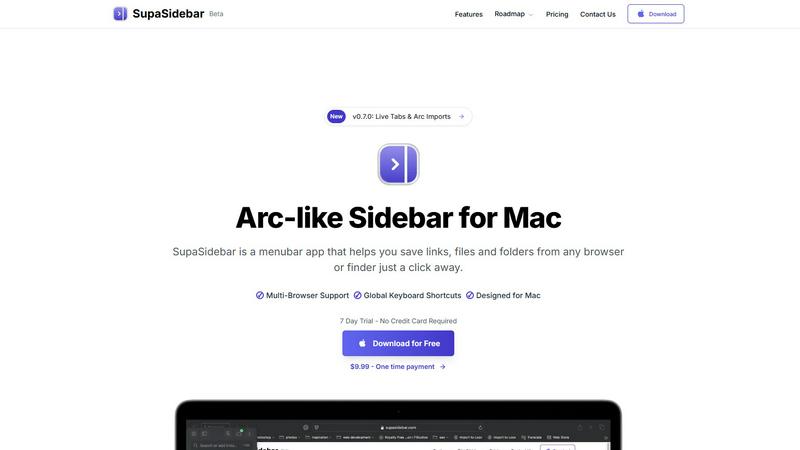
SupaSidebar is your AI-powered command center for effortlessly accessing links, files, and apps on Mac in an instant.
Last updated: February 28, 2026
Visual Comparison
RocketShare

SupaSidebar
Feature Comparison
RocketShare
Zero-Knowledge Encryption
RocketShare employs a groundbreaking zero-knowledge encryption model, meaning only you have access to your encryption keys. Files are encrypted on your device, ensuring that no third party, including RocketShare, can access your data. This transformative approach guarantees unparalleled privacy and security for all file transfers.
Cloud and Local Peer-to-Peer Sharing
With RocketShare, you can choose between cloud-based sharing for convenience or local peer-to-peer sharing for enhanced security. This flexibility allows users to tailor their file-sharing experience to their specific needs, whether they are in the office or on the go.
EU Data Compliance
RocketShare is committed to safeguarding your data under the stringent privacy regulations of the EU. All files are stored securely within the EU, ensuring compliance with robust data protection laws. This adherence to regulations provides peace of mind for users in jurisdictions with strict privacy requirements.
Intuitive User Interface
Designed with user experience in mind, RocketShare features a sleek and intuitive interface that makes file sharing effortless. Drag-and-drop functionality allows users to upload files quickly, while clear prompts guide them through the sharing process, making it accessible for everyone.
SupaSidebar
Instant Access to Everything
SupaSidebar provides immediate access to your essential apps, websites, and files through powerful keyboard shortcuts. No more wasting time searching for what you need; simply press a few keys and find everything instantly.
Unified Command Hub
With SupaSidebar, all your links, files, and folders from major browsers like Safari, Chrome, and Firefox, as well as Finder, are aggregated into one streamlined sidebar. This unification eliminates the chaos of navigating multiple platforms.
Recents & Favorites
SupaSidebar features a Recents tab that tracks every website you have visited in the last 48 hours, making it easy to return to your latest work. Additionally, you can pin your favorite items at the top of the sidebar for quick access.
Global Keyboard Shortcuts
Designed for speed and efficiency, SupaSidebar offers global keyboard shortcuts that allow you to save URLs and copy links with ease. Simply press CMD CTRL S to save or CMD CTRL C to copy, optimizing your workflow.
Use Cases
RocketShare
Law Firms
Lawyers can utilize RocketShare to send confidential case files securely to clients and colleagues. With zero-knowledge encryption, sensitive legal documents are protected from unauthorized access, ensuring compliance with legal confidentiality requirements.
Healthcare Providers
Healthcare professionals can share patient records and sensitive medical data without fear of breaches. RocketShare's encryption protocols ensure that patient information remains private, allowing providers to focus on care without compromising data security.
Creative Professionals
Photographers and videographers can deliver high-resolution images and video files to clients safely and efficiently. By using RocketShare, creatives can maintain the integrity of their work while ensuring that their intellectual property remains confidential.
Marketing Agencies
Marketing teams can collaborate on sensitive campaigns without worrying about data leaks. With RocketShare, agencies can securely share marketing materials, client information, and strategic documents while keeping their proprietary insights under wraps.
SupaSidebar
Research Efficiency
For researchers who often juggle multiple tabs and sources, SupaSidebar simplifies the process by consolidating all references in one location. This enables quick access to essential materials without losing focus.
Creative Workflows
Creators can benefit from SupaSidebar by keeping their favorite tools and resources at hand. This allows for a fluid creative process, where inspiration can be captured instantly without the hassle of searching through clutter.
Student Productivity
Students can leverage SupaSidebar to manage their study materials, links to research, and class notes. The ability to quickly access recent documents and favorite resources enhances learning efficiency.
Project Management
Professionals managing projects can use SupaSidebar to keep track of important files, links, and communications. By having everything organized in one sidebar, teams can collaborate more effectively and stay aligned on tasks.
Overview
About RocketShare
RocketShare is revolutionizing the file-sharing landscape with a commitment to robust security and uncompromising privacy. Designed for both individuals and enterprises, RocketShare enables users to send files of any size with absolute confidence, knowing that their content remains inaccessible to anyone, including RocketShare itself. Powered by a zero-knowledge encryption model, files are encrypted on the user's device before entering the digital realm, ensuring that the encryption key is securely embedded within the share link. This state-of-the-art approach means that only users have access to their data, while the servers handle only encrypted, unreadable information. From lawyers needing to send sensitive case files to marketing agencies sharing proprietary content, RocketShare is the ultimate tool for safeguarding intellectual property. With options for cloud-based and local peer-to-peer sharing, alongside compliance with EU data regulations, RocketShare is the ideal solution for those who seek a blend of simplicity and cutting-edge security in file sharing.
About SupaSidebar
SupaSidebar is a revolutionary productivity engine specifically designed for macOS that transforms your digital workspace into an efficient command hub. Gone are the days of juggling multiple browser tabs, bookmarks, and files scattered across your system. SupaSidebar integrates everything you need—links, files, folders, and open tabs—into a beautifully crafted native sidebar, allowing you to seamlessly navigate your workflow. Targeted at modern knowledge workers, researchers, and creators, this innovative tool eliminates the inefficiencies associated with context-switching and digital clutter. With its instantaneous, keyboard-driven access, SupaSidebar ensures that you can maintain a state of deep focus and flow. Whether you are a professional striving for efficiency or a student managing multiple projects, SupaSidebar serves as an extension of your cognitive process, placing everything you require right at your fingertips.
Frequently Asked Questions
RocketShare FAQ
How does RocketShare ensure my files are secure?
RocketShare uses a zero-knowledge encryption model where files are encrypted on your device before they are uploaded. This means that only you have access to the encryption keys, keeping your data safe from unauthorized access.
Can I share large files with RocketShare?
Absolutely! RocketShare allows you to share files of any size, ensuring that you can send your important documents, images, or videos without any limitations or concerns about file size constraints.
Is my data stored securely?
Yes, all data shared through RocketShare is stored securely within the EU, complying with strict data protection regulations. This commitment to security ensures that your files are protected according to the highest standards.
Do I need a credit card to start using RocketShare?
No, you can start using RocketShare without the need for a credit card. This makes it easy for new users to explore the platform and experience the robust security features without any financial commitment upfront.
SupaSidebar FAQ
Is SupaSidebar a browser extension?
No, SupaSidebar is a standalone menubar app designed specifically for macOS, allowing you to save links and files from any browser or Finder.
Which browsers does SupaSidebar work with?
SupaSidebar supports all major browsers, including Safari, Chrome, Firefox, Brave, and Arc, ensuring a seamless experience across your digital workspace.
What macOS version do I need?
SupaSidebar requires macOS 13 or higher to function properly, ensuring compatibility with the latest features and updates from Apple.
Where is my data stored?
All data handled by SupaSidebar is securely stored locally on your Mac. Nothing leaves your device, ensuring your privacy and data integrity.
Alternatives
RocketShare Alternatives
RocketShare is a cutting-edge secure file-sharing platform that prioritizes user privacy above all else. Utilizing a revolutionary zero-knowledge encryption model, it allows users to send files of any size while ensuring that not even RocketShare itself can access the content. This service is designed for both individuals and businesses, making it a versatile solution for anyone needing to share sensitive information securely. Users often seek alternatives to RocketShare for various reasons, ranging from pricing structures to specific feature sets that better align with their needs. Whether it’s the desire for different platforms, varying levels of encryption, or additional functionalities, the search for alternatives is common. When selecting a suitable option, consider factors such as security protocols, ease of use, integration capabilities, and the overall user experience to ensure it meets your unique requirements.
SupaSidebar Alternatives
SupaSidebar is an AI-native command center designed to revolutionize productivity for macOS users. It seamlessly aggregates links, files, and apps, transforming the traditional browser sidebar into a universal hub that enhances workflow efficiency. As a tool tailored for knowledge workers, researchers, and creators, SupaSidebar aims to eliminate digital clutter and the friction associated with context-switching, allowing users to maintain deep focus. Users often seek alternatives to SupaSidebar for various reasons, including pricing considerations, specific feature requirements, or compatibility with different platforms. When choosing an alternative, it's essential to prioritize user experience, functionality, and integration capabilities to ensure that the selected tool effectively meets your productivity needs and aligns with your workflow preferences.