
Pullsy vs Sketch To
Side-by-side comparison to help you choose the right AI tool.

Pullsy's AI organizes your inbox and drafts replies in your tone for ultimate control.
Last updated: February 28, 2026
Sketch To
Elevate your creativity by effortlessly transforming images into stunning sketches with Sketch To's AI-powered.
Last updated: February 28, 2026
Visual Comparison
Pullsy

Sketch To
Feature Comparison
Pullsy
AI-Powered Reply Drafting
Pullsy's neural networks draft complete, context-aware email responses that sound unmistakably like you. It intelligently detects intent within threads—such as questions needing answers, task confirmations, or scheduling requests—and constructs professional replies that address these actions directly. You can select from preset tones like Professional or Friendly, and the system adapts to your unique writing style over time. This allows for one-click sending of polished communications, eliminating the blank-page syndrome and hours of drafting.
Intelligent Inbox Prioritization & Organization
Your inbox is dynamically reorganized by Pullsy's AI to surface critical messages while filtering out noise. It automatically identifies and highlights what truly matters, such as urgent updates from leadership or time-sensitive documents, presenting them in a clear "Important Messages" dashboard. This predictive sorting ensures you never miss a crucial email, allowing you to focus your attention strategically and start each day with clarity and prioritized focus.
"Ask Pullsy" Conversational Interface
Engage in a direct dialogue with your inbox using the groundbreaking "Ask Pullsy" feature. This is a quantum leap beyond traditional search. You can instantly summarize long email threads, extract key action items and dates from messages or attached PDFs, and filter your inbox using natural language queries. It's like having a personal intelligence analyst dedicated to your communications, delivering precise insights on demand.
Unified Daily Dashboard ("Day at a Glance")
Pullsy consolidates your digital workday into a single, intelligent dashboard. This command center provides a personalized snapshot featuring your new messages, top-priority tasks extracted from emails, and upcoming meetings with calendar integration. This holistic view eliminates context-switching across tabs and apps, providing effortless organization and ensuring you are fully prepared for every commitment, all from one centralized location.
Sketch To
AI Image to Sketch Conversion
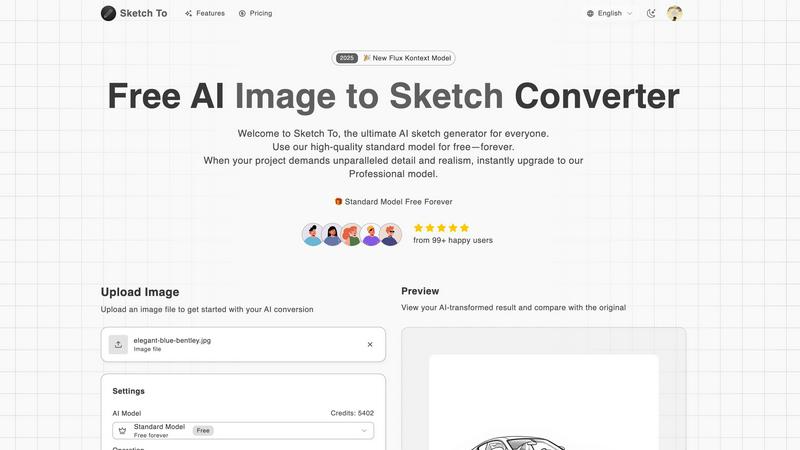
Sketch To employs advanced AI technology to transform photos into stunning pencil sketches, offering artists and designers a unique way to reinterpret their visual input. This feature is perfect for creating artistic renditions that maintain the essence of the original image while adding a hand-drawn quality.
Sketch to Image Transformation
The innovative Pro model allows users to convert their sketches into highly detailed and realistic images. This feature is ideal for professionals looking to add depth and realism to their artwork, making it suitable for commercial projects or detailed portfolios.
Instant Processing
With its powerful AI processing engine, Sketch To delivers instant results, ensuring that users can quickly see their transformations without long waiting times. This efficiency is crucial for those working on tight deadlines or needing immediate feedback on their creative endeavors.
High-Resolution Output
Sketch To guarantees that all creations can be downloaded in high resolution, making them suitable for both print and professional use. This feature ensures that users do not compromise on quality, whether for personal projects or commercial applications.
Use Cases
Pullsy
The Overwhelmed Executive or Entrepreneur
For leaders buried under hundreds of daily emails, Pullsy is a game-changer. It automatically triages their inbox, ensuring critical client emails, investor updates, and internal alerts are instantly visible. The AI drafts thoughtful, tone-appropriate replies to routine and complex emails alike, which the executive can review and send in seconds. This reclaims hours per week, allowing them to focus on high-level strategy and decision-making instead of email management.
The Client-Facing Professional or Sales Team
Sales representatives, consultants, and account managers can leverage Pullsy to ensure no client inquiry goes unanswered. The AI detects questions and requests within emails and drafts prompt, professional responses that maintain relationship momentum. The ability to quickly summarize lengthy client email chains or contract PDFs with "Ask Pullsy" ensures they are always prepared for calls, leading to faster deal cycles and superior client service.
The Project Manager or Small Team Lead
Managing team communication and task delegation via email becomes streamlined. Pullsy identifies action items and promises within email threads, helping the manager track commitments. The "Day at a Glance" dashboard centralizes task reminders from emails and upcoming team meetings. Drafting clear, directive replies to team updates or stakeholder requests becomes instantaneous, keeping projects moving forward efficiently.
The Information-Worker Seeking Deep Focus
For anyone whose workflow is constantly interrupted by email, Pullsy creates guardrails. The smart inbox filters out newsletters and non-urgent notifications, allowing for dedicated deep work sessions without fear of missing something important. When it's time to process email, the AI-assisted reply drafting and quick-summary features allow them to clear their inbox in a fraction of the usual time, minimizing mental load and maximizing productive output.
Sketch To
Social Media Enhancement
Artists and content creators can use Sketch To to enhance their social media presence by converting their photos into unique sketches. This artistic approach can help them stand out and attract more engagement from their audience, making their posts more visually appealing.
Educational Projects
Students can utilize Sketch To for school projects that require artistic interpretations of images or concepts. By converting photos into sketches, they can create visually engaging presentations that showcase their understanding of the subject matter in a creative format.
Professional Artwork Creation
Professional artists can leverage the Pro model to transform their sketches into photorealistic images, allowing them to present their work in a polished and market-ready format. This capability is essential for those looking to sell their art or submit it for exhibitions.
Creative Exploration
Casual users and hobbyists can explore their artistic side with Sketch To. By experimenting with different styles and models, they can create personalized artwork that reflects their creativity and allows them to discover new artistic techniques.
Overview
About Pullsy
Pullsy is not just another email tool; it's a revolutionary AI co-pilot engineered to dismantle the tyranny of the inbox. Built for the modern professional, entrepreneur, and agile team, Pullsy is the definitive solution for those who demand their time back. It transcends basic automation by deploying advanced artificial intelligence to actively manage, understand, and interact with your email ecosystem. Seamlessly integrating with Gmail and Microsoft 365, Pullsy acts as your intelligent layer, transforming a chaotic stream of messages into a structured, actionable command center. Its core value proposition is profound time reclamation and cognitive offloading. By intelligently labeling emails, drafting hyper-contextual replies in your authentic voice, and providing instant summaries and insights, Pullsy empowers users to navigate their inbox up to three times faster. It moves beyond simple sorting to offer a "Day at a Glance" overview, smart search via "Ask Pullsy," and enterprise-grade security. With a clean interface and a frictionless 14-day trial, Pullsy represents the next evolutionary leap in digital communication, turning email from a daily burden into a streamlined, AI-accelerated workflow that you finally control.
About Sketch To
Sketch To is a groundbreaking AI-driven platform specifically designed to revolutionize the way artists and designers create and visualize their work. It offers a powerful dual functionality that allows users to convert images into exquisite sketches and transform sketches back into photorealistic images. Catering to a diverse audience ranging from casual hobbyists to seasoned professionals, Sketch To seamlessly integrates creativity with cutting-edge technology. The platform’s user-friendly interface makes it accessible for anyone looking to explore their artistic potential. With advanced AI algorithms, users can achieve high-quality conversions that enhance their creative projects, whether for social media, intricate artwork, or academic endeavors. The standout feature of Sketch To is its ability to handle both conversions with remarkable ease, making it a must-have tool in the arsenal of digital art enthusiasts. Additionally, new users are greeted with trial credits, enabling them to dive into the creative experience without any financial commitment, ensuring they can appreciate the innovative capabilities of Sketch To right from the start.
Frequently Asked Questions
Pullsy FAQ
What is Pullsy and how does it work?
Pullsy is an AI-powered inbox management co-pilot that connects to your Gmail or Microsoft 365 account (with calendar and soon Slack integration). Once connected, its advanced algorithms work continuously to analyze your incoming mail. It automatically organizes your inbox by importance, drafts context-aware email replies in your tone, and provides tools like thread summarization and natural language search via "Ask Pullsy." The platform presents everything through a smart dashboard, effectively reducing the time and cognitive effort required to manage daily communication.
Is Pullsy safe to use?
Absolutely. Data security is our foundational priority. Pullsy is built with enterprise-grade security protocols. We are Google OAuth Verified, have completed CASA (Cloud Application Security Assessment), and are GDPR compliant. A SOC 2 Type II examination is currently in process. Your data is protected with robust encryption, and we adhere to strict privacy standards, ensuring your information remains secure and confidential at all times.
Can Pullsy draft replies for me?
Yes, this is one of Pullsy's core revolutionary functions. Its AI doesn't just generate generic text; it comprehends the context and intent of each email thread. It identifies specific elements like questions, tasks, and scheduling needs, then drafts a complete, nuanced response that directly addresses those points. You can select a tone and then simply review, tweak if desired, and send with a single click, dramatically accelerating your response time.
What tools can I integrate with Pullsy?
Currently, Pullsy offers seamless native integration with Gmail and Microsoft 365 (Outlook), including calendar functionality for meeting overviews and preparation. We are actively developing integration with Slack to further unify your communication workflow. This expanding ecosystem is designed to make Pullsy the central AI command hub for all your professional interactions.
Sketch To FAQ
What types of images can I upload to Sketch To?
Sketch To supports various image formats, allowing users to upload photos and sketches seamlessly. Users can easily drag and drop their files onto the platform to begin the conversion process.
How does the trial credits system work?
New users are provided with trial credits that allow them to explore Sketch To's features without any initial investment. This enables users to experience the platform's capabilities before committing to a paid plan.
Can I upgrade from the Standard Model to the Pro model?
Yes, users can easily upgrade from the Standard Model to the Pro model whenever they need enhanced quality and realism. This flexibility allows users to choose the model that best fits their current project requirements.
How long does it take to process an image?
Sketch To's advanced AI processing engine ensures that image conversions are completed instantly. Users can expect to see their transformed images in a matter of seconds, making it an efficient tool for creatives.
Alternatives
Pullsy Alternatives
Pullsy is a next-generation AI inbox assistant, a revolutionary force in the Email Tools category designed to automate organization and communication. It represents the vanguard of AI-native workflow augmentation, transforming chaotic inboxes into streamlined command centers. Users often explore alternatives for various reasons, such as specific budget constraints, the need for integrations beyond core email platforms, or a desire for different feature weightings like advanced team collaboration or specialized CRM functions. The quest for the perfect tool is a personal optimization problem. When evaluating other solutions, prioritize core intelligence: the AI's ability to authentically mimic your communication style and its depth of contextual understanding. Security posture and data handling are non-negotiable. Finally, assess the tool's capacity to integrate seamlessly into your existing digital ecosystem without creating friction.
Sketch To Alternatives
Sketch To is a groundbreaking AI-driven tool that belongs to the realm of digital art and design, allowing users to transform images into stunning sketches and vice versa. Its intuitive interface and advanced technology cater to a diverse audience, from casual hobbyists to professional artists and designers seeking to enhance their creative projects. Users often seek alternatives due to various reasons such as pricing structures, specific feature sets, or compatibility with different platforms. When choosing an alternative, it’s crucial to consider factors like ease of use, the quality of output, and the unique functionalities offered. Look for tools that empower your creative expression and fit seamlessly into your artistic workflow, ensuring that you can achieve the desired results efficiently.