
Decode This Text vs SupaSidebar
Side-by-side comparison to help you choose the right AI tool.

Decode This Text
Decode This Text delivers instant, human-like insights to decode confusing conversations in just 30 seconds.
Last updated: February 28, 2026

SupaSidebar
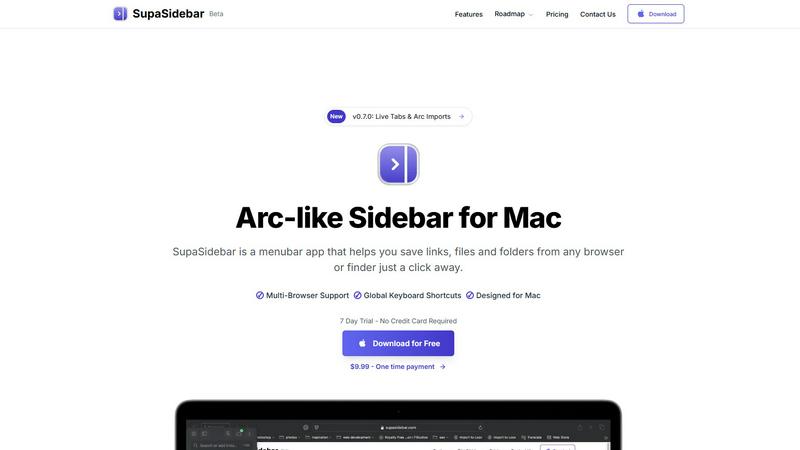
SupaSidebar is your AI-powered command center for effortlessly accessing links, files, and apps on Mac in an instant.
Last updated: February 28, 2026
Visual Comparison
Decode This Text

SupaSidebar
Feature Comparison
Decode This Text
Instant Message Analysis
Get immediate insights into the emotional tone and intent of any message. Simply paste the text, and within seconds, you receive a detailed breakdown of feelings, interests, or concerns, enabling you to respond appropriately.
Visual Message Input
No need to type everything out. The Visual Message Input feature allows users to upload screenshots of chats, making it easier than ever to decode conversations without the hassle of rewriting.
Emotional Temperature Measurement
Decode This Text analyzes the emotional temperature of the messages you receive. By determining if the tone is friendly, sarcastic, or cold, users can avoid misinterpretations and respond with the right emotional touch.
Tailored Response Suggestions
Struggling to find the right words? Decode This Text provides three customized response options—calm, direct, or firm—tailored to the context of the conversation, helping users communicate effectively and confidently.
SupaSidebar
Instant Access to Everything
SupaSidebar provides immediate access to your essential apps, websites, and files through powerful keyboard shortcuts. No more wasting time searching for what you need; simply press a few keys and find everything instantly.
Unified Command Hub
With SupaSidebar, all your links, files, and folders from major browsers like Safari, Chrome, and Firefox, as well as Finder, are aggregated into one streamlined sidebar. This unification eliminates the chaos of navigating multiple platforms.
Recents & Favorites
SupaSidebar features a Recents tab that tracks every website you have visited in the last 48 hours, making it easy to return to your latest work. Additionally, you can pin your favorite items at the top of the sidebar for quick access.
Global Keyboard Shortcuts
Designed for speed and efficiency, SupaSidebar offers global keyboard shortcuts that allow you to save URLs and copy links with ease. Simply press CMD CTRL S to save or CMD CTRL C to copy, optimizing your workflow.
Use Cases
Decode This Text
Navigating Romantic Relationships
Decode This Text is invaluable for individuals in romantic relationships who find themselves puzzled by their partner's texts. By providing clarity on emotional undercurrents, it helps users understand their partner's feelings and intentions better.
Enhancing Workplace Communication
Professionals can utilize this tool to decipher cryptic emails or terse messages from colleagues and superiors. By understanding the nuances of workplace communication, users can respond effectively and avoid unnecessary conflict.
Clarifying Friendships
When friends send mixed signals through texts, Decode This Text offers insights into their true feelings. This helps users foster stronger friendships by addressing concerns before they escalate into misunderstandings.
Family Dynamics
In family communication, misunderstandings can arise easily. Decode This Text aids in interpreting vague messages from family members, ensuring that users can respond with empathy and understanding, thus improving family relationships.
SupaSidebar
Research Efficiency
For researchers who often juggle multiple tabs and sources, SupaSidebar simplifies the process by consolidating all references in one location. This enables quick access to essential materials without losing focus.
Creative Workflows
Creators can benefit from SupaSidebar by keeping their favorite tools and resources at hand. This allows for a fluid creative process, where inspiration can be captured instantly without the hassle of searching through clutter.
Student Productivity
Students can leverage SupaSidebar to manage their study materials, links to research, and class notes. The ability to quickly access recent documents and favorite resources enhances learning efficiency.
Project Management
Professionals managing projects can use SupaSidebar to keep track of important files, links, and communications. By having everything organized in one sidebar, teams can collaborate more effectively and stay aligned on tasks.
Overview
About Decode This Text
Decode This Text is an innovative, AI-driven solution designed to unravel the complexities of communication, enabling users to decode the underlying meanings of messages that often leave them perplexed. Whether it’s cryptic emails from superiors, vague texts from friends, or ambiguous messages from clients, this tool provides the clarity needed to navigate murky communication waters. By simply pasting a conversation or describing the context, users receive rapid, comprehensive analyses of emotional tones, intentions, and effective response strategies. Ideal for professionals, students, and anyone seeking to enhance their interpersonal skills, Decode This Text empowers users to eliminate misunderstandings and foster better relationships. With a user-friendly interface and lightning-fast response time, this tool transforms the way you communicate, allowing you to engage confidently without the burden of overthinking every word.
About SupaSidebar
SupaSidebar is a revolutionary productivity engine specifically designed for macOS that transforms your digital workspace into an efficient command hub. Gone are the days of juggling multiple browser tabs, bookmarks, and files scattered across your system. SupaSidebar integrates everything you need—links, files, folders, and open tabs—into a beautifully crafted native sidebar, allowing you to seamlessly navigate your workflow. Targeted at modern knowledge workers, researchers, and creators, this innovative tool eliminates the inefficiencies associated with context-switching and digital clutter. With its instantaneous, keyboard-driven access, SupaSidebar ensures that you can maintain a state of deep focus and flow. Whether you are a professional striving for efficiency or a student managing multiple projects, SupaSidebar serves as an extension of your cognitive process, placing everything you require right at your fingertips.
Frequently Asked Questions
Decode This Text FAQ
How does Decode This Text analyze messages?
Decode This Text employs advanced AI algorithms that assess the words, tone, and timing of messages to determine underlying intentions and emotional states, providing users with clear insights.
Is my data safe and confidential?
Absolutely. Decode This Text prioritizes user privacy with a 100% anonymous experience. No human reviews your texts, ensuring that your conversations remain private and secure.
Can I use Decode This Text for professional emails?
Yes, Decode This Text is perfect for analyzing professional emails. It helps you understand the emotional tone and intent behind messages, allowing for appropriate and effective responses in a business context.
What types of messages can I decode?
You can decode any form of text-based communication, including SMS, emails, and social media messages. Whether it’s a casual chat or a formal email, Decode This Text can provide insights.
SupaSidebar FAQ
Is SupaSidebar a browser extension?
No, SupaSidebar is a standalone menubar app designed specifically for macOS, allowing you to save links and files from any browser or Finder.
Which browsers does SupaSidebar work with?
SupaSidebar supports all major browsers, including Safari, Chrome, Firefox, Brave, and Arc, ensuring a seamless experience across your digital workspace.
What macOS version do I need?
SupaSidebar requires macOS 13 or higher to function properly, ensuring compatibility with the latest features and updates from Apple.
Where is my data stored?
All data handled by SupaSidebar is securely stored locally on your Mac. Nothing leaves your device, ensuring your privacy and data integrity.
Alternatives
Decode This Text Alternatives
Decode This Text is a revolutionary tool in the realm of Productivity & Management, designed to unravel the complexities of communication. With its ability to analyze messages and provide insightful interpretations within moments, users experience a new level of clarity in their interactions. As individuals navigate the often convoluted landscape of digital communication, the need for alternatives arises due to factors such as pricing, desired features, or compatibility with various platforms. When seeking an alternative to Decode This Text, it's essential to consider aspects like user-friendliness, speed of analysis, and the depth of insights provided. Additionally, evaluating the specific needs of your communication style and the types of messages you encounter can guide you toward the best choice, ensuring you maintain effective interactions without the stress of miscommunication.
SupaSidebar Alternatives
SupaSidebar is an AI-native command center designed to revolutionize productivity for macOS users. It seamlessly aggregates links, files, and apps, transforming the traditional browser sidebar into a universal hub that enhances workflow efficiency. As a tool tailored for knowledge workers, researchers, and creators, SupaSidebar aims to eliminate digital clutter and the friction associated with context-switching, allowing users to maintain deep focus. Users often seek alternatives to SupaSidebar for various reasons, including pricing considerations, specific feature requirements, or compatibility with different platforms. When choosing an alternative, it's essential to prioritize user experience, functionality, and integration capabilities to ensure that the selected tool effectively meets your productivity needs and aligns with your workflow preferences.